Slide Software Offers Great Flexibility, But Are You Wasting Valuable Time?
Traditional slide software gives you plenty of creative control. Modern tools, on the other hand, can help you build polished decks faster without spending hours arranging every detail. You can improve presentation productivity by planning your message and choosing tools that reduce repetitive slide-creation tasks.
According to WorkTime, office workers are only focused for around 2 hours 53 minutes during an 8-hour shift. Every minute counts when you have limited time to focus on important tasks.
Creating a presentation can eat into those valuable hours, especially when you spend too much time formatting slides and adjusting layouts. With the right strategies, you’ll work faster without sacrificing quality.
Which Presentation Productivity App Should I Use?
It depends. Some tools offer more design controls, while others support teamwork and automated slide creation.
If you prepare reports with charts and figures, look for tools that support data visualization and make it easy to update information. If you often create sales pitches, ready-made layouts and presentation automation features will help you be more productive.
What Are Some Good Presentation Productivity Strategies?
Plan your content and focus on one idea per slide. You should also separate writing from designing.
Prepare your content first, then work on the visuals. Switching between both tasks too often may slow you down.
The Flexibility and Tradeoffs of Traditional Slide Software
Traditional slide software gives you plenty of control over your presentations. You can change the layouts and other features to match your needs.
However, their flexibility also means more manual work. When using such tools, you’ll spend time on tasks like:
- Adjusting text boxes
- Changing font sizes
- Moving images
- Fixing spacing
Templates help, but you still need to organize your ideas and decide how to present them.
Enhancing Presentation Productivity With Modern Tools
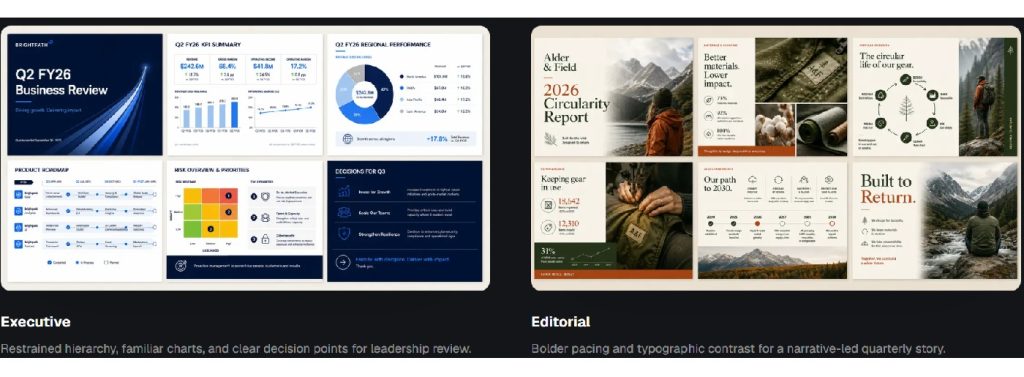
Modern deck tools reduce the time spent creating, formatting, and updating slides. Embrace them in your workflows to avoid repetitive work.
Use AI-Powered Tools to Create Slides Faster
AI tools make it easy to turn an idea or brief into a structured presentation. Instead of creating every slide from scratch, provide the tool with your key information and objectives. It will generate an initial deck, and you can then:
- Double-check the facts
- Remove any irrelevant points
- Adjust the tone
- Ensure the presentation reflects your goals
If you want to get the best results from automated slide building, provide clear instructions. The material you feed your AI tool should include the information you want to highlight in the slides. Having a high-quality brief will make it easier to review the generated deck.
Explore AI PowerPoint generator capabilities to see how automated slide creation can support a faster workflow.
Use Templates to Maintain a Consistent Design
Templates help you avoid making the same formatting decisions when creating each presentation. Once you’ve established a suitable style, reuse the design and formatting details across different projects.
Consistency is crucial when you’re preparing presentations. If you have a deck with matching headings and balanced layouts, it will look more organized. Inconsistent formatting, on the other hand, will distract the audience from your message.
Avoid forcing every part of your presentation to fit into the same layout. A slide comparing two plans may work well with side-by-side columns. A process explanation may need a timeline or numbered steps. Rather than forcing different types of content into one layout, build a flexible collection of templates for different presentation needs. You can also save time by starting with professionally designed slides. Explore MotoCMS PowerPoint templates to find ready-made presentation designs that help you create polished, consistent slides with less manual formatting.
Doing so will help you simplify design work without making some slides look out of place.
Automate Repetitive Formatting Tasks
Formatting your slides can consume a huge amount of time, especially when you work with long presentations. Look for features that apply formatting across an entire deck. You can also use the following to avoid editing each slide individually:
- Theme settings
- Master slides
- Alignment tools
Automation will also be helpful if you often create recurring reports. You’ll be able to reuse the same section headings, chart styles, or summary layouts while replacing outdated figures with new information. It’s still a good idea to review the finished deck after applying many changes.
Use Modern Deck Tools to Explain Complex Ideas in Less Time
Modern deck tools help you create engaging slides using charts, diagrams, and images. They also improve software efficiency by suggesting the best layouts for specific information. Modern presentation tools can help you:
- Turn complex information into simple charts and diagrams
- Choose layouts that make your content easier to follow
- Create visuals that support your main points
Only add visuals with a clear goal rather than using them for decoration. Ensure you also review each slide to ensure the information in the visuals is correct. The details should match what you present orally.
Frequently Asked Questions
How Can I Prepare for a Presentation Without Memorizing Every Slide?
Learn your main points. Write short speaker notes with key facts and keep them nearby. You may include examples and the statements you’ll use to transition between topics.
If you forget your points during the presentation, use the slide heading to guide you back. Rehearsing aloud also helps you identify unclear sections so you can fix them.
What Should I Check Before Presenting on a Different Computer?
Check if every detail displays as expected. Some devices may not have the fonts or media files in your original deck.
Save a backup copy and check if you can access it if your main file fails. You should also test any embedded links or videos before the session.
Can I Use Traditional Slide Templates With Modern Tools?
Absolutely. Modern presentation tools let you upload templates from other sources. The solutions then save your designs, allowing you to reuse your preferred features.
Combine the use of familiar templates with automation. This action will help you create slides faster while ensuring your presentations align with your brand.
Improve Your Presentation Productivity With the Right Tools
If you want to improve your presentation productivity, you need to invest in tools that save you time. Use templates to maintain a consistent design, and automate repetitive formatting tasks.
Generate your first drafts faster with AI tools instead of writing from scratch. With the right workflow, you’ll create professional presentations without wasting time on design details.
Explore MotoCMS website templates to find a starting point for building a modern website that presents your business and its content professionally.




Leave a Reply