Top 5 LMS Software Small Businesses Actually Use (Pros & Cons)
Two-thirds of small businesses—64 percent—already pay for a learning management system, yet 46 percent of HR pros still call training a top headache. Something’s off: the tools exist, but the skills gap sticks around. Price creep after trials, missing mobile apps, and pay-walled features keep tripping teams up.
This guide cuts through the noise. We spotlight five LMS software platforms real small companies use daily, reveal clear costs and hidden catches, and share a ten-step proof-of-concept checklist you can run this week—so the platform you pick finally closes the gap.
The Five LMS Software Options at a Glance
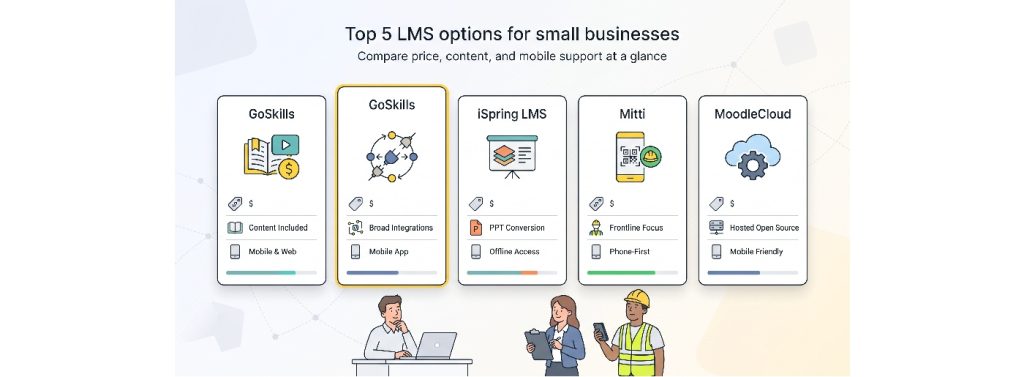
Need the short answer? This table lines up starting price, free tiers, content, and mobile support so you can compare in seconds.
| LMS | Best for | Starting cost* | Free tier | Built-in content | Mobile |
| GoSkills | Launch fast with business-skill courses | Free; paid from $9.71 per user per month (annual billing) | Yes | 110+ business courses | Responsive PWA |
| TalentLMS | Growing teams that need integrations | Free; paid from $119 per month for 40 users (annual) | Yes | Add-on (1,000+) | Native iOS & Android, offline |
| iSpring LMS | Turning PowerPoint into courses | £5.41 per active user per month at 100-user tier (≈ $6.60) | Trial | Yes | Native iOS & Android, offline |
| Mitti | Frontline safety micro-learning | $24 per seat/month billed annually, or $29 per seat/month billed monthly | Yes | 1,000+ editable | Native app, QR login |
| MoodleCloud | Hands-on admins on a budget | AUD 230 per year for 50 users (≈ $150) | 28-day trial | None | Moodle App, offline |
*Prices verified October 13, 2026. Non-USD figures converted at mid-market rates for reference only.
We scored each platform on eight small-business factors: cost, setup effort, content, standards, integrations, mobile experience, analytics, and support. GoSkills and TalentLMS both earned a 90/100. GoSkills edges ahead because its first paid tier stays under the twenty-dollar-per-seat comfort zone, while companies that depend on single sign-on or Workday feeds usually choose TalentLMS.
What Counts as an LMS for a Small Business?
LMS software is a learning management system that lets you create or import training, assign it, track progress, and prove completion. Everything else, such as AI writers, mobile apps, or compliance dashboards, layers on top of that core loop.
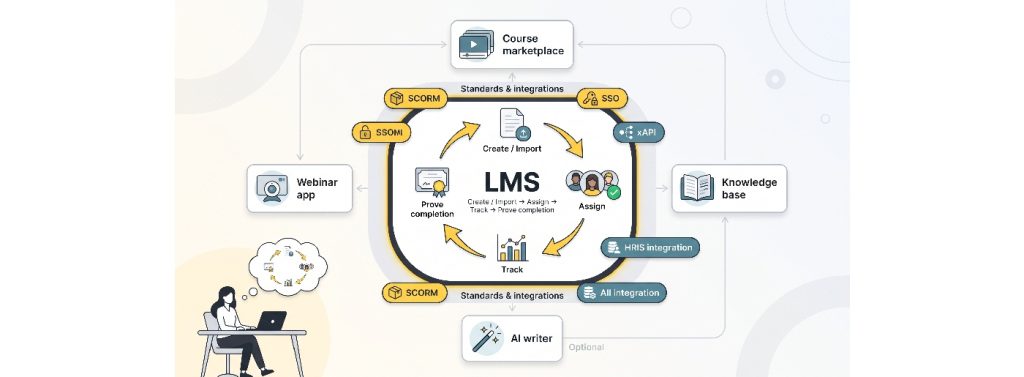
Plenty of products look similar but miss that loop. Course marketplaces sell individual classes but don’t follow employees. Webinar apps host live sessions yet rarely issue certificates. Knowledge bases store articles, not structured lessons. Helpful add-ons, yes, but not the training command center under review.
Key terms you’ll see again:
- SCORM. A packaging format, first released in 2001, that lets interactive courses travel between LMSs while recording scores.
- xAPI. A newer standard that captures learning activity anywhere: inside a course, on a website, or in VR.
- Single sign-on (SSO). One company login for every system, sparing learners from extra passwords.
- HRIS integration. A live link between your HR database and the LMS, so new hires appear automatically and alumni disappear just as fast.
Five buying patterns appear in most small firms:
- Need turnkey content and an LMS software today
- Growing fast, integrations outrank price
- Existing training lives in PowerPoint decks
- Frontline staff learn on phones during shifts
- Budget rules, and the team enjoys hands-on tinkering
Keep your top scenario in mind; the best LMS is the one that solves that single problem first.
1. GoSkills: Fast Setup Plus Ready-Made Business Content
The free tier is fully functional, paid plans start at $9.71 per user (annual billing), and a library of hundreds of business-skill courses can be bundled for $15.28 (see GoSkills’ interactive LMS Software Comparison — Find Your Best-Fit Platform for up-to-date figures).
Quick Verdict
GoSkills lets a five-person team publish its first course before lunch, then scale for under $20 per learner per month. The free tier is fully functional, paid plans start at $9.71 per user (annual billing), and a library of hundreds of business-skills courses can be bundled for $15.28. Four import standards and built-in authoring cover most formats. The main limitation is mobile delivery through a progressive web app rather than a store-listed native app.
Why Small Businesses Choose GoSkills
Speed comes first: sign up with an email, invite colleagues, and launch training in minutes. The interface feels like a modern site builder, so managers handle setup without IT tickets. Cost follows: the free plan tracks real completions; the first paid tier keeps licenses below ten dollars, and the Courses and Platinum tiers add hundreds of Excel, project-management, and soft-skill modules. Authoring, quizzes, certificates, and refresher cycles live in one dashboard, while live chat support often replies with a personalized Loom clip, handy when your “L&D department” is a multitasking office admin.
Pricing that Fits a Five-Person Budget
- Free: unlimited admins, basic reports, unlimited self-authored courses
- LMS Pro: $9.71 per learner per month (annual) for certificates, automation, advanced analytics
- Courses / Platinum: $13.91–$15.28 per learner per month (annual) for the full course library
Prices apply to named learners, so invoices stay flat during quiet months. Note: marketing pages sometimes quote “110+ courses,” but the catalog holds 110+ business courses as of October 2026.
Where GoSkills Falls Short
Mobile users install a progressive web app, not a native download, which can be a deal breaker if your policy requires App Store distribution. HRIS integrations cover Google Workspace, Microsoft 365, Okta, and an API, yet lack the plug-and-play catalogs found in TalentLMS. Branding controls stop at logo and color swaps, which creative agencies may outgrow.
If those gaps matter, move to the next platform; otherwise, GoSkills offers strong value per dollar for very small teams.
2. TalentLMS: integration workhorse
TalentLMS official homepage screenshot for integration workhorse section
Quick Verdict
TalentLMS is the go-to choice when training must plug straight into HR, CRM, or SSO systems. A forever-free sandbox supports five users and ten courses. The first paid tier costs $119 per month (annual billing) for up to 40 learners and gives access to native iOS and Android apps with offline sync, SCORM 1.2, xAPI, cmi5, and broad SSO options.
Why Small Businesses Choose TalentLMS
Multiple portals under one license let you train employees, customers, and partners without juggling vendors. Branches and granular roles keep audiences separate, while built-in groups automate enrollments. Out of the box you can connect Google Workspace, Microsoft 365, Okta, HubSpot, and Zapier. SAML, LDAP, and OIDC cover deeper IT requirements. A Workday beta and the first-party TalentHR link push job titles and managers directly into course rules, eliminating manual CSV uploads.
The native TalentCraft builder layers AI on top of templates, turning a five-slide deck into a polished micro-course in under an hour. Learners download a true native app, work offline on a flight, and sync results when they reconnect.
As of October 2026, TalentLMS lists more than 800 G2 reviews with an average 4.6/5 rating, clear evidence that the platform scales beyond a pilot.
Pricing Designed for Growth
- Free: 5 users, 10 courses
- Core: $119 per month (annual) or $149 month-to-month for 40 users and unlimited courses
- Plus / Premium: higher caps, AI credits, priority support, and advanced automation
- TalentLibrary add-on: 1,000+ soft-skill courses billed separately
TalentLMS uses plan-based active-user limits, so check the applicable tier and billing terms as your team grows. Its Core plan starts at $119 per month with annual billing for up to 40 users; monthly billing costs more.
Where TalentLMS Falls Short
Paying for 40 seats can feel wasteful if you need only a handful. Branding options stay basic, with logo and color tweaks rather than full layout control. Some headline features (offline playback, extended AI translation, video generation) sit behind Plus or Premium plan gates, so confirm required functions before you subscribe.
If you need deeper visual customization or a smaller paid entry point, GoSkills or MoodleCloud may fit better, but when integrations and multiple portals top your list, TalentLMS remains the safest bet.
3. iSpring LMS: Turns PowerPoint into Polished Courses
Quick Verdict
iSpring LMS software converts existing PowerPoint decks into interactive, SCORM- and xAPI-ready courses in minutes, then delivers them online or through offline-capable mobile apps. Pricing starts at £5.41 per active user per month at the 100-seat tier (≈ $6.60; price checked October 2026). Smaller teams need a quote, but the built-in authoring suite often balances the extra step.
Why Small Businesses Choose iSpring
PowerPoint is still the default authoring tool in many companies. iSpring works with that reality: open a deck, add quizzes, dialogue branches, or screen recordings through the iSpring Suite plug-in, and publish straight to the cloud portal, no reformatting marathon required. Subject-matter experts can update text inside PowerPoint, which shortens review cycles, and AI translation handles first-pass localization.
Learners benefit from native iOS and Android apps that cache content for flights or field work, then sync results automatically. Reports drill from course level to individual quiz items, revealing knowledge gaps in real time. Around-the-clock live chat and email support (documented on the vendor site, October 2026) assist small teams without dedicated IT cover.
Pricing and the Active-User Puzzle
- Published rate: £5.41 per active user per month at 100 seats, billed annually
- Below 100 seats: custom quote (often bundled with iSpring Suite licenses)
- Currency note: invoices are issued in GBP; at recent rates that equals roughly $6.60 USD, confirm at purchase time
Active-user billing means you pay only for people who log in during a given month, a budget win for seasonal or project-based teams. Contracts are typically annual; month-to-month terms cost more and require sales approval.
Where iSpring LMS Falls Short
The authoring plug-in runs only on Windows PowerPoint, so Mac-first or browser-only teams must use the lighter web editor or spin up a VM. Self-service checkout stops below 100 active users, so very small companies face a quote process. Annual contracts and active-user math can overcharge organizations that train the same tight group every month. Branding controls are limited to logo and accent color, which creative agencies may outgrow.
If you need instant self-service pricing or deep interface customization, keep reading. Mitti covers frontline mobile, while MoodleCloud offers an open-source path.
4. Mitti: Mobile-First Frontline and Safety Training

Quick Verdict
Mitti LMS software is worth considering for small teams that want a straightforward training platform. Its free plan supports up to 10 users, while Premium starts at $24 per seat per month with annual billing, or $29 per seat per month with monthly billing. Check the current plan limits and included features before choosing a subscription.
Why Small Businesses Choose Mitti
Frontline shifts leave little desk time. Mitti micro-lessons finish in a few thumb swipes, and AI can convert a PDF checklist into a mobile course within minutes. New hires scan a QR poster, set a four-digit PIN, and start day-one safety training; completion records flow straight into the inspections dashboard your supervisors already use. Editable templates cover ladder safety, knife handling, and food-temperature logs. Managers pay $5 for each seasonal Lite seat, while only supervisors need $24 Full licenses. Push notifications and a traffic-light training matrix chase expirations automatically.
Pricing that Flexes with Seat Types
- Free for teams of up to 10;
- Premium $24 per seat per month with annual billing and $29 monthly.
Verify current plan limits and included training features before purchase.
Billing is monthly or annual; annual payments lock pricing and add a double-digit discount if Mitti adjusts rates.
Key fine print: SCORM imports and Premium support sit behind Full licenses, so teams with existing packages will upgrade quickly.
Where Mitti Falls Short
The $24 Full seat is above the $15 range from GoSkills; run cost comparisons if most staff need authoring access. Brand history (EdApp to SC Training to Mitti) can confuse IT policies, so verify domains before rollout. Native SCORM works, but xAPI and cmi5 are not on the roadmap as of October 2026. Reporting stops at completion matrices; question-level analytics require exports, which analytics-heavy teams may find limiting.
Need deeper standards support or richer dashboards? TalentLMS and iSpring offer those options, but for phone-first safety content, Mitti often remains the fastest path from QR scan to a compliance record.
5. MoodleCloud: Low-Cost Managed/Open-Source Option
Quick Verdict
MoodleCloud LMS software delivers a fully hosted Moodle instance for AUD 230 per year (≈ $150) for 50 users, but standard plans block custom plugins and integrations. If you can live with core features, it offers the lowest price per learner of any managed LMS (price verified October 2026).
Why Small Businesses Choose MoodleCloud
Self-hosting Moodle can feel like a full-time IT chore; MoodleCloud removes the server patching and database tuning. Sign up, choose a subdomain, and start creating quizzes, H5P interactions, and certificates within minutes. The 50-user Starter plan costs AUD 230 and includes 1 GB of storage; even the 500-user tier stays below many single-user authoring licenses. The official Moodle App Premium is bundled, so learners install a store-listed app, study offline, and sync results on reconnection. Decades of community documentation and YouTube tutorials answer most “How do I…?” questions, helpful for hands-on administrators who like to tinker.
Where MoodleCloud Falls Short
- No custom plugins. Standard plans exclude third-party xAPI layers, e-commerce add-ons, or HRIS connectors
- Tight storage caps. The 1 GB allowance fills quickly if you upload HD video; host media on YouTube or Vimeo to stretch space
- Complex interface. The 2026 theme refresh helps, but new admins still navigate nested settings that feel developer-centric
- Self-service support. Priority help is limited to full outages; routine questions rely on forums and docs
Need total plugin freedom or premium support? Consider self-hosted Moodle or a Moodle partner. Otherwise, MoodleCloud remains the cheapest managed path to a feature-rich LMS software.
Detailed LMS Comparison at a Glance
Use this matrix to double-check pricing, standards, and contract terms before you launch a trial. (Prices verified October 13, 2026; non-USD figures show USD equivalents at mid-market rates.)
| LMS | Starting cost* | Free tier / trial | Built-in content | SCORM | xAPI / cmi5 | Mobile offline | SSO & HR integrations | Contract |
| GoSkills | Free; paid from $9.71 per user per month (annual) | Forever-free core LMS | 110+ business courses (Platinum) | Yes | Yes | PWA install | Google, Microsoft, Okta, API | Monthly / annual |
| TalentLMS | $119 per month for 40 users (annual) | Free 5-user sandbox | Add-on 1,000+ | Yes (1.2) | Yes | Native iOS / Android | SAML, LDAP, OIDC, Workday beta | Monthly / annual |
| iSpring LMS | £5.41 per user per month (≈ $6.60) at 100 seats | 30-day trial | Authoring assets + paid courses | Yes | Yes | Native apps | API, SSO on request | Annual, active-user |
| Mitti | $24 Full / $5 Lite per user per year | Free 10 Full seats | 1,000+ editable | Yes | — | Native apps | SSO / SCIM on Premium | Monthly / annual |
| MoodleCloud | AUD 230 per year 50 users (≈ $150) | 28-day trial | None | Yes (1.2) | Plugin-only† | Moodle App | No custom integrations† | Annual |
†Standard MoodleCloud plans block plugins, so xAPI and third-party integrations are unavailable out of the box.
Both GoSkills and TalentLMS score 90/100 on our small-business rubric. GoSkills edges ahead for its sub-$20 entry cost, while TalentLMS is stronger when deep integrations or native offline apps matter more.
How to Choose the Right LMS Software without Trusting a Demo
Sales demos hide day-to-day hurdles. Recreate a normal workweek instead:

- Import one real course. Upload a SCORM package (or convert a slide deck) and time how long it takes.
- Build a micro-lesson from scratch. Use the built-in editor to judge learning curve and design limits.
- Enroll ten colleagues. Mix tech-savvy and tech-averse users; note friction points.
- Complete the lesson on iOS and Android. Check load speed, responsiveness, and offline sync.
- Issue a certificate with an expiry date. Confirm auto-reminders fire before the deadline.
- Run a non-completion report. You should locate laggards in two clicks or fewer.
- Sync user data. If you use an HR system, add a test hire and verify automatic course assignment; otherwise import a CSV.
- Contact support with a technical question. Record first-response time and clarity.
- Export courses and learner data. Verify you can back up content and results in open formats.
- Cancel the trial. Confirm the account closes cleanly; no lingering data or surprise invoices.
Block two afternoons, involve the people who will manage training long term, and score each platform against this checklist. Choose the LMS that clears every step, not the one with the flashiest demo.
Which LMS Software Fits Your Small-Business Scenario?
Match your situation to the platform most likely to succeed:
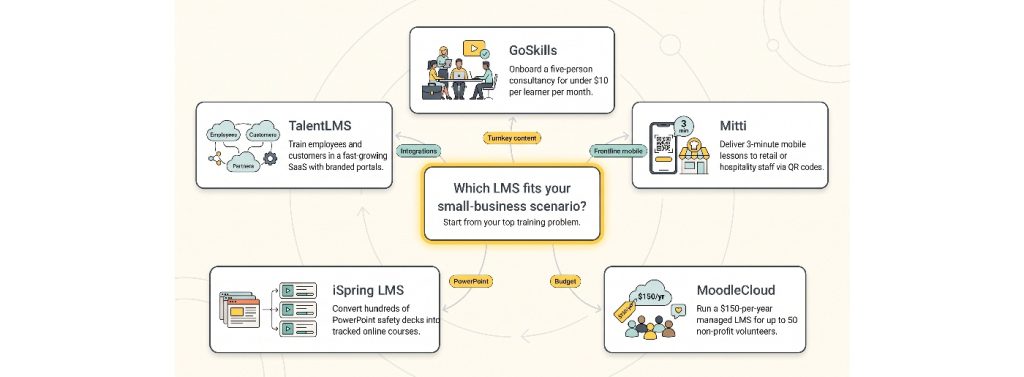
- GoSkills: launch onboarding for a five-person consultancy today for under $10 per learner per month.
- TalentLMS: support a fast-growing SaaS that trains employees and customers through branded portals with HubSpot and Workday feeds.
- iSpring LMS: turn 300 PowerPoint safety decks at a manufacturing firm into tracked, interactive courses without rebuilding content.
- Mitti: deliver three-minute mobile lessons to retail or hospitality staff via QR code and $5 Lite seats.
- MoodleCloud: stretch a non-profit’s budget with a $150-per-year managed LMS for up to 50 volunteers when plugins are optional.


Leave a Reply