Choosing Reliable Networking Tools Without Overspending
Networking costs rarely blow up overnight. They creep. A monitoring plan bought for a product launch keeps renewing, the VPN still has 25 seats even though the team shrank to 11, and somewhere in the finance export there’s a proxy subscription nobody can explain.
The usual reaction is to slash everything and switch to free tools. That works for about a month, until something breaks right before a client deadline.
There’s a less dramatic option. It starts with being honest about what the work needs.
Start with the Actual Workload
Say a small analytics team tracks competitor prices on about 300 product pages a day, mostly German and Polish stores. Honestly, that’s a modest job. It doesn’t call for an enterprise plan or a pool of 10,000 rotating IPs, even if a sales page makes it sound like it does. Before comparing providers, it helps to understand how proxy servers work and how different proxy types serve different purposes.
Datacenter proxies are often inexpensive and fast, but some websites apply stricter checks to traffic from hosting providers. Residential proxies use IP addresses associated with residential internet connections, which can be useful for certain location-sensitive tasks, but often come with bandwidth-based pricing. Neither type guarantees access, so the right choice depends on the target, workload, and required stability.
For steady work like that price tracking, static ISP proxies usually fit better, since the addresses are registered to real providers but run at datacenter speed. It’s a reasonable moment to get affordable ISP proxy services instead of paying residential rates for traffic that doesn’t need to rotate in the first place.
Which is really the whole idea. Buy for the job you have now, not the one in the pitch deck, and revisit it every six months or so.
Look Past the Monthly Fee
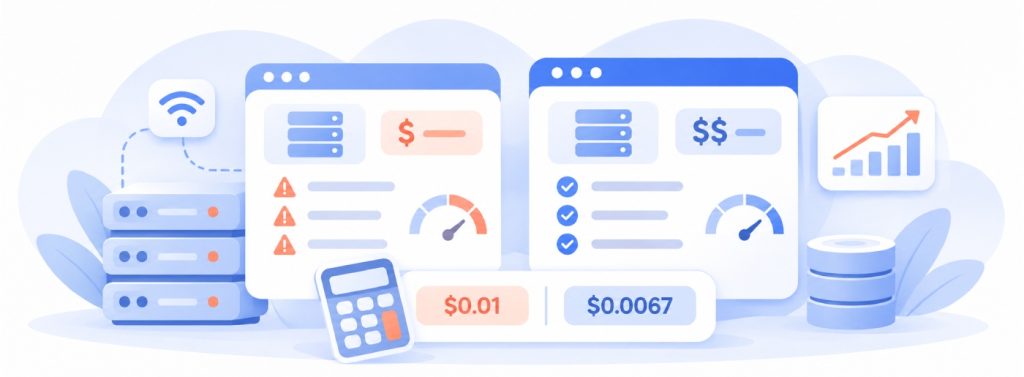
The sticker price is the easy bit. The broader financial picture is often described as total cost of ownership, which considers not only the purchase price but also the costs of operating and maintaining networking tools over time.
Here’s a simple example. A $30 plan may look cheaper than a $90 alternative, but if it regularly interrupts jobs, requires manual retries, or leaves gaps in collected data, the savings can disappear quickly. A more expensive service may offer better value if it completes more jobs reliably and reduces the time engineers spend troubleshooting. The important figure isn’t just the monthly subscription; it’s the cost of producing one successful, usable result.
So test it properly. Two weeks on the real workload, with your own logs rather than the provider’s dashboard, tells you more than any feature table. Per-IP vs per-GB billing is worth a closer look too, since image-heavy sites can make per-GB plans surprisingly pricey.
Calculate the Cost per Successful Request
One useful way to compare providers is to calculate the cost per successful task:
Cost per successful request = Total monthly operating cost ÷ Number of successfully completed requests
For example, if a service costs $60 per month and completes 6,000 usable requests, the effective cost is $0.01 per successful request. If another service costs $100 but completes 15,000 usable requests, its effective cost is lower at approximately $0.0067.
The calculation should include more than subscription fees. Add relevant infrastructure expenses, bandwidth charges, and the engineering time spent handling failures. This gives teams a more realistic basis for comparing providers and deciding whether a higher-priced plan offers better value.
Build a Networking Tools Cost Checklist
Before choosing between networking tools, list the costs and capabilities that matter to the actual workload. A useful comparison should go beyond the advertised monthly price.
| Evaluation factor | What to check |
| Subscription cost | Monthly fees, minimum commitments, and renewal terms |
| Usage limits | Bandwidth allowances, IP limits, concurrent connections, and overage charges |
| Reliability | Uptime history, connection failures, and session stability |
| Performance | Response times, throughput, and location coverage |
| Security | Authentication methods, access controls, and logging policies |
| Scalability | Whether seats, IPs, or bandwidth can be adjusted without changing plans |
| Support | Response times, technical documentation, and escalation options |
Not every team needs the same features. A small research operation may prioritize stable connections and predictable bandwidth costs, while a distributed company may need centralized access controls and detailed usage reporting. The goal is to compare networking tools against the requirements that actually affect daily operations, rather than paying for features that will remain unused.
Don’t Cut Corners on Security
According to IBM’s Cost of a Data Breach Report, the average breach cost $4.99 million globally in 2026. US companies averaged $11.5 million.
A small team won’t see numbers that big, obviously. Smaller organizations may face different breach costs, but even a relatively limited incident can create substantial expenses through investigation, recovery, customer communication, and business disruption.
Free, publicly shared proxy lists can introduce additional security risks. You don’t know who runs them or what they do with the traffic, and that’s a strange risk to take for something that touches client data, all to save maybe $20 a month.
NIST’s Zero Trust Architecture guidance provides useful background. Its central principle is that access should not be trusted automatically based on network location or device ownership; authentication and authorization should be evaluated before access to resources is granted.
Before committing to a networking provider, ask a few practical questions: How are account credentials protected? Can access be restricted by user or IP address? What connection and usage data is logged, and how long is it retained? Is there a documented process for reporting security incidents?
These questions are particularly important when networking tools handle business traffic, internal systems, or client-related information. A provider’s security documentation should be part of the purchasing decision, not something reviewed only after an incident.
Keep Commitments Small at First
Annual plans tend to come with a 15 to 20% discount. That’s nice until the project gets cancelled in month four and there are eight months left on the contract.
Paying monthly for the first quarter costs a bit more, but it keeps you flexible. It’s also worth checking whether you can scale from 10 IPs to 200 on your own, without waiting on a sales rep.
One more thing worth doing during the trial: send support a question late in the evening and see how long it takes them to reply. It’s a slightly silly test, but it tells you a lot about what happens when something actually breaks.
Where This Is Heading
AI projects and automation are competing for the same IT budgets, while network usage keeps evolving. That makes it increasingly important to understand what networking tools actually contribute.
Teams with reliable data on uptime, failure rates, bandwidth usage, and support costs can make budget decisions more easily. A tool is easier to justify when you can demonstrate its value, rather than defend it simply because it was inexpensive.



Leave a Reply