Building Reliable Mobile Testing Environments Across Markets
A familiar support ticket at app companies might read: “Payment page won’t load in Brazil.” The QA team in Berlin tests the same flow on their iPhones, sees no problem, and marks it as “can’t reproduce.” From their location and setup, that conclusion may be correct. Building reliable mobile testing environments means accounting for the different devices, network conditions, and regional settings that customers use.
Many mobile testing workflows still rely on this setup: one office, decent Wi-Fi, phones that cost more than plenty of customers earn in a month. It catches crashes fine, but says very little about someone in Recife on a three-year-old Android with two bars of signal.
Fixing that takes more than buying extra test phones (though that helps).
Location Changes More than People Expect
The same app can behave differently across markets. Checkout options may vary by country, with Pix commonly used in Brazil and UPI in India, while privacy notices and consent flows may differ between EU and US deployments. Testing these differences requires more than changing an IP address: teams also need to validate the app’s locale, regional configuration, account state, and available payment methods.

A tester in London is only ever going to see the London version of all this.
Then there’s the IP issue, which tends to get overlooked until it bites. Lots of fraud and bot-detection tools are wary of traffic from cloud providers, so an automated run on an AWS instance in Frankfurt may get CAPTCHAs or a trimmed-down page that no real customer would ever load, and the test results end up describing the hosting rather than the app. For a broader explanation of the technology, see our guide to how proxy servers work.
Because of this, teams shipping to several countries often route some of their test traffic through actual mobile carrier connections. For anyone looking into a mobile proxy buy, the useful questions are pretty unglamorous ones, like which countries and carriers are really covered, how rotation is handled, and whether a session can keep the same IP for the ten or so minutes a slow checkout might take.
Building Mobile Testing Environments Beyond Emulators
Emulators are quick and inexpensive, which is why teams rely on them. The catch is that a Pixel emulator on an M3 MacBook may have plenty of memory available, while a budget Android phone with 4 GB of RAM may start closing background apps under similar workloads.
A sensible approach is to select devices based on market share, customer analytics, support tickets, and the minimum hardware requirements of the app—not just the latest flagship models. In markets such as India and Indonesia, that may mean including popular budget Android devices and older supported OS versions. Choosing representative devices is one part of delivering a good experience; our guide to the user experience process and mobile app quality explores the broader relationship between UX and app quality.
Test Real Devices and Network Conditions
Testing on physical devices helps teams uncover issues that emulators may miss. Google’s Firebase Test Lab runs tests on physical devices hosted in Google’s data centers. However, Firebase Test Lab is scheduled to shut down on September 30, 2027, and Google is directing users toward its Developer Device Platform, currently in preview. Teams that depend on Test Lab should review the migration guidance and plan accordingly.
For iOS, Apple’s XCTest framework supports unit, UI, and performance testing. Xcode schemes can configure an app’s language and region, while Network Link Conditioner can simulate challenging network conditions.
Network testing should cover more than low bandwidth. Test what happens when latency rises, connections drop during a request, DNS resolution fails, or the app switches between Wi-Fi and mobile data. Check whether requests retry safely, whether users receive clear error messages, and whether interrupted payments or submissions can be recovered without creating duplicates. Where relevant, test IPv4 and IPv6 connectivity separately, as well as dual-stack mobile testing environments.
Build a Market Testing Matrix
Rather than testing every possible device and network combination, start with a matrix based on the markets, devices, and user journeys that matter most. For each market, record the configurations that need coverage and the behavior that should pass.
| Test dimension | What to verify |
| Country and locale | Language, date formats, currency, and regional content |
| Payment method | Availability and completion of locally supported checkout flows |
| Device and OS | Layout, memory use, crashes, and background behavior |
| Network conditions | Slow connections, interrupted requests, timeouts, and recovery |
| IP and connectivity | Region-dependent responses, IPv4/IPv6 compatibility, and access behavior |
| Release validation | Screenshots, logs, expected results, and regressions |
Start with the highest-risk combinations, then expand coverage when analytics, customer reports, or previous failures point to gaps. This keeps the test suite manageable without assuming that one device or network represents an entire market.
A Quick Note on Carrier IPs
Mobile carriers often use carrier-grade NAT (CGNAT) to share public IPv4 addresses among many subscribers. As a result, a single public IP address may represent many legitimate users. Blocking that address can therefore affect people who have nothing to do with suspicious activity.
For website operators this is awkward, since blocking a single mobile IP might cut off hundreds of ordinary users at once. Most simply don’t do it, which is a big part of why carrier IPs are handy for testing (and why it’s bad form to hammer production through them).
Keep Testing Traffic Controlled
Use staging mobile testing environments whenever possible, and agree on request limits before running tests against production. Coordinate with payment providers and fraud-prevention teams when test traffic may trigger their controls. Use designated test accounts and payment credentials, protect test logs, and stop automated runs if they begin generating unexpected load or real transactions. The goal is to reproduce customer conditions safely, not to bypass security controls or make automated traffic appear indistinguishable from ordinary users.
Keeping It Repeatable
Market setups that only exist on one engineer’s laptop have a habit of vanishing the week that engineer goes on holiday. Writing each market into a config file, with country, carrier, device list, locale and expected currency, means GitHub Actions or Jenkins can rerun the whole lot overnight.
A useful test report should make a failure reproducible without requiring the original tester. Record the app build, device model, operating system, country and locale settings, network type, test timestamp, and relevant logs. For location-dependent failures, also record the configured test location and IP region when appropriate. Avoid storing credentials, payment details, or other sensitive user data in test artifacts.
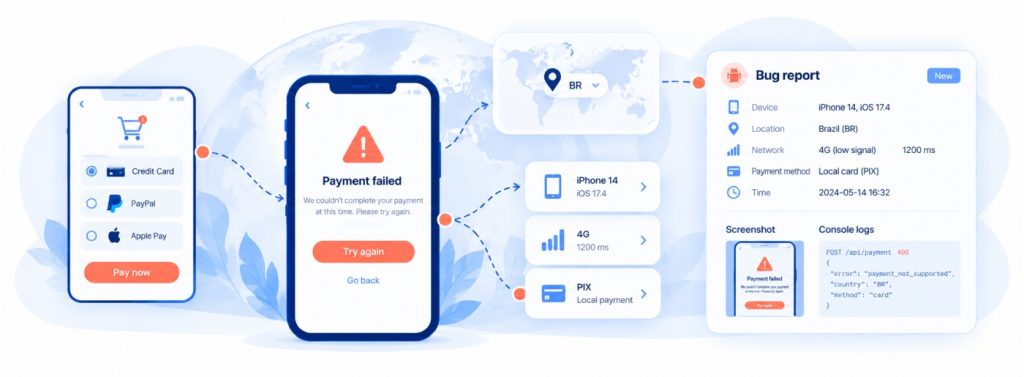
For example, “checkout failed in Brazil” is a starting point, not a diagnosis. A report that identifies the app version, Android device, locale, network conditions, selected payment method, and exact failure step gives engineers a much better chance of finding the cause.
The assertions matter as well. A 200 response doesn’t say much, whereas checking that the Polish checkout shows złoty and offers BLIK actually confirms something, and a saved screenshot per market per release lets a visual diff spot the German button label that’s spilled out of its box.
Where This is Heading
Reliable mobile testing environments are not about collecting the largest possible number of devices or IP addresses. It is about choosing representative conditions, defining what success looks like, and making failures reproducible across releases. As mobile networks evolve, including the continued adoption of IPv6, teams that regularly validate connectivity and regional behavior will be better prepared to identify compatibility issues before customers encounter them.





Leave a Reply