Employee Remote Monitoring: Best Practices for Remote Teams in 2026
Most managers running distributed teams don’t lose sleep over whether their people are working. They lose sleep over not knowing where things stand until something breaks.
A deadline slips. A project stalls for three days because nobody noticed a blocker. Someone burns out for weeks before it surfaces in a resignation letter.
Employee remote monitoring, when approached with the right intent, isn’t about watching people. It’s about building the kind of operational visibility that enables distributed teams to function well.
80% of companies already monitor remote or hybrid workers in some form, yet most of those teams still deal with the same coordination and accountability problems they had before any tool was installed. That gap is worth paying attention to. The tool isn’t the solution. The visibility is.
When Remote Team Productivity Suffers Without the Right Visibility
Picture a 14-person digital agency running projects across three time zones. The account manager in London thinks the developer in Manila is waiting for the approved copy. The developer thinks the copy went to the wrong Slack channel two days ago. The client’s deadline is tomorrow. Nobody was dishonest. Nobody skipped work. The project fell into a coordination gap that nobody had the visibility to catch in time.
This is the most common remote team productivity failure, and it has nothing to do with effort or intention. It comes down to operational blind spots. Without visibility, small delays compound silently. Workloads pile up unevenly across the team. The person closest to burnout is usually the last one anyone notices.
The confusion that follows in many organizations is between productivity and surveillance. Managers who feel the pressure of invisible teams often reach for the most obvious fix: track everything. Screenshots every few minutes. Application logs. Keystroke counts. That impulse is understandable. But it almost always creates a different problem than the one it was supposed to solve.
What meaningful visibility looks like in an async remote environment:
- Knowing what’s in progress and what’s blocked, not just what got submitted
- Understanding whether the workload is distributed reasonably across a team
- Catching coordination failures early enough to act before a deadline
- Spotting behavioral patterns that signal someone is overwhelmed
None of that requires screenshot software. It requires the right kind of data to surface at the right level of your organization.
What Employee Remote Monitoring Means in 2026
The phrase still carries baggage from the early remote work era, and fairly so.
First-generation tools were blunt instruments built for doubt, not operations. Screenshots on a timer. Keylogger data. Activity percentages that flagged someone as idle if they were in a video call or thinking through a problem. That’s not what modern employee remote monitoring looks like at its best.
The category has shifted significantly toward workforce analytics and workflow intelligence. That shift matters because it changes what you’re collecting and what you can do with the data.
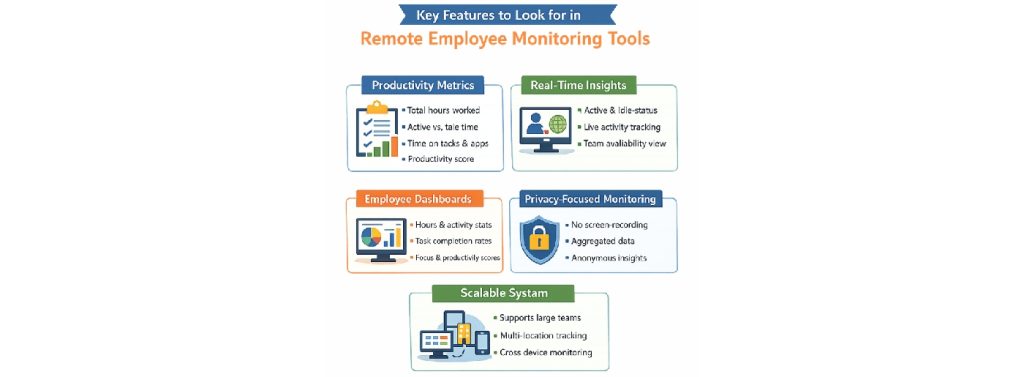
- Time and activity tracking reveals exactly how work hours are distributed across projects, clients, and tasks. For agencies handling multiple client accounts, even small gaps in time reporting can affect profitability over time. Platforms such as Time Doctor help address this challenge through automated time tracking, distraction alerts, productivity dashboards, and detailed reporting. By providing a clearer view of how hours are allocated across projects and clients, these tools can help agency leaders improve billing accuracy, optimize resource allocation, and reduce the revenue leakage that often occurs when teams rely solely on manual time logging.
- Workload and capacity analytics surface whether individuals are running at 140%, while others have bandwidth to spare. This is the dimension most managers want but rarely have without a dedicated tool.
- Project and workflow visibility shows progress at a task or milestone level. It’s separate from whether someone appears “online” on a status indicator, which tells you almost nothing useful.
- Behavioral and engagement signals flag patterns like consistently late logins, significant drops in output, or reduced responsiveness that might indicate disengagement or overwork before either becomes a formal problem.
Example: A remote-first design firm used workload heatmaps from their monitoring platform to discover that two senior designers were carrying roughly twice the billable load of their junior colleagues. They redistributed three projects within the week. Neither designer had raised the issue directly. The workforce analytics data made the invisible visible before it became a retention problem.
Where Productivity Tracking Software Creates Real Operational Value
Monitoring tools don’t deliver equal value across every team or business model. They work well in specific operational contexts, and knowing that will help you avoid buying a solution to a problem you don’t have.
- Distributed teams managing async handoffs get the clearest benefit from productivity tracking software. When team members across different time zones pass work between shifts, visibility into handoff status eliminates the most common async failure: one person assuming the other already has what they need. A shared project-level status view removes that assumption entirely.
- Agencies with billable hour requirements use employee productivity tracking to separate billable from non-billable time without asking people to manually log every 15-minute block throughout the day. The alternative, relying on memory and spreadsheets at the end of the week, produces billing errors that compound across a client portfolio.
- Teams managing workload balance get real value from capacity analytics. A content production agency noticed two writers consistently showing late-session activity spikes every Thursday and Friday for several weeks. When a manager looked into it, both were absorbing revision work that should have gone to a third team member. The workload was corrected three weeks before either writer reached a breaking point. Without that data, the pattern would have stayed invisible until one of them quit.
- Project scoping accuracy improves over time when teams can see historically where hours went on past projects. Future estimates stop being educated guesses and start reflecting what the work genuinely costs.
It’s also worth noting that workflow visibility has taken on a newer dimension in 2026. Many remote employees now use AI tools that haven’t been vetted, approved, or aligned with client confidentiality policies. Managing unauthorized AI tool usage has become a real operational concern for teams handling sensitive client data, and employee remote monitoring platforms that surface unusual application activities give managers a way to address this through clear policy rather than discovering it after a data incident.
The Risks of Remote Employee Monitoring Tools You Cannot Ignore
This is where well-intentioned monitoring programs usually derail. It deserves honest treatment because most vendor materials skip it entirely.
1. Micromanagement by data
This is the most consistent failure mode. A manager installs a tool to get operational clarity, then starts reviewing individual activity logs daily. Employees notice the level of scrutiny. They begin optimizing for the metrics rather than the actual work. The person doing focused deep research keeps a browser tab active to maintain a visible “active” status. Output quality drops while the dashboard numbers look fine.
2. Productivity theater
It’s the direct result of that dynamic. When people feel closely monitored, a portion of their energy shifts from doing good work to appearing busy. This isn’t a character flaw in the individual. It’s a rational response to a surveillance environment. The remote employee monitoring tools end up generating the behavior they were installed to prevent.
3. Trust erosion moves faster than it builds
A team operating on reasonable professional trust can lose that foundation when monitoring feels disproportionate to the business problem. Take the example of a tech startup that introduced real-time screen monitoring without any prior communication with the team. A clear employee communication plan can help companies explain why new monitoring tools are being introduced, what data will be collected, and how the information will support teams rather than create unnecessary pressure. Three senior engineers resigned within six weeks. The combined replacement cost far exceeded whatever operational problem the tool was meant to address. The monitoring program itself became the operational problem.
4. Legal exposure is real and frequently underestimated
Privacy regulations around employee monitoring vary significantly by country and, in some cases, by state or region. GDPR across Europe, PDPA in parts of Asia, and various U.S. state-level laws each impose different requirements on what you can collect, how long you can store it, and whether you need documented employee consent before collection begins. Deploying a hybrid work management tool without checking local legal requirements is a compliance risk with real financial consequences.
How to Evaluate Hybrid Work Management Tools Without Getting It Wrong
Most teams select monitoring tools based on a vendor demo and a pricing comparison page. That’s how organizations end up with platforms nobody uses past the first month, or tools that damage team culture over time without anyone recognizing the cause.
A more useful evaluation focuses on dimensions that most demos never address.
1. Employee transparency features
Hybrid work management tools that give workers access to their own data change the dynamic from surveillance to operational self-awareness. When employees can see what’s collected and why, resistance drops significantly, and adoption tends to stick.
2. Privacy policy clarity
It should be answerable in plain language before you sign anything. What gets collected, how long it’s stored, and who can access it at what level are questions every vendor should be able to answer directly and categorically. If the explanation requires reading a 40-page data processing addendum, you should ask harder questions.
3. Integration quality
This determines whether the tool reduces administrative work or adds to it. A monitoring platform that doesn’t connect to your project management system, communication tools, or calendar creates manual reconciliation overhead that defeats the operational purpose. Compatibility with tools your team already uses matters more than a long list of features you’ll never need.
4. Reporting depth versus reporting noise
It separates useful platforms from exhausting ones. Some tools generate data volumes that require a dedicated analyst to interpret. The better platforms surface actionable patterns rather than raw activity dumps. Superior workforce analytics should tell you something worth acting on, not just confirm that people were online.
5. Pre-rollout communication
This is a must step. Before anything goes live, the team needs a clear explanation of what’s being tracked, why it’s being tracked, who sees the data, and how it connects to their day-to-day work. Every organization that skips this step reports that there was lower adoption, higher friction, and employees associated the tool with distrust rather than operational support.
Example: One remote operations team shortlisted three platforms and eliminated two within the first evaluation week, purely based on how clearly each vendor explained their data handling practices. The surviving tool wasn’t the most feature-rich option. It was the one they could explain to their team in a single conversation without legal review.
Employee Productivity Tracking Tools Worth Considering in 2026
Rather than comparing features line by line, focus on which organizations each tool serves best and what trade-offs tend to emerge in day-to-day use. That’s usually a better predictor of success than any feature checklist.
1. Hubstaff and Time Doctor
These tools remain the most widely used options for agencies and contractor-heavy teams. Both track time at the task level, integrate with billing platforms, and provide managers with a clear report on how their employees’ time is invested. Individual tracking feels invasive when employees don’t understand the purpose behind it or haven’t been clearly told how the data gets used. These tools work well in client-billing environments where time tracking is obviously needed.
2. Toggl Track and Clockwise
They are perfect for product teams and async-first companies, where the goal is to understand how work flows rather than to monitor individual hours. Clockwise is particularly useful for protecting focus time in calendar-heavy environments where meetings fragment the workday into unproductive blocks. Neither tool carries the same perception of surveillance as heavier platforms, so adoption tends to be smoother.
3. Microsoft Viva Insights
This makes practical sense for mid-size to enterprise teams already running on Microsoft 365. It surfaces collaboration patterns, meeting load, and focus time at both individual and team levels, with employees’ own data visible to them by default. That default transparency is a meaningful design choice that affects how the tool lands with teams. This AI strategy roadmap covers how tools like Viva fit into a broader operational strategy without creating the kind of overhead that slows distributed teams down, rather than supporting them.
4. Teramind
It sits at the more comprehensive end of the spectrum and fits security-sensitive environments like financial services, legal firms, or any organization where data handling compliance is a genuine operational requirement. The practical caution with both Viva and Teramind is that data volume can outpace a manager’s capacity to act on it without structured reporting practices already in place.
For teams simultaneously building out hiring infrastructure for a distributed workforce, the Remote People Review 2026 covers the international hiring and compliance side of that equation in the same practical terms.
Monitoring Should Serve the Team, Not Watch It
The teams that get lasting value from employee remote monitoring treat it as an operational tool, not a substitute for trust or a response to anxiety about remote work. Visibility supports sound decisions. Surveillance undermines the conditions that make good work possible. The difference comes down to whether the data serves the work or just watches the workers.
Choose tools your team can understand, that surface meaningful patterns, and that you can explain clearly before they go live. If you find yourself unsure how to explain why something is being tracked, that’s a question worth resolving before the rollout.
Your remote team’s internal operations deserve the same clarity you bring to your external presence. If your business website still doesn’t reflect the professionalism of the team behind it, MotoCMS lets you build a polished, well-structured website in minutes without touching a single line of code. For distributed teams, freelancers, and growing businesses, that’s a practical way to build a professional website.



Leave a Reply