Resume Templates in Word: Create a Resume That Works
Most people treat a resume like a formality. In practice, it’s usually the first real impression you make before a conversation even begins.
Recruiters often scan dozens — sometimes hundreds — of resumes quickly. They’re not only looking at experience. They’re also judging clarity, structure, and whether the document feels professional enough to trust.
That’s why a good professional resume still matters. The difference between getting ignored and getting shortlisted is often less about qualifications and more about how clearly those qualifications are presented.
A strong resume doesn’t need to feel “creative.” It needs to feel easy to understand.
Why Word Still Works Better Than Most Resume Tools
Despite the rise of AI resume builders and online platforms, Microsoft Word remains one of the most practical formats for job applications.
There’s a simple reason for that: recruiters and applicant tracking systems still expect standard, editable documents. Word files are flexible, widely compatible, and easy to update when you need multiple versions of the same resume.
You can always export your final version as a PDF, but starting in Word gives you more control during editing.
More importantly, Word doesn’t automatically mean “boring.” Modern resume templates can still look structured and professional without turning your CV into a graphic design experiment.
When a Resume Website Makes More Sense

For some professions, a traditional document only tells part of the story.
If you work in:
- design
- marketing
- development
- content creation
…a personal website can strengthen your application significantly.
Instead of attaching static samples, you can showcase projects, testimonials, case studies, or even your process. Platforms such as Weblium make it relatively simple to create a lightweight portfolio or resume website without building everything from scratch.
That said, a website rarely completely replaces a resume. Most employers still expect a document they can download, forward, or quickly scan internally.
👉 In practice, the strongest approach is often both: a clean Word resume supported by a simple online portfolio.
Why Templates Save More Than Just Time

Creating a resume from scratch sounds manageable until you start adjusting spacing for the tenth time.
Formatting is where many applicants lose hours unnecessarily. Alignment, typography, margins, and section hierarchy — none of these should consume the majority of your effort.
That’s why templates remain useful.
The problem is that many free templates online look outdated, overloaded, or overly generic. Recruiters see the same layouts repeatedly, especially from popular free download sites.
A professionally structured template doesn’t magically improve your experience, but it does improve readability. And readability affects whether someone continues reading at all.
A More Practical Approach to Resume Design
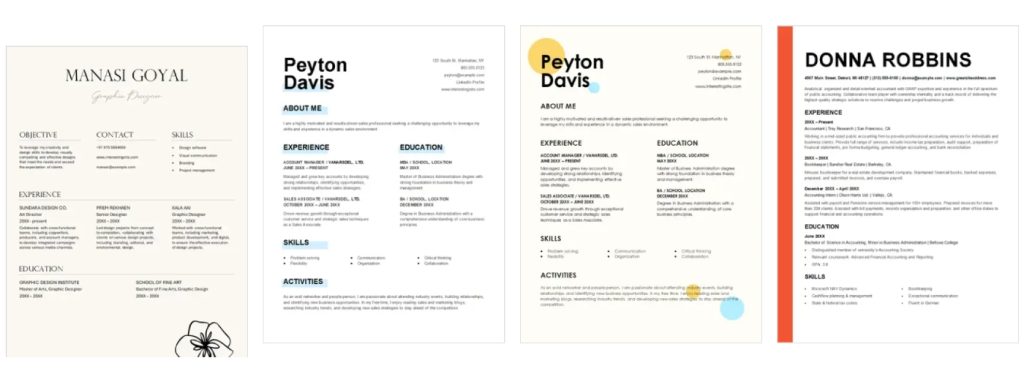
Instead of manually rebuilding layouts every time, it usually makes more sense to start with a system that already works.
MotoCMS offers resume and CV templates designed to remain clean and readable across formats, including Word and PDF. The biggest advantage isn’t visual polish — it’s consistency.
You don’t need to think about:
- spacing
- hierarchy
- alignment
- visual balance
Those decisions are already handled, allowing you to focus on the content itself.
And honestly, content is what determines whether a resume works.
Step-by-Step: Creating a Resume in Word

Step 1: Start With the Right Template
Choose a template that fits your industry rather than your personal taste.
Creative industries usually allow more visual flexibility, while finance, operations, or corporate roles tend to reward clarity and simplicity. Trying to make a conservative role look “innovative” often backfires.
If you need a starting point, MotoCMS also offers a CV builder with editable layouts designed specifically for professional resumes.
Step 2: Adjust the Layout Carefully
Once you open the template in Word, replace the placeholder content gradually rather than redesigning everything immediately.
One of the biggest mistakes applicants make is over-customizing templates:
- changing fonts
- shifting spacing
- adding unnecessary colors
- squeezing too much onto one page
Templates are usually already optimized for readability. Small adjustments are fine, but redesigning the structure often makes the resume harder to scan.
Step 3: Focus on What Actually Matters
This is where strong resumes separate themselves from average ones.
A polished layout cannot compensate for weak content.
Instead of listing responsibilities mechanically, focus on outcomes and clarity. Recruiters care more about:
- impact
- relevance
- communication
…than perfectly optimized wording.
For example:
❌ “Responsible for social media management.”
✅ “Managed social campaigns that increased engagement by 35% over six months.”
Small differences like this change how experience is perceived.
It’s also worth proofreading carefully. Even good resumes lose credibility through avoidable grammar or formatting mistakes. Tools like Scribbr can help catch issues before sending applications.
Common Resume Mistakes That Hurt Applications

Some resume problems appear constantly, regardless of industry.
The most common ones include:
- trying too hard to look creative
- using too many fonts or colors
- writing long, unfocused descriptions
- including irrelevant experience
- ignoring proofreading
None of these automatically destroys an application, but together they create friction for the person reviewing it.
A resume works best when it feels easy to follow.
By the way, if you’re about to take your exams, we suggest you check out CompTIA Security+ Practice Test Dumps, which offers CompTIA Security certification study guides and training courses that include practice test questions and answers, as well as exam dumps.
Does a Resume Really Need to Be One Page?
This depends more on relevance than strict rules.
Entry-level applicants can usually stay within one page because their experience is limited. Mid-level professionals often need more space, while senior specialists may require two pages or more.
What matters is whether every section supports your application.
If something doesn’t strengthen your case for the role, it probably doesn’t need to stay.
Final Thoughts
A resume doesn’t need a complicated design to work well.
Most successful resume templates Word share the same qualities:
- clear structure
- readable formatting
- relevant information
- realistic presentation
Templates simply remove unnecessary friction from the process. Instead of spending hours manually adjusting the layout, you can focus on presenting your experience clearly and professionally.
And in most hiring situations, clarity beats creativity.





Leave a Reply