8 AI Marketing Plan Presentation Generators Tested
Turning a 30-page marketing plan into a slick slide deck can devour an afternoon. A new crop of AI presentation generators promises to cut that grind to minutes. We tested eight frontrunners—feeding each the same brief—to see which ones truly spare you the copy-paste slog and which still need human polish. Read on for the quick wins, hidden snags, and the best fit for your workflow.
How We Tested Each AI Deck Builder
To keep the test consistent, we provided all presentation generators with the same three-page (≈820-word) marketing plan outlining goals, audience, tactics, timeline, and KPIs. The input never changed; only the software’s output did.
We ran two passes with each tool:
- Baseline run. A simple “build me a deck” prompt measured default quality.
- Editing run. We used the tool’s own AI commands to rewrite, add, or reorder slides, mirroring real-world tweaks.
During both runs, we scored four factors that matter to busy marketers:
- Content accuracy – did the slides mirror the strategy or drift into buzzwords?
- Design strength – were layouts polished and brand-ready?
- Workflow fit – how easily could we refine, collaborate, and export?
- Value for money – do paid tiers earn their keep when deadlines loom?
A stopwatch kept us honest. All eight platforms produced an editable draft in 1–9 minutes. That range lines up with results reported by AI presentation maker PlusAI, whose own documentation notes that users typically generate a first draft in minutes, while an independent review puts the average closer to a single minute. We still docked any tool that needed heavy rewriting, because speed only counts when the deck is usable.
That gap in turnaround time and quality informs the tool-by-tool recommendations that follow.
At-a-Glance: Which Tool Fits Your Scenario?
Need a five-second answer? The table below shows where each AI deck builder stands out, whether you can start for free, and the lowest monthly price (December 2025). Choosing the right SaaS for small business often comes down to balancing these specific features against your budget.
| AI tool | Best for | Stand-out feature | Free tier? | Entry price* |
| PlusAI | Working inside Google Slides or PowerPoint | Generates and rewrites slides in your existing deck | 7-day trial | $10/mo |
| SlidesAI | Fast text-to-slide drafts in Google Slides | One-click outline conversion | Yes | $10/mo |
| Beautiful.ai | Designer-level polish with little effort | Smart templates that auto-reflow content | 14-day trial | $12/mo |
| Canva Magic Design | Creative range in a familiar workspace | Multiple theme options per prompt | Yes | $13/mo |
| Visme | Visual, data-rich plan documents | AI plan maker plus advanced charting | Yes | $25/mo |
| Gamma | Interactive, scrollable story decks | Built-in viewer analytics | Yes | $8/mo |
| Pitch | Real-time team collaboration | Brand kit plus live co-editing | Yes | $20/mo |
| Decktopus | Last-minute speed | Guided Q&A to full deck | Yes | $15/mo |
*Lowest paid tier available in December 2025. Prices for using presentation generators may change.
PlusAI: Native AI inside Google Slides and PowerPoint
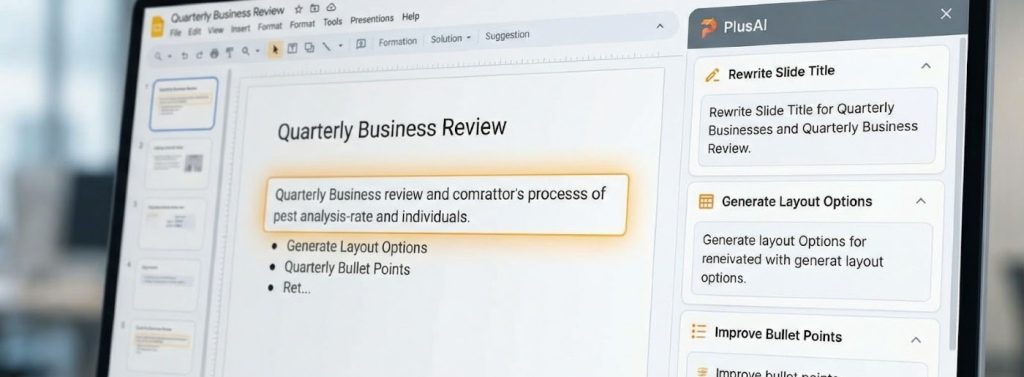
If you already build decks in Slides or PowerPoint, PlusAI acts like a built-in copilot. Open the add-on, paste a prompt or upload your full marketing plan, and watch it outline, write, and format slides without leaving the file (see the PlusAI step-by-step guide).
In our test, PlusAI produced a nine-slide draft in under three minutes and kept every section header from the source doc. A right-hand sidebar then let us:
- Rewrite or shorten copy
- Swap a cluttered layout for a cleaner one
- Insert a new slide on demand, all powered by the same AI engine
The default design is intentionally plain—consultant clean rather than showy—so your brand theme drops in with one click, and teammates can edit as they normally do. Choose PlusAI when speed and native workflow outrank dramatic visuals.
Pricing: 7-day free trial, then $10 per user per month (Pro plan).
SlidesAI: Quick-Draft Helper for Google Slides
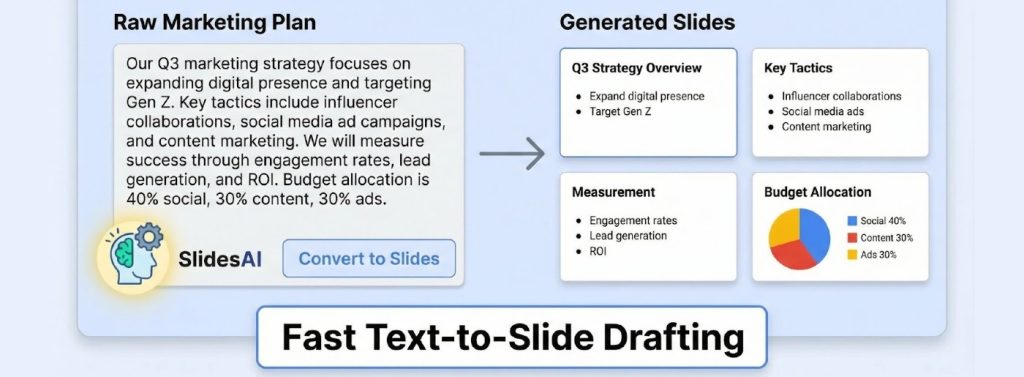
Need a blank deck filled fast? SlidesAI turns raw text into slides in seconds. Install the add-on, paste your marketing plan, pick a tone, and watch it convert prose into slide titles and bullets, right inside Google Slides.
In our test, a three-page (≈820-word) plan became an eight-slide draft in 28 seconds. Each original heading stayed intact, and SlidesAI trimmed paragraphs into three-to-five-bullet blocks, perfect for a first pass. After that, design is up to you: apply a theme, add images, and refine wording.
Because the add-on focuses on structure, visuals default to Google’s basic theme. That works for internal reviews, but client decks will need styling time.
Pricing
- Basic (free): 12 presentations per year, 2,500 characters each
- Premium: $16.67 per month (billed annually) for unlimited decks and 12,000-character inputs
If you work in Google Workspace and want a quick skeleton, not a finished showpiece, SlidesAI delivers with one click.
Beautiful.ai: When Design Polish has to Impress

Beautiful.ai feels like handing your slides to an agency. Drop in talking points, choose a smart template, and the software realigns each element until the deck looks intentional.
In our test, the three-page plan became a 12-slide presentation with animated timelines, branded SWOT diagrams, and generous whitespace. DesignerBot also surfaced alternative layouts mid-edit, saving dense bullet lists without manual effort.
Trade-offs:
- Content depth. The AI formats well but writes generic copy unless you provide detailed inputs.
- Design freedom. Locked positions keep slides tidy, which can frustrate users who want pixel-level tweaks.
Pricing
- 14-day free trial
- Pro plan: $12 per month when billed annually
Pick Beautiful.ai among presentation generators when visual credibility is critical, and you already have a clear story. It delivers agency-quality polish with no designer needed.
Canva Magic Design: Creative Freedom with an AI Head Start
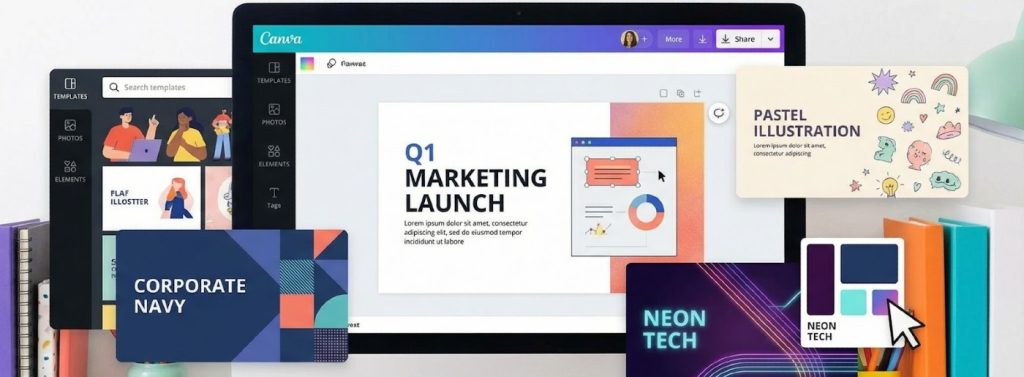
Magic Design turns Canva into a brainstorming partner. Enter a prompt (ours was “Q1 product-launch marketing plan”) and it returned six themed style boards (corporate navy, pastel illustration, neon tech, and more). Choosing one generated a seven-slide skeleton complete with stock photos and matching icons, all fully editable.
Why does it shine among presentation generators
- Breadth of assets. Canva’s large template and media library sit one click away, so turning a KPI slide into a branded chart or social mock-up is simple.
- Smooth collaboration. Live cursors and comment threads mimic Google Docs, keeping marketing, design, and execs in sync.
Where it falls short
- Headings default to placeholders like “Our Strategy” until you add specifics.
- The open canvas invites tinkering, so deadline-driven teams may lose time styling.
Pricing
- Free tier: Magic Design access with limited premium assets
- Pro plan: $15 per month for a single user, billed monthly, unlocking 3.6 million+ premium templates and 100 GB storage
Pick Canva when you want creative control plus an AI jump-start, and you can spare a few extra minutes for polish.
Visme AI Plan Generator: Turning Strategy into a Visual Report

Visme treats a marketing deck like a magazine layout. Its AI Marketing Plan Maker creates a multi-page document with icons, charts, and section dividers, so the result looks like a designed report rather than a simple template.
We fed it the same Q1 plan and chose a minimalist blue theme. Within 45 seconds, it produced a 14-page file: cover, executive summary, persona cards, channel charts, and a roadmap timeline. Every block was live; double-click a chart, and the data editor opened so we could drop in real numbers. Converting the doc to widescreen slides took one click, and elements resized automatically.
What to expect
- Depth comes with complexity. The interface is rich, with layers, asset libraries, and animation toggles, so first-timers spend a few minutes orienting.
- Copy is skeletal. Headlines and placeholder text need your insights; treat the output as a wireframe you will refine.
Pricing
- Free tier: exports include a watermark
- Starter: $12.25 per month (billed annually) for basic downloads
- Pro: $24.75 per month for high-resolution exports, brand kits, and analytics
Choose Visme among other presentation generators when your marketing plan must double as a leave-behind report, and you prefer fine-grained visual control over pure speed.
Gamma: Interactive Storytelling with Built-in Engagement Data

Gamma swaps static slides for a scrollable story made of “cards.” Viewers swipe or arrow through the deck, so objectives flow into personas and then channel tactics without awkward transitions—see how AI-driven presentation tools are changing storytelling for examples that range from comic-con panels to boardroom pitches.
Workflow
- Paste raw text or drop a Google Doc link.
- Gamma auto-chunks the content into cards, adds headings, and suggests visuals.
Our test produced eight cards in under one minute, each in a clean sans-serif theme.
Why it stands out
- Built-in analytics. Share a link and see who viewed, how long they stayed on each card, and where drop-offs occur, according to Gamma’s help center.
- Interactive embeds. Add GIFs, charts, or live web content; exports to PDF or PPT flatten these features.
Trade-offs
- Teams tied to offline .pptx will need a formatting pass after export.
- Limited brand controls on the free tier.
Pricing
- Free: 400 AI credits and basic themes
- Plus: $8 per month for unlimited generations
- Pro: $15 per month adds full analytics and branding tools (prices as of December 2025)
Pick Gamma when storytelling flow and viewer data matter more than traditional file formats.
Pitch: Collaboration First, AI Second
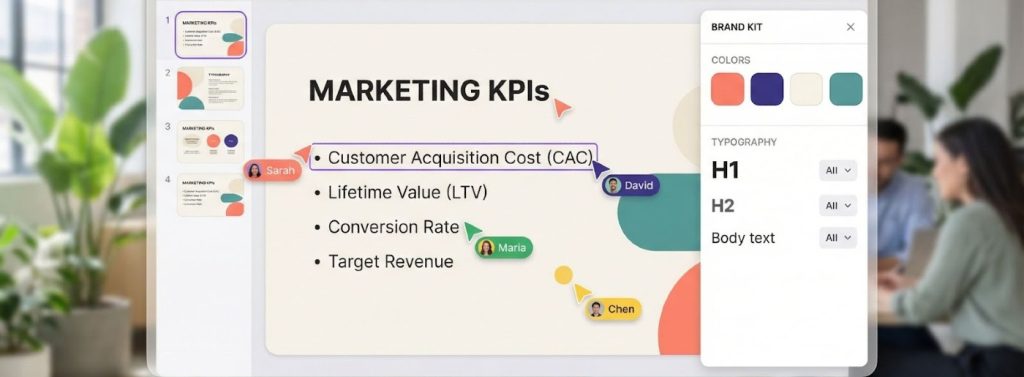
Pitch feels like Google Slides with design upgrades and live co-editing built in. Teammates can tweak the same slide at once, add comments, and roll back through version history.
AI workflow
- Click Generate and describe the deck in one sentence.
- Select a color palette; Pitch applies your brand kit if one is set.
- The tool outlined 10 slides (market context, objectives, tactics, KPIs) in our test, then let us run “AI actions” to shorten bullets or insert a SWOT slide.
Why teams like it
- Copy, imagery, and feedback stay in one place; no exporting needed.
- A downloaded PPTX keeps core content, although interactive embeds flatten.
Pricing (December 2025)
- Free: up to 5 members and 100 lifetime AI credits
- Pro: $20 per user per month with 500 AI credits per seat each month
- Business: higher limits and advanced analytics
Choose Pitch among presentation generators when on-brand design and real-time teamwork matter, and you want AI to speed rather than replace group creativity.
Decktopus: Q&A Speed Runs for Last-Minute Decks
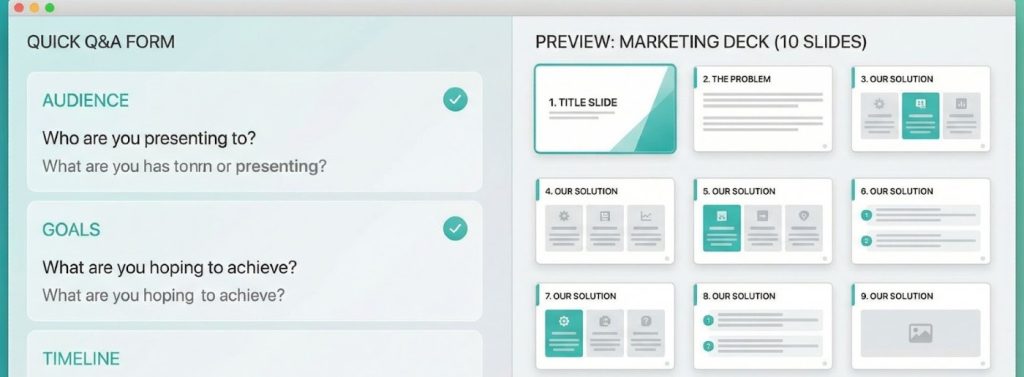
Decktopus trades a blank canvas for a guided questionnaire. Answer a few prompts (title, audience, goals, timeline) and the tool assembles a deck in minutes.
In our trial, those answers produced a 10-slide presentation covering the problem, solution, audience, tactics, timeline, and budget. Copy was concise, layout clean, and only light polishing was needed for internal use.
Trade-offs
- Speed over flexibility. Slide order and many design elements are locked, so you can’t swap a timeline for a funnel graphic without starting over.
- Modest visuals. Templates resemble competent corporate PowerPoint themes rather than stage-ready designs.
Pricing (December 2025)
- Free: watermark on exports, limited templates
- Pro: $14.99 per month (billed monthly) with 9,000 AI credits per year and up to 300 AI-generated presentations
- Business: $34.99 per user per month for extra credits and analytics
Choose Decktopus when you need speed and prefer answering smart prompts over wrestling with a blank slide.
Conclusion: Picking Your Perfect Match
Choosing an AI presentation maker starts with pinpointing the real bottleneck between plan and deck.
- Need speed in familiar software? Stick with PlusAI or SlidesAI; both turn Google Slides or PowerPoint files into drafts in under ten minutes.
- Chasing designer polish? Beautiful.ai locks layouts so nothing slips, while Visme lets you adjust every chart and icon until it’s on brand.
- Crave creative freedom and teamwork? Canva offers more than three million templates you may already know, and Pitch layers in live co-editing and version history.
- Want interactive storytelling and viewer data? Gamma’s card format and built-in analytics show who paused on the budget slide.
- Racing a deadline? Decktopus converts a short Q&A into a ten-slide deck in minutes, sparing you the blank canvas struggle.
Treat any of these tools as an accelerator, not an autopilot: feed them a clear strategy, pick the workflow that solves your pain point, and spend the saved hours refining insight instead of formatting slides. Treat any of these tools as an accelerator, not an autopilot: feed them a clear strategy, pick the workflow that solves your pain point, and spend the saved hours refining insight instead of formatting slides. For a slide-by-slide look at how these presentation generators perform on a real marketing brief, check out this hands-on benchmark of AI presentation generators for marketers.
FAQ
1. What is an AI marketing plan presentation generator?
It’s a tool that turns written marketing strategies—such as briefs, plans, or reports—into slide decks automatically. Most accept raw text, a document link, or guided inputs, then generate slide outlines, copy, and layouts within minutes.
2. How accurate are these tools at translating a full marketing plan?
Accuracy varies. Tools like PlusAI and SlidesAI preserve headings and structure closely, while design-forward tools such as Beautiful.ai or Canva Magic Design may emphasize aesthetics over fidelity. In general, AI handles summarization well but still needs human oversight for nuance and brand voice.
3. Do AI-generated decks still require editing?
Almost always. While the first draft can be produced in under a minute, you’ll still need to refine messaging, update data, apply brand guidelines, and ensure strategic alignment. AI saves time on layout and structure, but humans ensure accuracy and insight.
4. Which tool is best for Google Slides or PowerPoint users?
PlusAI and SlidesAI are strongest for native workflows. PlusAI works inside Slides/PowerPoint as a sidebar copilot, while SlidesAI focuses on rapid text-to-bullet conversion inside Google Slides.
5. Which generator makes the most visually polished decks?
Beautiful.ai offers agency-level design with auto-reflowing smart templates. Visme provides the most detailed visual elements—charts, icons, persona cards—ideal for plan documents that double as reports.
6. What’s the fastest tool for turning text into slides?
In testing, SlidesAI, Gamma, and Decktopus delivered drafts in under a minute. However, Decktopus achieves speed by limiting customization, while Gamma trades traditional slides for scrollable “cards.”
7. Which option is best for collaboration?
Pitch is built for teams. It supports real-time co-editing, comments, version history, and brand kits. Canva and Google Slides also offer strong collaborative features but rely more on manual design work.





Leave a Reply