How to Recover Permanently Deleted Text Messages from iPhone?
Losing essential text messages on your iPhone can be painful, and it can be even worse if they’re permanently deleted. Whether the message contains important meeting information, a meaningful conversation, or just some information that you may need in the future, deleted text messages can be scary. However, the good news is that there are several iPhone recovery workarounds you can try to recover permanently deleted text messages.
In this guide, we will discuss various iPhone data recovery methods for recovering lost or deleted text messages. Just follow these steps to recover permanently deleted text messages from your iPhone smoothly and successfully.
Can I Recover My Deleted Text Messages from iPhone?
Fortunately, you can; there are many methods available to recover permanently deleted text messages from iPhone. But before this, we need to know the nature of the deletion that occurred:
- Soft Deletion: The message is no longer available in the Messages app but it is temporarily stored in your iPhone’s storage. Using previously created backups should make it easy for you to recover those deleted messages.
- Permanent Deletion: Instances may occur when you don’t have any backup of your lost messages or if new data have overwritten the storage sector. Using iPhone data recovery software is the best way to recover data.
How do I Retrieve Permanently Deleted Text Messages on iPhone?
Irrespective of the aforementioned reasons for text message loss on your iPhone, it’s essential to immediately proceed with adequate iPhone data recovery methods to restore lost/deleted text messages on your iPhone. Go with these methods one by one to retrieve your lost messages and ensure you don’t lose important conversations:
Method 01: Recover Text Messages from iCloud
If you’ve iCloud backup of your lost or deleted text messages, check these backups to restore your texts without much hassle. Learn more about how cloud storage solutions support scalability and data recovery in Cloud Computing for Startups.
- Firstly, open Settings app. Then, go to Name > iCloud > Manage Storage > Backups.
- Now, select your device to view all available backup options.
- Then, erase your iPhone by going to Settings > General > Transfer or Reset iPhone > Erase All Content and Settings.
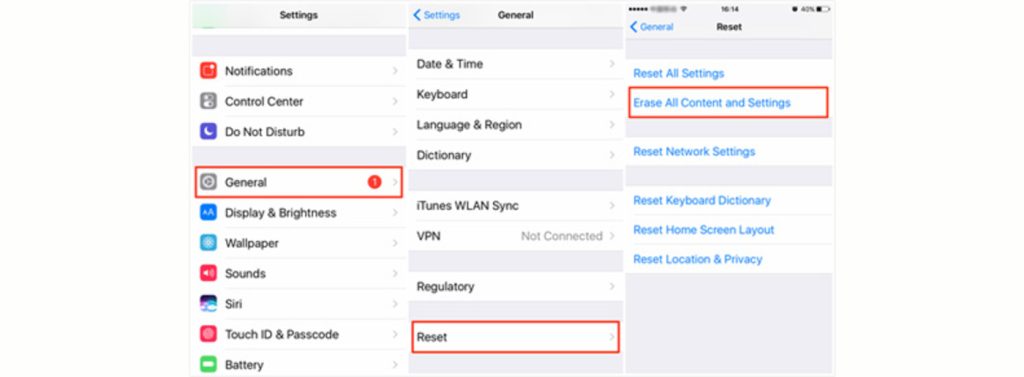
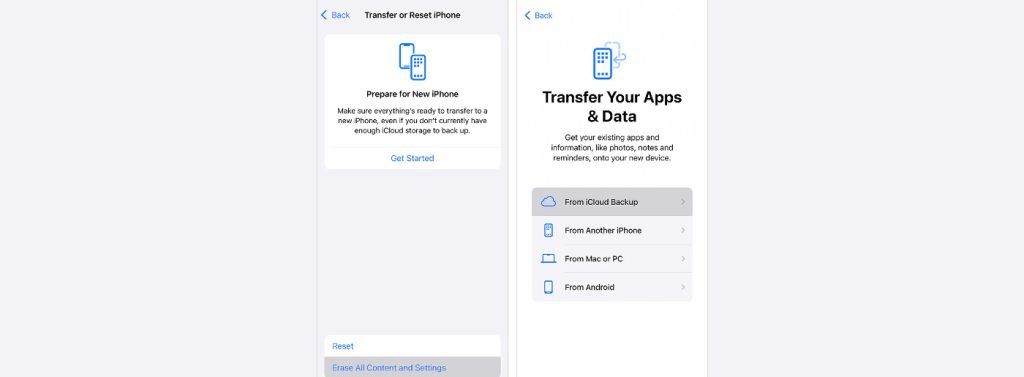
- After erasing, your iPhone will restart. Follow the on-screen instructions until you reach the Apps & Data screen.
- Sign in using your Apple ID and select the backup to restore.
- Once restored, check if your deleted text messages and other data are back.
Method 02: Use iTunes/Finder Backup
To recover permanently deleted text messages from iPhone, you can use iTunes or Finder backup. Here are the steps for doing this:
- Firstly, attach your iPhone to a computer using a USB cable.
- Launch Finder or iTunes, depending on the OS version installed on your device.
- Select your iPhone on the homepage, then click Restore Backup in the Backups section.
- Now, select the desired backup of your lost texts, then tap Restore.
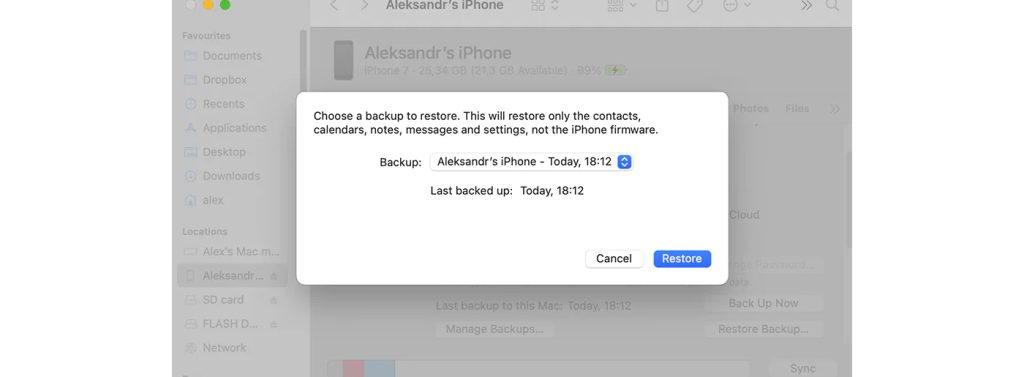
Wait till the recovery process is complete. Once done, check the Message app to confirm that the selected messages have been restored.
Method 03: Use iPhone Data Recovery Software
If you don’t have a backup of your lost text messages, iPhone data recovery software is the best choice in this case. Stellar data recovery for iPhone in one of the best software available in the market to do so.
Amazing Features of Stellar Data Recovery for iPhone Tool:
- It lets you recover permanently deleted text messages from iPhone and iMessages in just a few clicks.
- This iPhone data recovery tool lets you recover data from iCloud and iTunes backups.
- It has a preview feature that lets you view recoverable files before restoring them.
- The iPhone recovery application is compatible with all popular iPhone models and the latest iOS versions.
- It provides an easy-to-use interface, allowing even non-tech geeks to retrieve lost iPhone data easily.
Here’s how to perform deleted text message recovery using the all-in-one Stellar Data Recovery for iPhone tool:
- Install the software on your computer from the website.
- Connect your iPhone to your computer.
- Select Recover from iPhone from the left pane and choose Messages & Chats.
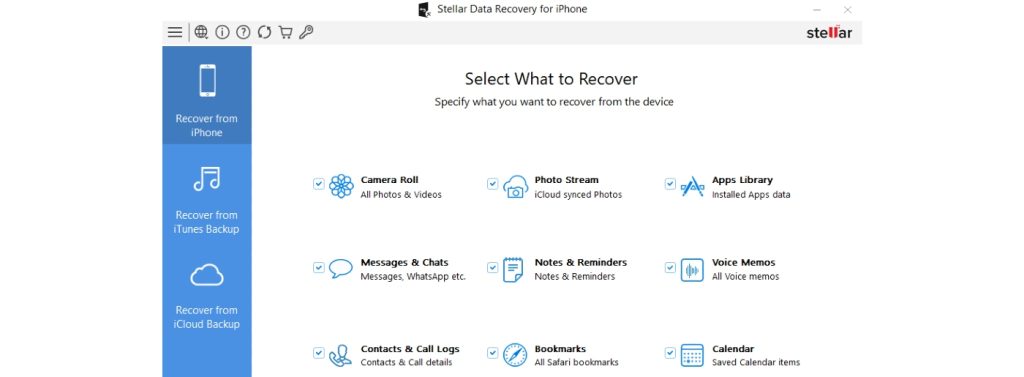
- Click scan to search for recoverable data.

- Now select the messages you want to recover.
- Tap Save to get them back on your device.
Method 04: Contact Apple Support
Sometimes, you may not have a backup of the text messages you deleted, or the Stellar data recovery for iPhone software may not help you to retrieve lost texts. At that point, you can reach out to the Apple Support team, as it would be beneficial. They will help you along the way with troubleshooting, verifying your iCloud status, and restoring your backup to recover permanently deleted text messages from iPhone.
Wrapping Up
If you’re missing crucial messages, the easiest way to get them back is to use the appropriate iPhone data recovery procedures. The recovery process is initiated by confirming whether you have any previous backups, and then using either iCloud or iTunes/Finder.
If a backup is unavailable, the best option is to use iPhone data recovery software. It is advised that you back up your device and keep your software and iOS up to date.




Leave a Reply