5 AI Humanizer Tools Compared (2026): Which Ones Truly Sound Human?
This comparison is based on real-time testing in January 2026. We judged these AI humanizer tools on how truly natural and “human” they sound right now. Since AI tech moves fast, your results might vary slightly depending on future updates or your specific text inputs.
The Short Answer: Which AI Humanizer Tool Wins in 2026?
If you want the bottom line without scrolling: GPTHumanizer AI is the clear winner for 2026.
Why? Because it was the only tool in my evaluation that landed in the “Sweet Spot”: It reliably bypassed the most legitimate detectors (GPTZero, Originality AI) without destroying your text with cringe-worthy nonsense synonyms. All the other tools failed the test by either being detected or by making the text read like a bad-grammar/typo ramble. But GPTHumanizer kept the text natural, engaging, and logical. And GPT Humanizer AI is the most cost-effective value for creators and students with its Unlimited Free Lite Model.

Why I Wrote This Review (The “Robotic” Trap)
I’ve been a content creator for years. Lately, I’ve been noticing a trend. We’re so caught up in trying to “bypass” AI detectors that we’ve decided to ignore the human reader. I’ve tested so many “humanizers” that just take a perfectly good sentence and change it to an obscure synonym, or, worse, introduce typos just to trip up the algorithm.
That’s not humanizing; That’s sabotaging your own job.
If you’re a student who’s looking to freshen up your material or a blogger who’s looking to win the trust of your audience, you want text that’s got soul, not just a green checkmark. You want content that’s flowing, that keeps the reader reading, and that sounds like you.
So, I stopped caring about the “Detection score.” And I fed a 500-word AI draft into the top 5 tools on the market to answer a single question: Which one writes like a real human being?
My Testing Methodology (The “Gauntlet”)
To keep this honest, I didn’t just read the landing pages. I ran a controlled stress test using a marketing draft generated by GPT-5.
Step 1: The Gatekeeper (Detection Test)
First, survival. If a tool can’t bypass the “Big Three” detectors, discussing its writing style is a waste of time. I ran every output through:
- GPTZero
- Originality AI
- ZeroGPT
Step 2: The “Human Soul” Check
Only the tools that passed Step 1 advanced to this stage. Here, I analyzed the quality of the text:
- True Readability: Does it flow like a conversation, or does it feel “clunky”?
- Context Retention: Did the tool understand what I was saying, or did it change the meaning?
- The “Glitch” Factor: Did it insert fake typos or bad grammar just to cheat the detector?
- Cost Efficiency: Is it worth the money?
Here is the data-driven breakdown of how the top 5 contenders performed.
Quick Comparison: The 2026 Humanizer Landscape
If you are skimming for data, here is the snapshot of my results.
| Tool Name | Detection Pass Rate | “Sound Human” Quality | Free Option? | Price (Monthly) |
| GPTHumanizer AI | 9/10 | ⭐⭐⭐⭐⭐ (Natural) | Yes (Unlimited) | Free / $7.99 for Ultra Model |
| Undetectable.ai | 7/10 | ⭐⭐⭐⭐ (Formal) | Paid Trial | $14.99 |
| StealthWriter | 8/10 | ⭐⭐⭐ (Awkward) | Limited | $20.00 |
| Quillbot | 6/10 | ⭐⭐ (Robotic) | Limited | $9.95 |
| HIX Bypass | 8/10 | ⭐⭐⭐⭐ (Good) | No | $19.99 |
1. GPTHumanizer AI (My Top Pick)
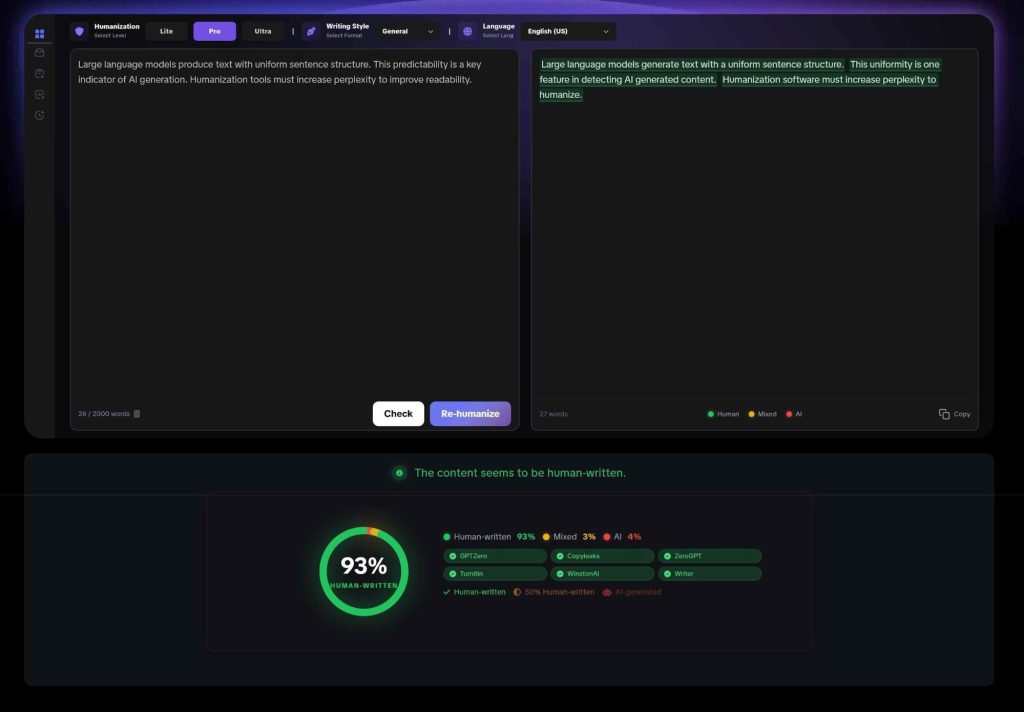
Starting out, the endless free version made GPTHumanizer AI catch my eye. Truthfully, expectations were low. Most times, things labeled “free” stop working fast – either locked behind payments or spitting out junk filled with random pop-ups.
But GPTHumanizer AI was different. Its Lite model is genuinely free for users to use—forever. Even the built-in AI detector, which integrates scores from major platforms, is completely free to access.
What surprised me was how good it looked once I tested it. Far from what you’d expect from something free. Every check came back clean and passed every detector without issue. Meaning stayed intact, exactly as intended. Reading through, the flow seemed effortless. No strange terms picked from deep inside a thesaurus. No silly errors added on purpose to trick the software. Simply put, it reads as if someone wrote it.
What I Liked:
- It Actually Works: It passed the strict detection tests and remained readable.
- The Price Tag: It is a real Unlimited Free AI Humanizer.
- Built-in Feedback: It highlights sentences in Red (AI), Yellow (Mix), and Green (Human), teaching you exactly which parts of your writing trigger the detectors.
The Drawbacks:
- Word Count Variance: The AI sometimes expands or contracts the text length slightly.
- Manual Review: Like all AI, you should give it a final read-through to ensure the nuance matches your personal voice perfectly.
The Verdict:
If your priority is quality content that passes detection without looking like garbage, this is the tool to use.
2. Undetectable.ai
Undetectable.ai has been a big name in the industry for a while, but the interface feels a bit old-school—honestly, I initially struggled to even find the tool on the homepage because it wasn’t immediately obvious.
Once I got it running, the results were decent but middle-of-the-road. It is a heavy hitter in the “bypass” category. To its credit, I didn’t see any “fake errors” or intentional typos, which is a plus. However, it wasn’t bulletproof; in my testing, there were a few instances where it still failed a GPTZero scan.
What I Liked:
- Consistency: The grammar is generally flawless.
- Options: You can choose readability levels (High school, University, Journalist).
The Drawbacks:
- Cost: It is one of the pricier options on the list.
- Over-Editing: It often changes the voice so much that it sounds like a different person wrote it.
The Verdict:
It offers API integration and business plans, making it a solid choice for enterprise teams that need formal text in bulk. For individual creators, it feels a bit clunky.
3. StealthWriter
StealthWriter offers an overwhelming amount of customization: you can choose from 5 humanized models, 10 levels of humanization, and 8 different writing styles. I tested two extreme styles to see what would happen. The good news? It definitely changed the text structure significantly. The bad news? The coherence took a nosedive. The sentences became choppy and didn’t flow well together. It felt like the AI was working so hard to follow the strict “style rules” that it forgot how to tell a story.
What I Liked:
- Aggressive Rewriting: It certainly changes the text structure significantly.
- Multiple Versions: It gives you a few drafts to choose from.
The Drawbacks:
- The “Robot” Feel: The readability takes a massive hit in exchange for the bypass score.
- Pricing: The free version is extremely limited.
The Verdict:
This is the most expensive AI humanizer for my test, and the output, while unique, often sacrifices readability.
4. Quillbot
Quillbot is the tool many start with. Using Quillbot feels great—the interface is smooth, and the synonym slider gives you a sense of control. But when I took that rewritten text and put it into GPTZero, it failed. Why? Simply swapping “happy” for “joyful” doesn’t change the underlying mathematical patterns (perplexity) of the sentence structure. It’s excellent for avoiding plagiarism, but as a tool to make AI text “sound human” to a detector, it’s showing its age.
What I Liked:
- Control: The synonym slider is a great feature for manual control.
- Integration: The Chrome extension is convenient.
The Drawbacks:
- Fails Detection: It doesn’t fix the underlying patterns that detectors look for.
The Verdict:
Great for simple rewriting to avoid plagiarism, but do not rely on it to bypass AI detection in 2026.
5. HIX Bypass
HIX feels like the “Swiss Army Knife” of AI tools. It’s part of a massive ecosystem, and the interface is packed with features. My first impression was that this is a powerful, premium tool designed for power users who churn out thousands of words a day.
The performance was undeniably good. It managed to humanize the text while keeping the facts straight—something other tools struggle with. However, the experience was slightly marred by the constant upsell. Every time I tried to do something, it felt like I was being nudged to upgrade or buy a bundle. It’s a Ferrari engine inside a billboard-covered chassis.
What I Liked:
- Accuracy: It rarely distorted the facts in my draft.
- Speed: It processes long documents very quickly.
The Drawbacks:
- Price: It is priced for power users and agencies.
- Upselling: The interface is constantly pushing you to buy other tools.
The Verdict:
A strong contender for agencies, but likely too complex (and pricey) for individual bloggers or students.
My Recommendation: The “Human” Choice
After testing all five, I kept coming back to GPTHumanizer AI for one main reason: Balance.
It was the only tool that confidently checked both boxes:
- Passed the “Big Three” Detectors (GPTZero, Originality, ZeroGPT).
- Sounded like a human wrote it (Natural flow, no fake typos).
The fact that you can use this Free Unlimited AI humanizer without signing up makes it the obvious starting point. I found myself running a paragraph, checking the built-in detector colors, and tweaking it until it was perfect.
If you are looking for a reliable humanizer that actually works—without breaking your bank or your sentences—this is the one I’d recommend.
FAQ: Common Questions About AI Humanization
- Is using an AI humanizer considered cheating?
No, not if used responsibly. Think of it as a spell-checker for tone. If you use AI to generate ideas and a humanizer to refine the flow, you are acting as an editor. The goal is clarity and communication, not deception.
- Why do some humanizers add typos?
Some primitive tools add typos or bad grammar to lower the “perplexity” score and fool detectors. This is a bad strategy because it destroys your credibility. High-quality tools like GPTHumanizer focus on sentence structure rather than errors.
- Will these tools guarantee I pass every detector?
Let’s be real: No tool can guarantee 100% invisibility forever because detection algorithms update constantly. The goal shouldn’t be “beating the system” but rather creating high-quality content that engages readers.
- What is the difference between Paraphrasing and Humanizing?
Paraphrasing (like Quillbot) changes words. Humanizing changes the structure and pattern. Humanizing addresses the statistical predictability of text (perplexity), making it feel more creative and less algorithmic.




Leave a Reply