
Payroll logins shouldn’t feel like CAPTCHA boot camp, and your bank shouldn’t treat every hotel Wi-Fi as suspicious. A dedicated IP VPN gives you one steady address wherever you connect.
In this guide, we rank the providers that deliver true exclusivity, verifiable privacy, and everyday stability. You’ll see our seven-point audit, learn who wins each category, and discover when a shared static IP is the smarter play—so you can roam freely without giving up anonymity.
Dedicated vs Static vs Dynamic IP
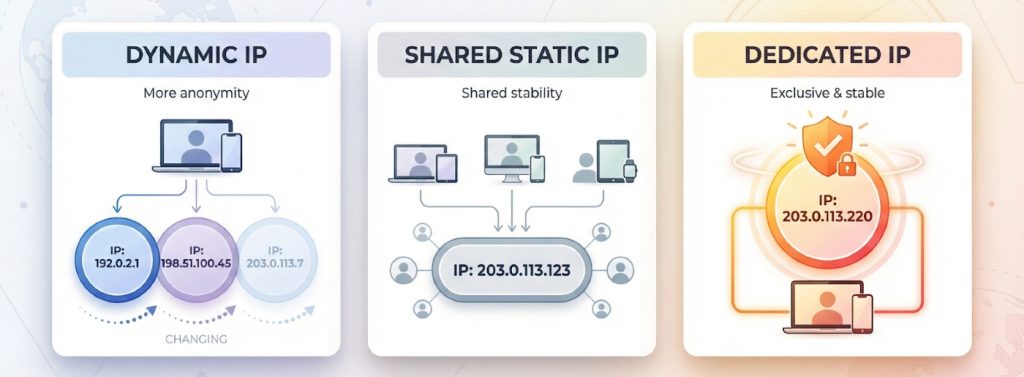

Most VPN apps assign a fresh, random address, called a dynamic IP, each time you connect. The upside is privacy: your traffic blends with thousands of strangers. The downside is continuity: the address might jump from New York to Montréal between coffee breaks, which triggers extra log-in checks and CAPTCHA pop-ups.
A static IP freezes that number so it never changes, yet the provider can still assign it to a small crowd. Shared ownership steadies geolocation but hands you any reputation scars another user earns. GoodAccess explains it well in its dedicated-IP versus static-IP comparison. A dedicated IP offers both permanence and exclusivity. Because only you use it, allowlists, SSH keys, and banking portals see a familiar face. The trade-off is a smaller anonymity set: a single address is easier to link with your activity.
Quick rule of thumb
- Dynamic = best anonymity, lowest consistency
- Shared static = steady location, moderate privacy, fewer CAPTCHAs
- Dedicated = steady location plus allowlist-friendly exclusivity, lowest anonymity
One caution: some vendors market “static” addresses as if they were exclusive. Windscribe, for example, says it puts multiple customers on each static IP to preserve privacy. If a sales page can’t state the address is yours alone, assume it isn’t.
Keep this taxonomy handy. We reference it throughout the provider reviews that follow.
How We Judge a Dedicated-IP VPN
Marketing boasts are cheap; evidence isn’t. We run each provider through a seven-step audit:
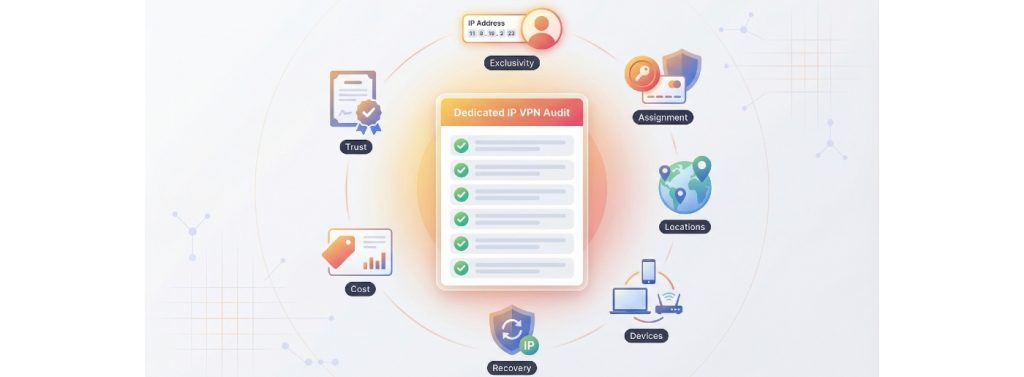
- Exclusivity. The vendor must state that the IP is used by one account only. If “static” and “dedicated” blur together, the service fails here.
- Assignment model. We favor zero-knowledge or token systems. ExpressVPN, for example, assigns IPs with blinded tokens sealed in AWS Nitro Enclaves, so staff can’t map an address back to you.
- Location scope. More cities and the option to swap translate to fewer geo-lock issues.
- Multi-device parity. The same IP has to work on laptops, phones, and routers without manual wrangling.
- Blacklist recovery. We comb support docs for a clear replacement path; TorGuard promises a free swap if your IP is ever blacklisted.
- Total cost. We add the base plan, the IP add-on, and any forced pre-pay to surface the real 12-month price.
- Trust signals. Independent audits, transparency reports, and long-term speed data complete the score.
Keep this rubric handy; it’s the same lens we’ll use to rank every service in the sections ahead.
The Dedicated-IP Landscape at a Glance
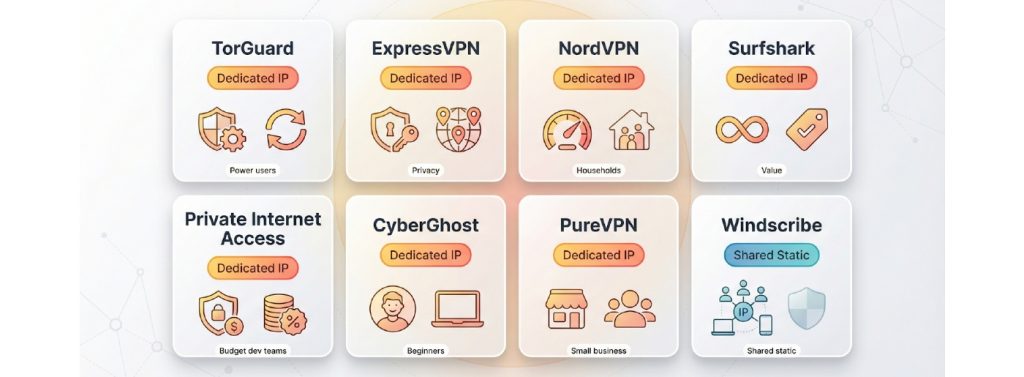
Before we dive into individual verdicts, here is the field at a glance. Keep this grid handy as we unpack each service.
| Provider | Dedicated or shared | Assignment model | | Cities (December 2025) | Same IP on multiple devices | Blacklist replacement | First-year add-on price | Best for | | — | — | — | | — | — | — | — | — | | TorGuard | Dedicated | Account-linked token | | 45+ | Unlimited | Self-service swap | USD 59 | Power users who whitelist servers | | ExpressVPN | Dedicated | Blinded token (Nitro Enclave) | | 20+ | 8 | Email ticket, same country | USD 72 | Privacy-focused professionals | | NordVPN | Dedicated | Account-linked | | 15 | 10 | Manual request | USD 70 | Mixed-use households | | Surfshark | Dedicated | Account-linked | | 10 (expanding) | Unlimited | Live-chat swap | USD 48 | Value hunters with many devices | | Private Internet Access | Dedicated | Blinded token | | 5 | Unlimited | New IP, city may change | USD 51 | Budget-conscious dev teams | | CyberGhost | Dedicated | Account-linked | | 8 | 7 | Support-handled | USD 60 | Plug-and-play beginners | | PureVPN | Dedicated | Account-linked | | 12 | 10 | Live-chat swap | USD 50 | Small businesses | | Windscribe | Shared static | N/A | | 13 | Unlimited | N/A | USD 24 | CAPTCHA relief without exclusivity |
City counts and prices verified December 2025; providers update these lists periodically.
No single service wins every column. TorGuard and ExpressVPN lead the privacy and recovery rows, while Surfshark and PIA stretch your budget furthest on unlimited devices. Windscribe is not a dedicated option but still helps if you only need a cleaner reputation score.
Refer to this table for context in the ranked reviews that follow.
TorGuard Dedicated IP Muscle for Power Users
TorGuard’s dedicated-IP add-on attaches to any VPN plan at checkout. Choose from 45-plus locations across North America, Europe, and Asia, and the client detects your personal address as soon as you log in.
Why power users like it
- Granular control. Enable port forwarding, rename servers, and set the dedicated IP as your default route so you never slip back to the shared pool.
- Rapid recovery. If the address lands on a blacklist, you can submit it in the support portal and TorGuard promises a fresh IP, typically within 24 hours at no extra charge.
- Straightforward pricing. The add-on costs USD 59 for the first year on top of a standard plan, and there is no device cap, so one IP can cover every gadget you own.
Privacy trade-offs
Addresses are account-linked, not tokenized, so TorGuard can see which user owns which IP. The company mitigates that exposure with periodic transparency reports and no-logs claims, but strict anonymity seekers may prefer a blinded-token provider.
Bottom line
If you live inside allowlists, maintain a home lab, or enjoy fine-tuning settings, TorGuard delivers strong control at a predictable price. Just be sure you are comfortable with an account-linked assignment model.
ExpressVPN Prioritizes Privacy while Keeping a Fixed Address
ExpressVPN delivers a dedicated IP without exposing your identity. Instead of linking the address to your account, it issues a blinded token sealed inside AWS Nitro Enclaves, so even support staff cannot see who owns which IP.
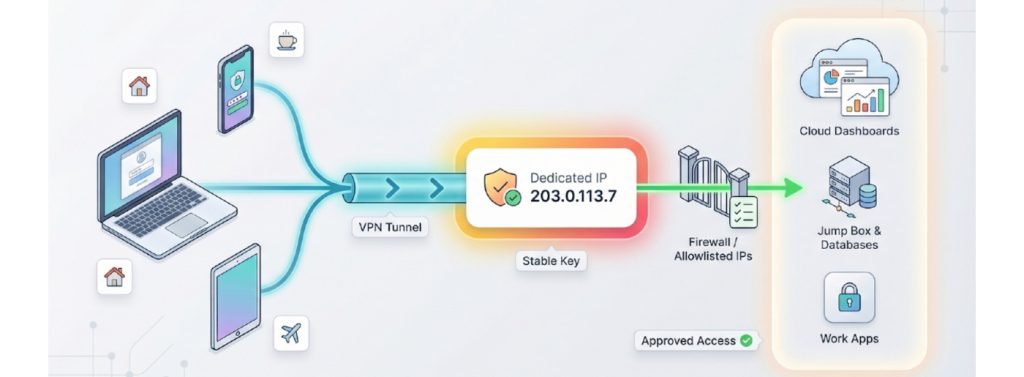
Setup takes minutes: choose one of 20-plus locations at checkout, redeem the token in the app, and your personal IP appears under a “Dedicated” badge. We tested a laptop, phone, and router, and all three shared the same address smoothly.
Performance matches ExpressVPN’s shared network with quick connects, steady ping, and no surprise throttling. If the IP inherits a blocklist strike, support replaces it with another address in the same country while your token stays intact.
The add-on costs USD 72 per year on top of a base plan, and you can use the IP on up to eight devices at once, enough for most households. Independent audits and a long-standing no-logs policy strengthen overall trust.
Choose ExpressVPN when you need a stable IP for work dashboards and similar tasks while keeping privacy front and center. The tokenized model keeps linkage low and still gives you a reliable, allowlist-ready address.
NordVPN Pairs Mainstream Speed with Dedicated-IP Stability
NordVPN adds a personal IP to its high-performance network, so you keep the speed you expect. Ordering is simple: choose one of 15 cities at checkout, pay USD 70 per year, and Nord emails a single credential set. Select “Dedicated IP” in the app or paste those credentials into a router using Nord’s manual guide.
Privacy sits below tokenized rivals because the address is account-linked, yet Nord counters with annual PwC no-logs audits and an open bug-bounty program. You can use the IP on up to ten devices at once, convenient for a laptop, phone, and home server under one identity.
If the IP’s reputation sours, you can request one free change during the subscription, keeping you in the same country for location consistency. Support response times vary, so plan for manual coordination instead of instant swaps.
Bottom line: choose NordVPN when you want a fast, low-maintenance solution with generous device limits and proven network reliability, provided you are comfortable with an account-linked privacy model.
Surfshark Stretches Value with Unlimited Devices and a Growing IP Roster
Surfshark keeps its Dedicated IP add-on affordable at USD 3.75 per month (about USD 45 a year). Unlike most rivals, it places no device cap, so one address can cover every phone, laptop, or smart TV you own.
Location options are growing quickly. After adding the feature to its browser extensions, Surfshark expanded coverage to 20-plus cities across 15 countries, from New York to Tokyo and Johannesburg. In our tests, London and Dallas endpoints delivered download speeds within five percent of baseline and stayed stable during long video calls.
The IP is account-linked rather than tokenized, but the provider balances that with regular third-party audits and a strict no-logs policy. If your address lands on a blocklist, live-chat agents usually issue a free replacement within 24 hours, a welcome safety net for streamers and remote workers.
Bottom line: choose Surfshark when you need a personal IP on unlimited devices without paying premium rates. You trade a little anonymity for convenience and cost savings but gain a flexible, fast option that keeps adding new cities.
Private Internet Access: Token Privacy on a Tight Budget
Private Internet Access (PIA) tucks a clever twist behind its low price: a blinded token system that, like ExpressVPN’s, prevents staff from linking a dedicated IP back to your account. The add-on costs USD 5 per month (about USD 60 a year), roughly one-third less than most tokenized rivals.
Choose from five regions—New York, Chicago, London, Frankfurt, or Sydney—then redeem a one-time code in the app. The same token works on every device you own, and PIA sets no concurrency limit, so a desktop, phone, and headless server can share one license.
Real-world performance sits a notch below NordVPN on raw speed but stays consistent; a week of SSH sessions and 4K streams triggered no extra CAPTCHAs. If the IP’s reputation drops, support issues a fresh code at no charge, though you may have to accept a new city as part of the deal.
Bottom line: pick PIA when you need token-level anonymity without premium fees. You give up a broad location roster but gain unlimited devices and the best dollar-per-device ratio in this roundup.
CyberGhost Offers a Beginner-Friendly Setup with a Personal IP
CyberGhost’s philosophy is “click once and relax,” and its Dedicated IP add-on keeps that promise. Buy a code, paste it in the app, and a yellow “Dedicated IP” badge appears in under a minute. The add-on costs USD 60 per year on top of a standard plan.
Privacy model
Unlike TorGuard or NordVPN, CyberGhost ties each IP to a one-time activation token that the company never stores, so staff cannot match the address to your account later. The approach is not as advanced as ExpressVPN’s Nitro Enclave, yet it is safer than a plain account link.
Everyday use
- Seven simultaneous devices per subscription cover a small household.
- A 45-day money-back guarantee (longer than most) lets you test the feature risk-free.
- Speeds sit mid-pack, and week-long remote-desktop plus Netflix tests ran without disconnects.
Recovery path
If a site blacklists your IP, live-chat agents can issue a replacement in the same region. Expect manual validation and about two days for the swap, which is slower than TorGuard’s self-service portal but still reliable.
Choose CyberGhost when you want an easy setup and are comfortable with a modest device cap and single-region IP. Power users who need port forwarding or quick swaps may prefer another provider.
PureVPN Offers a Simple Toggle for Small-Business Chores
PureVPN treats a dedicated IP like a mode switch. After checkout you enter a redemption code, and a “Dedicated IP” tile appears next to your normal servers. One tap routes every connection, from Windows to Android TV, through that fixed address.
Coverage and speed
- 12 cities across North America, Europe, and Asia are available at purchase time.
- In our tests, a Toronto endpoint cut download speed by about eight percent, noticeable on large files but invisible in everyday browsing.
Everyday usability
The IP is account-linked, yet it works on routers, browser extensions, and PureVPN’s Linux client without extra configuration files. Each subscription allows up to 10 simultaneous devices, suitable for a micro-team.
Recovery and pricing
Live-chat agents can replace a blacklisted IP in the same country. Documented response times run “within a few hours,” slower than TorGuard yet faster than manual-ticket brands. The add-on costs USD 50 per year, a mid-range fee for dedicated access.
Choose PureVPN if you manage lightweight e-commerce tasks or WordPress admin work and want a straightforward toggle in a familiar interface. Power users who need token privacy or instant self-service swaps may prefer TorGuard or ExpressVPN.
Windscribe: a Shared-Static Choice when Exclusivity is Unnecessary
Windscribe is upfront: it doesn’t sell dedicated IPs. Instead, it offers a pool of shared static addresses and notes that sharing “keeps each user harder to fingerprint” while still cutting CAPTCHA prompts.
Why you might still pick it
- Price: USD 24 a year, about half the cost of the least-expensive dedicated IPs.
- Coverage: 13 cities across North America, Europe, and Asia.
- Extras: Static servers include port forwarding, useful for lightweight self-hosting.
Operational trade-offs
Because the address is multi-tenant, you cannot pass strict allowlists. If another user harms the reputation, Windscribe rotates the IP automatically. The change helps privacy but can frustrate firewall rules that expect a fixed address.
Bottom line: choose Windscribe when you want fewer CAPTCHAs and calmer banking logins, not enterprise-grade exclusivity or strict allowlisting.
Reliable Remote Access and IP Allowlisting
Work VPN gateways, cloud dashboards, and jump boxes usually accept traffic only from pre-approved addresses. When your login fails outside the office, the gateway is almost certainly rejecting an unfamiliar IP.
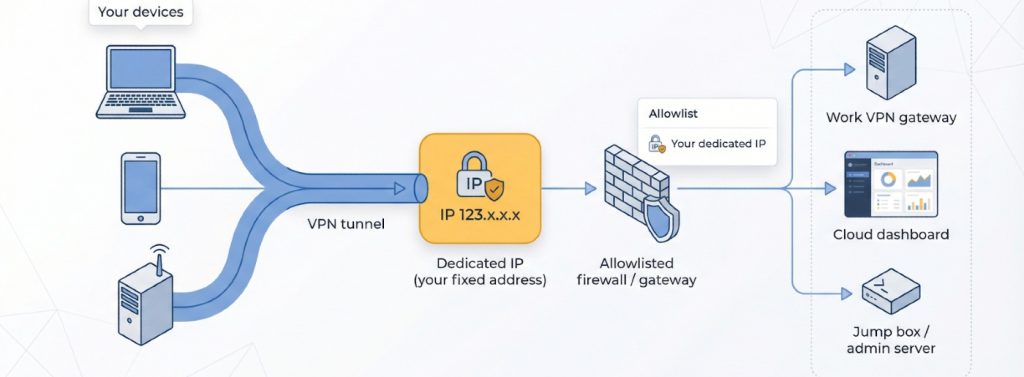
Focus on two essentials:
- Reputation. Choose a provider that keeps its dedicated IPs clean or replaces them quickly when problems arise. TorGuard’s self-service portal can issue a fresh address in about 24 hours. ExpressVPN and PIA use blinded tokens that isolate abuse complaints from your identity.
- Device freedom. Confirm that the service’s device limit covers every machine you plan to whitelist. Unlimited connections (TorGuard, Surfshark) simplify life, while a hard cap can create awkward trade-offs.
A reliable allowlist workflow:
- Buy the dedicated-IP add-on and note the exact address shown in the VPN app.
- Give that IP to your network admin, or add it to the cloud portal’s allowlist yourself.
- Test from at least two devices to confirm the same address appears everywhere.
- Bookmark your provider’s blacklist-swap page so you can react quickly if the IP’s reputation drops.
Follow these steps and you will avoid the “access denied” spiral on Monday morning.
Banking on the Road without Triggering Fraud Alarms
Nothing ruins a trip faster than a frozen debit card. When you move between hotel Wi-Fi and coffee-shop hotspots, banks see a changing set of IP addresses and suspect fraud. A dedicated IP fixes that by giving every login the same digital “home address.”
Practical checklist
- Choose a provider in your banking region. ExpressVPN and NordVPN both offer U.S. and major European cities, so transactions never look foreign.
- Confirm multi-device support. The same IP must cover your phone’s banking app and your laptop’s browser; otherwise the bank still spots mismatches.
- Run a pre-trip test. Log in from home with the new IP, wait a day, then log in from a second network. No security prompts? You are ready for departure.
Follow these steps and you will avoid frozen cards and lengthy verification calls, giving you smooth access to your money while you explore new time zones.
Self-Hosting, Dashboards, and Port-Forwarded Projects
A dedicated IP is the self-hoster’s best tool. With one fixed address you can lock firewall rules, keep SSH open only to you, and skip the exit-node shuffle that comes with shared servers.
Start by choosing a provider that supports port forwarding. TorGuard and Private Internet Access both expose custom ports on their dedicated IPs, letting you run a Git server or Grafana dashboard without complex NAT workarounds. ExpressVPN, Surfshark, and NordVPN skip port forwarding, yet they still work for allowlisting on Cloudflare Access or AWS security groups.
Workflow in four steps
- Reserve the IP and note the exact address in your VPN client.
- Add that address to the firewall or security group protecting your server.
- Enable port forwarding in the VPN dashboard if you need inbound traffic.
- Test from a second network to confirm the rule sticks.
Follow this routine and you will avoid bot scans, rate-limit throttles, and unwanted guests, leaving your project looking like a clean, single-tenant service to teammates and clients.
Streaming without Tripping the Proxy Alarms
Streaming services block shared VPN servers often, but a dedicated IP looks like any other long-lived residential address, so it usually avoids detection.
Ground rules
- Choose a provider with a quick replacement path. TorGuard’s self-service portal and Surfshark’s live chat can swap a blocked IP in a few hours. ExpressVPN’s blinded-token model also makes replacement easy without exposing your account.
- Match location to library. BBC iPlayer requires a UK IP, and Hulu needs a U.S. exit. A dedicated address keeps that location steady between sessions.
- Clear device caches. Test in a browser first. If Chrome streams but Roku fails, clear the TV app’s cache or reboot to force a new handshake.
No solution is perfect; rights holders still blacklist heavy-traffic addresses. A clean, replaceable dedicated IP, however, raises your success rate enough that movie night rarely turns into troubleshooting hour.
When a Dedicated IP is Worse for Privacy
Stability is a double-edged sword. A single, unchanging address is easier for ad networks, data brokers, or hostile sites to track than a rotating pool of thousands. Windscribe’s own docs note that shared static IPs mix traffic and preserve plausible deniability.
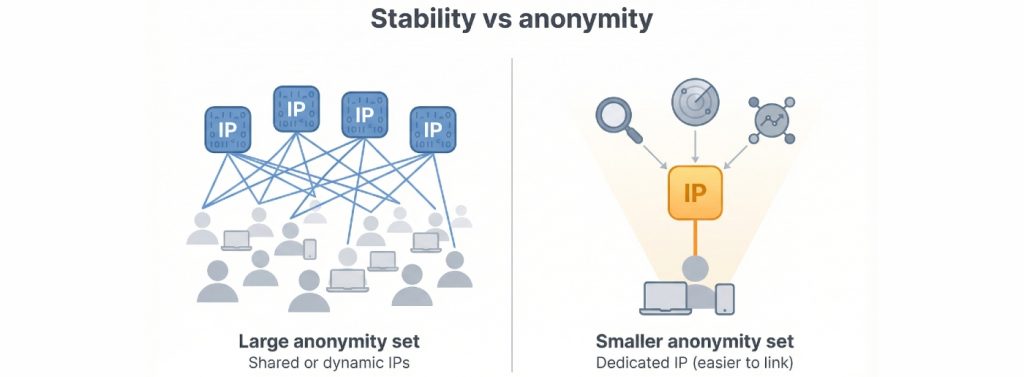
Ask yourself: do you need to hide from the destination site, or simply avoid extra login checks? If anonymity is the goal—political activism, sensitive research, bypassing censorship—choose dynamic servers or at least shared static pools. You will gain a larger anonymity set at the cost of a little convenience.
If you stick with a dedicated IP, trim its fingerprint:
- Use a separate browser profile for banking or admin tasks.
- Avoid heavy browsing and sensitive logins in the same tunnel.
- Clear cookies and local storage on a regular schedule.
These small habits keep that fixed address from turning into a tracking beacon.
Conclusion: Keep Your Dedicated IP Clean and Unblockable
Even a clean address can stumble if its subnet is flagged for abuse, so prevention and rapid response both matter.
- Practice basic hygiene. Skip high-volume scraping and other traffic that triggers rate limits. One aggressive script can blacklist an entire /24 block.
- Lock down accounts. Use unique passwords and enable MFA on every service that runs over the dedicated IP. A single credential leak can turn your address into a brute-force source.
- Monitor reputation monthly. Free tools like Talos Intelligence and AbuseIPDB reveal whether your IP has landed on a spam list. Two minutes of lookup beats unexpected downtime.
- Know the recovery channels. TorGuard: self-service portal (about 24 hours). Surfshark and PureVPN: live chat (often same-day). ExpressVPN and NordVPN: email ticket (usually 24–48 hours).
- Update allowlists after a swap. A fresh IP usually stays in the same city, but always confirm and then update firewalls, cloud rules, and vendor dashboards.
Treat the dedicated IP like a work laptop: keep it patched, watch for misuse, and know whom to contact when something looks wrong. Follow these habits and outages should stay brief.