

Shared VPN servers rotate IP addresses without warning—great for streaming, terrible when your SaaS allow-list or bank login expects the same source each time. If your team needs a fixed, exclusive address, this 2026 guide compares the top dedicated-IP VPNs. We bought every plan, timed provisioning, and scored business-critical features such as user seats, audit history, port forwarding, and replacement rules. The shortlist that follows ranks each service by use case and total cost. Quick note: a dedicated IP VPN improves reputation, but it won’t hide you or wipe out every CAPTCHA.
Quick Verdict: Who Wins and Why

- TorGuard: best for advanced controls. The Pro plan (around $14.29 per month) includes a dedicated IP, port forwarding, and 12 simultaneous connections, giving network admins everything in one purchase. TorGuard also advertises “anti-blocking” dedicated IPs that reduce captcha challenges—useful when finance apps or email portals flag shared VPN ranges. Full breakdown below.
- NordVPN: best for location breadth. A 28-country menu, plus six independent no-logs audits, makes it the strong choice when your team signs in from multiple regions.
- ExpressVPN: best for privacy separation. A blind-token system breaks the account-to-IP link, so you get a fixed address without tying it to your billing details.
- Private Internet Access: best for low total cost. Commit to the two-year term and the combined VPN plus dedicated IP price drops below $4 per month, still supported by a Deloitte-verified no-logs token design.
- Surfshark: best for many devices. Unlimited installs and roughly 20 dedicated-IP locations suit freelancers who switch between laptops, phones, and smart TVs.
Remember, a dedicated IP VPN improves reputation for allow-lists and logins, but it will not remove every CAPTCHA or guarantee endless streaming access.
How the Front-Runners Compare at a Glance
Before we dive into feature quirks and test results, the table below lines up the deal-breakers side by side.
| Provider | Best for | Combined long-term cost* | Dedicated-IP countries | Account vs. token | Port forwarding | Team controls | Audit evidence | Refund window |
| TorGuard | Advanced controls | $14.29 /mo (Pro) | Not fully disclosed | Account linked | Yes | Seats, API | None published | 7 days† |
| NordVPN | Location breadth | $7.68 /mo (2-yr) | 28 | Account linked | No (standard add-on) | Limited (consumer) | 6 no-logs audits | 30 days |
| ExpressVPN | Privacy separation | $5.99 /mo (Pro, 24-mo intro) | 22 | Blind token | No | Limited (consumer) | Multiple audits | 30 days |
| Private Internet Access | Low cost | $3.83 /mo (2-yr) | ≈10 | Blind token | Router unsupported | None | Deloitte 2026 | 30 days |
| Surfshark | Many devices | $6.24 /mo (2-yr) | ≈20 | Email linked; optional anonymous token | No | Limited (consumer) | Multiple audits | 30 days |
Cost equals the lowest advertised long-term VPN plan plus the dedicated-IP add-on, paid upfront and excluding tax.
†TorGuard’s seven-day guarantee excludes dedicated-IP fees, so allow time for testing.
Key takeaways:
- Location count is the quickest filter: if your allow-list needs a specific country, start there.
- Only a handful of consumer plans bundle both port forwarding and user seat management; if you need either, TorGuard (or a business platform) rises to the top.
Save or bookmark this grid, it works as a cheat sheet while we unpack each service below.
What a Dedicated IP Means
Think of three houses on one street:

- Rotating address. The number changes every hour, so pizza never arrives. That is a shared, dynamic VPN IP.
- Shared mailbox. One fixed address, five families. If a neighbor spams, every household feels the block. That is a shared static IP.
- Private porch light. One key holder, one letterbox, same number every day. That is a dedicated IP: yours alone, session after session.
The IP still sits in a data-center range, so websites can flag it as VPN infrastructure (NordVPN’s FAQ notes that a dedicated IP “can still be detected as coming from a VPN”).
Why choose it? Reputation. Because the address is yours alone, some providers unlock extra capabilities with it.
TorGuard’s setup guide notes that its dedicated IPs support instant port-forwarding of any TCP or UDP port above 2,048, with most requests approved within minutes, so a small team can publish an internal Grafana board or self-hosted Git repo without tweaking edge-firewall rules. CAPTCHAs drop, SaaS allow-lists stay happy.
Trade-off: the same static exit makes cross-site correlation easier. If maximum anonymity is your goal, keep using rotating shared servers. For stable business access, paying the dedicated toll is usually worth it.
How We Picked Our Winners
We started with a hard filter: each provider had to 1) sell an exclusive public IP today, 2) support modern VPN tunnels (WireGuard or OpenVPN), 3) publish a refund path, and 4) have no unresolved security incident. Anything else stayed on the bench.
After the filter, we scored six business-critical categories:
| Criterion | Weight | What we checked |
| Dedicated-IP capability & risk controls | 25 percent | Exclusivity, location list, port forwarding, replacement policy |
| Business readiness | 25 percent | Seats, SSO/MFA, user provisioning, reporting |
| Security evidence | 15 percent | Recent no-logs audits, protocol quality, account-to-IP separation |
| Performance | 15 percent | Our speed tests plus the latest independent labs |
| Price & value | 10 percent | Intro price, renewal jump, cost of a fail-over IP |
| Setup, support & refunds | 10 percent | Provisioning time, router guides, ticket response windows |
We bought plans, saved checkout receipts, timed provisioning, and opened support tickets to verify claims. If marketing promised “never blocked,” we searched user forums for counter-examples and marked the lower score when documentation conflicted.
The shortlist you saw earlier is the result of that rubric, not affiliate pressure. Now, let’s see why the top pick earned its spot.
1. TorGuard: Best for Advanced Controls and Port Forwarding
Most dedicated-IP add-ons hand you an address and stop there. TorGuard hands you the controls. The Pro plan bundles a dedicated IP with port forwarding and 12 simultaneous connections, which is why it topped our rubric on the two heaviest categories, dedicated-IP capability and business readiness. If that mix fits your stack, you can get started in a few clicks.
Why teams pick it
- Real port forwarding. Open any TCP or UDP port above 2,048, and most requests clear within minutes, so a small team can publish an internal Grafana board or a self-hosted Git repo without touching edge-firewall rules. No other consumer plan on this list ships that.
- Anti-blocking addresses. TorGuard tunes its dedicated IPs to clear captcha challenges, which matters when finance apps or email portals flag shared VPN ranges.
- Room to grow. Seat-based business bundles (roughly 5 to 20 users) add multiple dedicated IPs, 24/7 support, and a named account manager, so you are not forced onto a different platform when the team doubles.
- Power-user extras. SOCKS5 proxies, Stealth and V2Ray obfuscation for DPI bypass, and optional residential IPs cover the cases where a data-centre address still gets flagged.
Quirks to note
- No published no-logs audit. TorGuard states a strict no-logs policy but has not put an independent audit on the record, unlike NordVPN’s six. Compliance reviewers will ask.
- US jurisdiction. VPNetworks LLC runs from Florida, which some buyers rule out on principle.
- Thin location disclosure. The dedicated-IP country list is not fully published, so confirm availability with support before you commit an allow-list to it.
- The seven-day refund window excludes dedicated-IP fees, so test on the VPN plan first.
Cost
The Pro plan runs about $14.29 per month, the highest headline price in this roundup. Extra fail-over IPs cost $7.99 each, cheaper than the second full add-on NordVPN and Surfshark require.
TorGuard wins when you need to configure things rather than simply connect. Buyers who want an audit certificate and a polished consumer app should read the NordVPN entry next.
2. NordVPN: Best for Location Coverage and Audit History
Need a dedicated IP VPN almost anywhere? NordVPN currently lists 28 countries for its add-on. Six independent no-logs audits since 2018 (most recently February 2026) back its privacy claims better than any consumer rival.
Why teams pick it
- Broad menu: EU, Asia-Pacific, and North America are all covered, so finance or vendor portals that insist on a local IP seldom block you.
- Regular audits: An annual review cadence trims compliance paperwork.
- Fast checkout: Choose the location during purchase or later in your dashboard; provisioning usually can take up to three business days.
Quirks to note
- The dedicated IP is tied to your account email, not an anonymous token.
- OpenVPN allows up to 10 devices on the IP, while NordLynx limits you to 1.
- Port forwarding appears only in Nord’s separate private-server product, so developers may need that upgrade.
Cost
The add-on runs about $4.19 per month on a two-year plan, but nearly doubles at renewal. Set a calendar alert before the term flips.
If you want an audited, location-flexible IP and can work without built-in port forwarding, NordVPN remains the easiest mainstream choice.
3. ExpressVPN: Best for Anonymous Account-to-IP Separation
ExpressVPN relies on a blind-token system: you buy a token at checkout, redeem it once, and the company cannot trace the resulting IP back to your account. That extra privacy layer is rare among mainstream providers.
Coverage and performance
- 22 countries / 29 cities (July 2026), all running the in-house Lightway protocol, which connected a few seconds faster than OpenVPN in our lab tests.
- The dedicated IP VPN appears inside the standard app, so no second installer or manual config is needed.
Trade-offs
- Switching countries means buying a new token and paying another fee.
- No port forwarding, which rules out inbound hosting.
- The feature sits in the Pro tier; the introductory rate is about $5.99 per month for 24 months, then renews at $199.95 per year, a higher total cost than rivals.
If you need a fixed IP that even the VPN provider cannot link to your billing identity, ExpressVPN remains one of the few consumer options, but plan for the higher price and feature limits.
4. Private Internet Access: Best Budget-Friendly Anonymous IP
Need token privacy on a tight budget? PIA’s two-year plan plus dedicated IP averages about $3.83 per month, roughly half the cost of most rivals.
Why it stays affordable without cutting corners
- Uses the same blind-token system as ExpressVPN, so PIA cannot link your account to the IP.
- A February 2026 Deloitte assessment confirmed the token pipeline stores no user-to-IP data.
- Open-source apps and a 30-day money-back window add extra buyer confidence.
Where you compromise
- Only about 10 countries in the dedicated pool, and the list omits India and Brazil.
- Current documentation says the token setup will not load on a router.
- The exact IP ends with your term; you receive a new address at renewal, so allow overlap time if your allow-lists depend on it.
If those limits fit your budget, PIA offers anonymous IP assignment at the lowest verified long-term price in 2026.
5. Surfshark: Best for Multi-Device Households and Side Hustles
Surfshark works when one subscription has to cover everything: the work laptop, family tablets, and smart TVs. Unlimited devices, one login.
Pricing and reach
- Add a dedicated IP VPN for about $3.75 per month on top of the long-term VPN plan; the combined cost lands near $6.25 a month.
- The dedicated pool offers about 15 locations (including Japan, Singapore, and Australia), giving more Asia-Pacific choice than similarly priced rivals.
- Dedicated IPs now work in the browser extension and over WireGuard, so power users skip manual configs.
Governance trade-offs
- No seat management, SSO, or audit logs. Larger teams will miss central off-boarding.
- No port forwarding, which limits self-hosted projects.
- Surfshark replaces “burned” IPs, but a May 2026 user report showed a fresh address already blocked by HBO. Always test before allow-listing.
If you need a stable identity across a lot of gadgets and can work without enterprise admin features, Surfshark pairs the lowest unlimited-device price with a growing list of dedicated-IP locations.
Specialist Business Platforms Worth a Look
Consumer VPN add-ons cover freelancers and small teams. If you manage dozens of users, or face audits that demand SSO, MFA, and activity logs, start with a purpose-built gateway service.
These platforms cost more than consumer add-ons, yet they deliver the seat management, logging, and support SLAs that IT departments and auditors expect.
NordLayer: Private Gateways and Full Admin Control

NordLayer business VPN static gateway marketing page screenshot
- Pricing: Core seats cost $11 per user per month on an annual plan, sold in blocks of five. A dedicated private gateway with a static IP adds $40 per month, putting the entry bundle at about $95 per month.
- Features: SCIM user sync, Azure AD and Okta SSO enforcement, role-based policies, device-posture checks, and exportable activity logs. You can deploy extra gateways on new continents in minutes.
- Performance: Each gateway runs on isolated hardware, so bandwidth and IP reputation stay independent from other customers. This separation improves speed consistency and hygiene.
NordLayer is excessive for freelancers, yet invaluable for IT teams juggling contractors, SOC 2 reviews, or region-specific SaaS allow-lists.
Proton VPN Business: Privacy-First Dedicated IPs for Regulated Teams
- Pricing: VPN Professional starts at $9.99 per user per month. Dedicated servers add $39.99 per month.
- Coverage: Private gateways in 21 countries under Swiss privacy law, all backed by disk-less servers and a June 2026 no-logs audit.
- Admin controls: Web console for seat assignment, enforced 2FA, split tunnelling, and downloadable activity logs.
- Security extras: Optional Secure Core multi-hop routing and full open-source client code. Port forwarding is a one-click toggle.
- When it wins: Finance, health-care, or legal teams that need audited infrastructure plus GDPR and HIPAA assurance. Proton costs more than consumer add-ons but less than most zero-trust suites, and it delivers the audit trail regulators expect.
Why CyberGhost, PureVPN, and Trust.Zone Missed the Cut
Not every familiar name meets our 2026 inclusion bar. Here is why these three stay on the bench for now.
- CyberGhost: Token model and 45-day refund on multi-year plans look good, yet we see no clear seat management, IP-replacement policy, or updated location list. Until those business details appear, it remains an honourable mention.
- PureVPN: Marketing still advertises a “low-cost dedicated IP VPN plus port forwarding” bundle, but the checkout shows 2025 prices, and pages conflict on whether the IP is exclusive or simply static. Without verifiable 2026 figures, PureVPN does not make the shortlist.
- Trust.Zone: The last public list still shows 4 dedicated-IP countries, and we find no WireGuard-era speed data or recent no-logs audit. That result is too stale to recommend today.
All three could earn a place in a future roundup with fresh audits, clearer documentation, and confirmed 2026 pricing. For now, the stronger choices above deserve your budget.
Which VPN Fits Your Use Case?
Match your Monday-morning task to the right provider:

- SaaS allow-lists, minimal downtime: NordVPN for its 28-country dedicated pool, or NordLayer if you also need SSO and user revocation.
- Self-hosted servers or game hosting: TorGuard is the only consumer plan in this shortlist with built-in port forwarding.
- Bank logins, minimal paperwork: ExpressVPN uses a blind token so the company cannot link your account to the IP.
- Freelancer juggling many devices: Surfshark offers unlimited installs; the dedicated IP VPN add-on costs about $3.75 per month.
- Strict budgets: Private Internet Access averages $3.83 per month over two years, with an audited blind-token model.
- Imminent compliance audit: Proton VPN Business combines Swiss jurisdiction with an annual no-logs audit and exportable activity logs.
Choose the tool that solves the job at hand; extra features only matter when they match your real workflow.
IP Reputation: Why Exclusivity Is Only Half the Story
Owning an IP no one else can use feels safe, yet history matters more than the contract.
Anti-abuse databases such as Spamhaus, AbuseIPDB, and Cisco Talos score addresses for spam or botnet activity. Content-delivery networks often flag entire data-centre ASNs as “VPN infrastructure,” so a brand-new dedicated IP can still trigger CAPTCHAs or streaming blocks. This issue can be particularly relevant for AI-driven workflows; see our guide to IP reputation for AI teams for more context.
Three checks before you allow-list:
- ASN look-up. If the range clearly signals a hosting provider, expect extra scrutiny.
- Blocklist scan. Run the IP through at least two services; one hit is a warning, multiple hits are a red flag.
- Replacement policy. NordVPN and Surfshark lock in your location choice permanently, TorGuard sells extra IPs à la carte, and ExpressVPN and PIA require buying a new token.
Bottom line: exclusivity cuts collateral damage, but vigilance keeps the address usable. Audit it, monitor it, and keep a backup plan.
Dedicated IP vs. Residential IP vs. Rolling Your Own VPS
At first glance, all three routes give you a static address, yet the differences appear when something breaks.
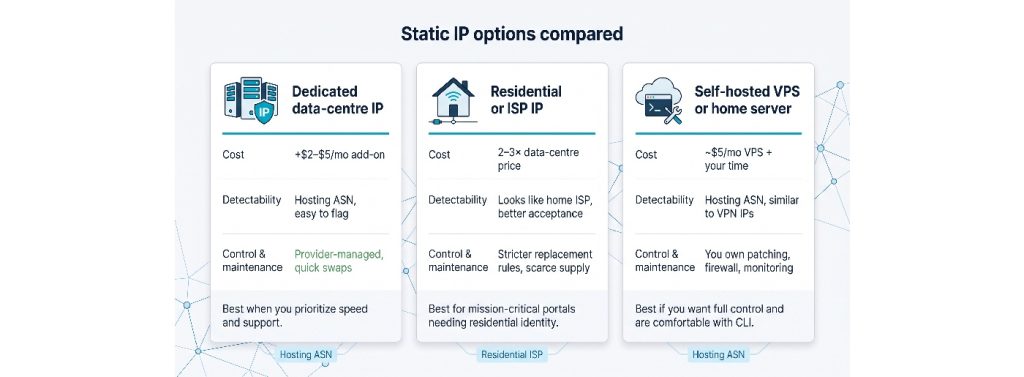

- Dedicated data-centre IP (focus of this guide)
Cheap (usually $2–$5 per month on top of the VPN plan), provisioned in minutes, and fully encrypted. Downside: hosting ASNs are easy for anti-fraud systems to flag. If the IP’s reputation slips, most providers will swap it, sometimes for a fee.
- Residential or ISP IP
Lives inside a consumer ISP range, so bank logins and streaming apps succeed more often. Expect to pay two to three times the data-centre price, and accept stricter replacement rules; true residential space is scarce. Always confirm the provider leases blocks directly rather than using peer-to-peer proxy networks.
- Self-hosted VPS or home server
Spin up a $5 per month cloud VM, install WireGuard, and you control every setting. You also own the patching, firewalling, and monitoring. The IP still sits in a hosting ASN, so detectability matches a commercial dedicated add-on, with one extra risk: if the provider reassigns the IP at renewal, your allow-lists break overnight.
Quick guide
- Prioritise speed and support → choose a provider-managed dedicated IP.
- Need a residential identity for a mission-critical portal → pay the premium and audit the source.
- Comfortable with CLI work and want maximum control → run your own VPS (and document the renewal plan).
Total Cost of Ownership: Look Beyond the Sticker Price
Dedicated IP VPN deals often hide extra fees in the fine print. Check four numbers before you sign:
| Cost factor | What to watch | Example (July 2026) |
| Contract length | Rock-bottom monthly rates usually demand two to three years prepaid. Refunds end after 30 days. | PIA’s $3.83 per month rate requires a two-year term. |
| Renewal jump | Introductory discounts vanish at renewal. | ExpressVPN Pro rises from $5.99 per month to $16.66 per month ($199.95 per year) after the intro term. |
| Fail-over IP | One IP equals one point of failure. Extra IP pricing differs. | TorGuard sells additional IPs for $7.99 each, while NordVPN and Surfshark require a second full add-on. |
| Seats vs. devices | Consumer plans quote device limits, not named users. | NordLayer bills $11 per user but adds SSO and logs; sharing a single NordVPN login breaks audit trails. |
Bottom line: the cheapest front-page price is rarely the cheapest over the full contract once renewals, redundancy, and seat counts are included. Do the math now, and your finance team will thank you later.
Setup and Deployment: a 10-Minute Checklist
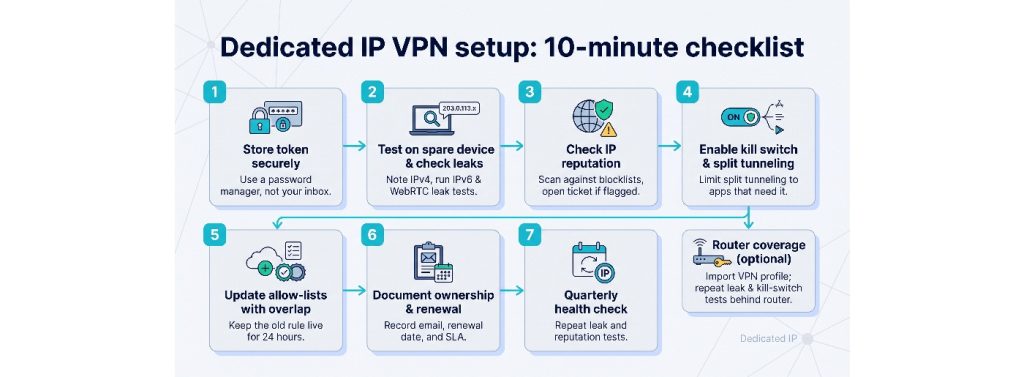
- Store the token. Paste the one-time code into a password manager, not your inbox.
- Test on a spare device. Connect, note the public IPv4, and run an IPv6 and WebRTC leak test (for example, ipleak.net).
- Check reputation. Query the IP against Spamhaus and AbuseIPDB, and open a ticket if you see recent hits.
- Flip the kill switch. Turn it on in the desktop or mobile app. Enable split tunnelling only for apps that break under VPN.
- Add to the allow-list with overlap. Keep the old rule live for 24 hours to avoid propagation delays.
- Document ownership. Record the controlling email, renewal date, and support SLA in your IT run-book.
- Quarterly health check. Run leak and reputation tests again, and confirm geolocation consistency.
Spend five more minutes if you need router coverage: import the WireGuard or OpenVPN profile, then repeat steps 2–4 on a test device behind the router.
Follow this checklist, and your dedicated IP VPN will stay reliable long after the purchase confirmation lands in your archive.
Privacy Trade-Offs: When a Stable Address Hurts Anonymity
A dedicated IP smooths SaaS logins, yet it changes your privacy posture in three ways:
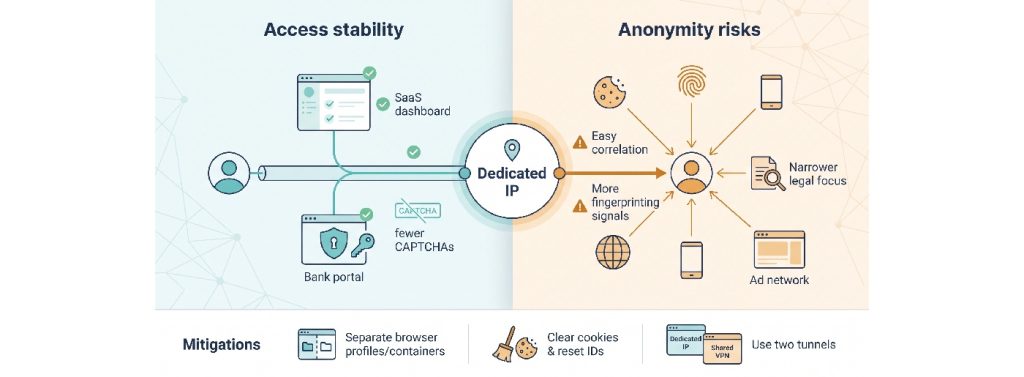
- Easy correlation. The same exit node links sessions across sites and time, whereas a shared pool blends you into thousands of users.
- Added fingerprinting. Ad networks already stitch device IDs, cookies, and TLS signatures; a fixed IP is one more constant they can track.
- Narrower legal scope. A subpoena for a shared server covers hundreds of accounts, while a dedicated IP VPN often points to one. Providers such as NordVPN (audit February 2026) and PIA (audit February 2026) log no traffic, yet the smaller target can shift investigative attention.
Mitigations
- Use separate browser profiles or containers for different contexts.
- Clear cookies and reset device identifiers regularly.
- Run two tunnels: the dedicated IP for allow-listed apps and a shared VPN for general browsing.
Conclusion
Treat a dedicated IP VPN as an access-control tool, not an anonymity shield.