
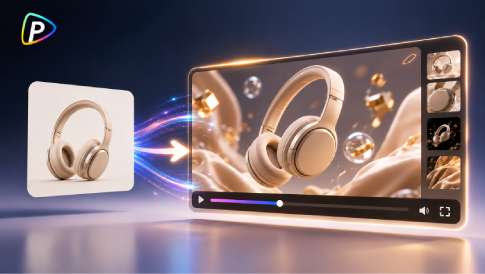
A product photo can do more than sit on a product page. With the right motion, the same image can become a short video for social media, product content, or a quick campaign test.
Pika on Pollo AI makes this possible by turning an existing product image into a video. Instead of creating every scene from scratch, users can start with an image they already have and describe how it should move, how the camera should behave, or what visual effect to add.
The useful part is not simply making a product image move. It is choosing movement that adds something the original photo could not show.
What Can Pika on Pollo AI Do with Product Images?


Pika on Pollo AI supports image-to-video generation as well as creative effects such as Inflate, Melt, Explode, Squash, Crush, and Cake-ify. This gives product teams a few different ways to reuse the same source image.
A beauty brand, for example, could use a slow camera push to make a bottle feel more polished. A beverage brand could add movement to condensation and the surrounding environment. For social content, a more unusual effect may work better than realistic motion.
The choice depends on the goal. When product accuracy matters, controlled movement is usually the safer option. When the goal is attention, more experimental effects can make sense.
How to Create a Product Video with Pika on Pollo AI
1. Start with a Clean Product Image
The source image still matters. A clear product, good lighting, and a simple composition give the model less visual noise to interpret.
Packaging-heavy products need particular attention. Logos, labels, small text, and unusual shapes can become distorted when the image is animated.
A studio product photo is not required, either. A lifestyle image can work when the goal is to add subtle movement to an existing scene.
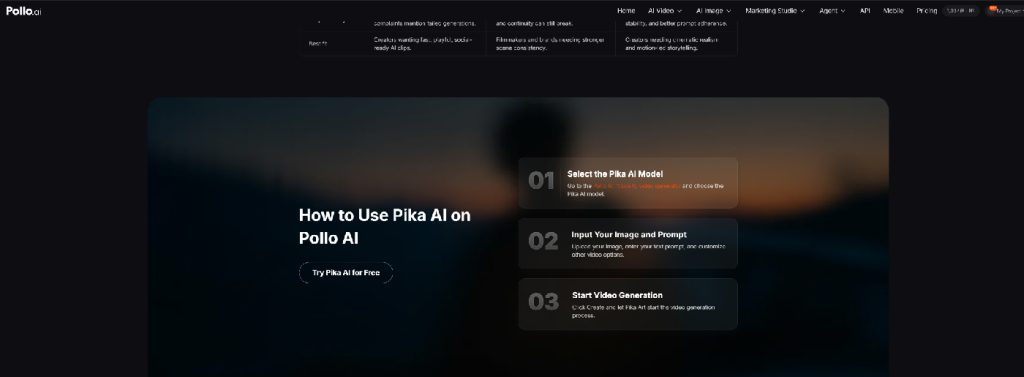
2. Select Pika on Pollo AI
Open the image-to-video workflow on Pollo AI and select Pika AI. Upload the product image and add a prompt describing the desired motion and visual treatment.
The original image is the starting point, so you don’t need to describe every visible detail again. You can also test the same image with different prompts to explore several directions.
3. Write a Prompt That Describes Motion
For image-to-video generation, focus the prompt on what changes rather than repeating what is already in the image.
For example, a perfume image could use:
Slow camera push toward the perfume bottle, soft reflections move across the glass, subtle movement in the background, realistic commercial lighting.
For a beverage product:
The can stays centered as the camera slowly moves around it, condensation catches the light, subtle cold mist in the background, realistic product photography.
These prompts give the model a subject, movement, and camera direction without adding unnecessary detail. A vague instruction such as “make it engaging” leaves too much open to interpretation.
4. Generate Several Versions
The first result is better treated as a test than a final cut.
One product image can support several treatments. A slow push may work for a product page, while a camera orbit could be better for social content. A more dramatic Pika effect can create a completely different version for a short-form post.
Pika includes effects such as Inflate, Melt, Explode, Squash, Crush, and Cake-ify, which are useful when realistic product motion is not the main goal.
There is no need to generate dozens of nearly identical clips. A few clearly different directions usually provide more useful feedback.
5. Review the Product Before Publishing
AI-generated motion can introduce problems that are easy to miss at first glance.
A bottle may change shape slightly. A logo can lose its proportions. Reflections, packaging details, hands, or background objects may also behave unexpectedly.
These issues can be particularly important for e-commerce listings and paid advertising, where product details must stay accurate. A playful post may tolerate a minor visual glitch, while a product-focused ad usually cannot.
Pika’s output quality can vary in consistency and visual fidelity, so the generated clip should always be checked before publication.
Product Video Ideas That Work Well with Pika
The strongest ideas are often simple because the product remains the focus.
For beauty products, restrained camera movement and changing highlights can add depth without making the shot look artificial. Beverage brands can use condensation, mist, or subtle environmental movement to make a static pack shot feel colder and more dynamic.
Consumer electronics can benefit from controlled camera movement that reveals materials, shape, or surface details. Accessories can be placed into a moving lifestyle context without requiring a completely new shoot.
For social content, Pika’s more unusual effects offer another direction. Effects such as Melt or Explode are less about product realism and more about creating a visual hook.
The main distinction is straightforward: use controlled motion when the product needs to stay believable, and creative effects when the visual idea matters more than realism.
How to Get Better Results from Pika on Pollo AI
Longer prompts do not automatically produce better videos. A simple structure is usually enough: subject, movement, camera behavior, and visual style.
For example:
Black wireless headphones on a clean desk. Slow camera orbit, subtle reflections on the ear cups, realistic commercial photography, minimal background movement.
It is also better to start conservatively. Complex interactions, dramatic rotations, multiple moving objects, and fast camera movements give the model more opportunities to introduce inconsistencies.
A useful approach is to look at what the original photo lacks. If it feels flat, add camera movement. Introduce subtle environmental motion if the product feels isolated. If the image already looks polished but ordinary, a creative effect may give it a stronger visual identity.
That is usually more effective than simply adding more words to the prompt.
When Pika on Pollo AI Makes Sense
Pika on Pollo AI is most useful when the raw material already exists.
A brand with a large library of product photos can turn selected images into video variations without rebuilding the visual from scratch. Those clips can then be tested across social posts, product content, promotions, or other short-form formats. For brands that use video as part of their broader online presence, website templates can provide a starting point for creating a site that showcases product content and campaigns.
It is not a replacement for professional video production when a campaign requires precise packaging, complex demonstrations, or highly controlled scenes. AI-generated motion still needs review, especially when small product details matter.
The practical advantage is simpler: one product image can become several pieces of content. For teams that already have strong product photography, Pika on Pollo AI provides a way to get more mileage from those existing assets.