

Most website owners assume their hosting provider is handling security monitoring for them. In reality, many security incidents go unnoticed for days — sometimes weeks — simply because nobody was actively watching what was happening inside the cloud environment.
That’s part of what makes cloud security monitoring so important today. Modern attacks are increasingly automated, opportunistic, and difficult to notice without visibility into your infrastructure. Attackers are no longer focused only on large enterprises. Automated bots continuously scan websites of all sizes, looking for exposed credentials, outdated plugins, misconfigured storage, weak passwords, or publicly accessible admin panels.
And the uncomfortable part is this: many website owners only realize something went wrong after customers report suspicious activity or Google flags the site.
This guide explains what cloud security monitoring actually means for website owners, why it matters at every growth stage, and which practical steps can reduce your risk without turning your business into a full-time security operation.
What Cloud Security Monitoring Actually Means
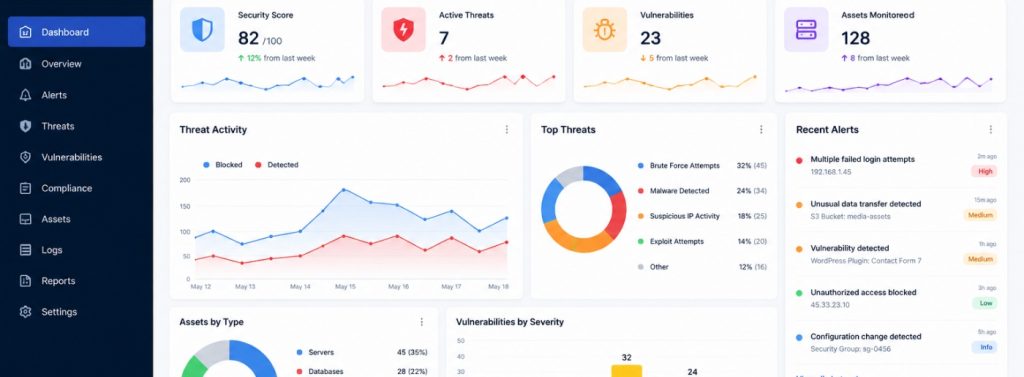

Cloud security monitoring is the ongoing process of tracking activity across your cloud infrastructure in order to identify unusual behavior, vulnerabilities, or potential security incidents before they escalate.
That includes:
- monitoring login attempts
- tracking configuration changes
- analyzing traffic patterns
- reviewing system activity
- identifying suspicious file changes
A simple way to think about it is like a surveillance system for your website and hosting environment. Without monitoring, you may have no idea if someone is attempting to access your systems, export data, or abuse a vulnerable plugin in the background.
With monitoring in place, unusual activity becomes visible much earlier.
For most website owners, monitoring usually focuses on:
- who is accessing the hosting environment
- whether configuration settings have changed
- if unauthorized file modifications occurred
- whether data is being transmitted unexpectedly
- whether known vulnerabilities exist in the stack
The level of monitoring required depends on several factors, including website size, the type of customer data being stored, and whether the infrastructure is self-managed or handled by a hosting provider.
Why It Matters More Than Many Businesses Expect

Smaller companies often assume they’re unlikely targets because they don’t operate at enterprise scale. Unfortunately, modern attacks rarely work that way anymore.
Most malicious scans are automated. Bots search the internet continuously for websites with known weaknesses, regardless of business size. If your site stores customer emails, login credentials, payment information, or even basic contact form submissions, it already has value to attackers.
A common misconception is that security problems are always obvious. In practice, many breaches start quietly:
- a compromised plugin
- a forgotten admin account
- an exposed storage bucket
- suspicious traffic after business hours
Without monitoring, these issues can remain invisible for a long time.
There’s also a growing compliance aspect to consider. Businesses handling customer information may be subject to regulations such as the GDPR or other privacy frameworks that require reasonable technical safeguards. Monitoring activity and maintaining logs can help demonstrate that your company takes data protection seriously.
And perhaps most importantly, companies that detect incidents early usually recover faster and with less damage than those that react only after customers complain publicly.
The difference between discovering an issue within hours versus discovering it two weeks later can be enormous.
The Core Components of Cloud Security Monitoring
Understanding the main parts of cloud security monitoring makes it easier to evaluate hosting providers, security tools, and service recommendations more realistically.
1. Log Collection and Analysis
Every action inside a cloud environment creates logs, including:
- login attempts
- configuration changes
- API activity
- file modifications
- permission updates
Monitoring starts with collecting and analyzing these logs for suspicious patterns.
For example, repeated failed logins from unfamiliar countries or unusual admin activity late at night may indicate an attempted compromise.
Without logs, investigating incidents becomes extremely difficult.
2. Threat Detection
Modern monitoring systems use predefined rules and behavioral analysis to automatically identify suspicious activity.
Examples may include:
- repeated failed login attempts
- sudden spikes in traffic
- large file exports
- unusual API requests
- access from unexpected locations
The goal is not to block every action automatically, but to separate genuine threats from normal activity before damage escalates.
3. Configuration Monitoring
Cloud environments change constantly, especially when multiple developers, agencies, or administrators have access.
Over time, settings can drift away from their original security baseline.
A common example is a storage bucket or database accidentally becoming publicly accessible during a configuration update. Monitoring tools help detect these changes quickly before they become larger problems.
4. Vulnerability Scanning
Regular vulnerability scanning helps identify outdated software, insecure plugins, weak server configurations, and known exploits before attackers do. Threats to websites increasingly arrive through third-party components rather than the core stack, which is why tracking software supply chain security news has become a routine input for any monitoring team that wants to prioritize what to scan next.
This is one of the simplest ways to stay proactive rather than react after a breach occurs.
For ecommerce businesses in particular, regular security checks are essential. MotoCMS recently covered several practical recommendations in its guide to ecommerce website security, including ways to reduce exposure from third-party integrations and outdated extensions.
5. Alerting and Response
Monitoring only matters if somebody responds to the alerts.
Strong monitoring systems include:
- clear notification workflows
- assigned responsibilities
- response procedures
- escalation plans
Without this layer, alerts often become background noise that nobody acts on.
Even small businesses benefit from having a simple response process in place before problems occur.
How to Approach Cloud Security Risk Management
For many website owners, the challenge isn’t deciding whether monitoring matters. It’s figuring out how to approach it realistically without creating unnecessary complexity.
A practical starting point is performing a formal cloud security risk management assessment. This helps identify where the biggest vulnerabilities exist in your current infrastructure, rather than relying on assumptions.
Once you understand your exposure, the process becomes much easier to prioritize.
Practical Security Steps Website Owners Can Start With
1. Review Access Controls
Start by checking who currently has administrative access to:
- hosting accounts
- CMS dashboards
- databases
- connected third-party services
Former contractors, inactive employees, and outdated credentials are common security gaps.
The principle of least privilege still applies: users should only have access to the systems they actually need.
MotoCMS also provides a useful overview of essential website security features businesses should implement early.
2. Make Sure HTTPS Is Enabled Everywhere
SSL certificates remain one of the most basic — and most important — security layers for modern websites.
Without HTTPS, data transferred between visitors and your site can become exposed.
Monitoring suspicious activity becomes far less meaningful if the underlying communication isn’t properly encrypted.
If you haven’t reviewed this recently, MotoCMS also explains how an SSL certificate for websites protects customer data and improves trust signals.
3. Enable Logging at the Hosting and Application Level
Access logs, error logs, and event logs should all remain enabled and retained for a reasonable period.
One of the most frustrating situations during incident response is realizing there’s no historical data available to investigate what happened.
Even basic logging provides valuable visibility.
4. Run Regular Vulnerability Checks
Automated website scans help identify:
- outdated software
- malware
- weak configurations
- exposed services
While automated scans are not a complete security strategy, they’re still a strong starting point for businesses building better visibility into their environment — pairing them with periodic Pentesting Services closes the gap automated tools alone can’t cover.
5. Understand What Your Hosting Provider Actually Monitors
Many managed hosting companies advertise “security monitoring,” but the actual coverage varies significantly. Vendors that field these due diligence questionnaires from many prospects often turn to tools that automate questionnaire responses, pulling answers from existing compliance documentation rather than reinventing them per request.
Ask specific questions:
- What events are monitored?
- How are incidents reported?
- What response actions are included?
- Who is responsible during a breach?
The difference between providers can be substantial.
What Changes as Your Website Grows
Security monitoring requirements evolve alongside the business itself.
A simple informational website has very different risks compared to a large ecommerce platform processing customer payments daily.
As websites grow, several things usually happen simultaneously.
More Integrations Increase Risk
CRM systems, payment gateways, plugins, analytics tools, and marketing platforms all create additional attack surfaces.
Each integration introduces new:
- credentials
- permissions
- dependencies
That’s why regular reviews and credential rotation become increasingly important over time.
Larger Teams Increase Identity Risks
As more employees and contractors gain backend access, credential-related risks increase as well.
This is where:
- MFA
- stronger password policies
- access reviews
- role separation
…become much more important than many businesses initially expect.
More Customer Data Means Greater Responsibility
As customer databases grow, so do compliance expectations and reputational risks.
Monitoring access patterns, export activity, and unusual database behavior becomes increasingly important for preventing misuse or unauthorized access.
More Traffic Creates More Noise
At scale, manually reviewing logs becomes almost impossible.
This is where automated threat detection and smarter monitoring tools become necessary rather than optional. Otherwise, important signals get buried under normal operational activity. Many teams handle this by adopting dedicated infrastructure monitoring tools that pull logs, traffic patterns, and system health into a single dashboard instead of reviewing everything by hand.
Final Thoughts
Cloud security monitoring does not need to be overly technical to be effective.
For most website owners, the highest-impact improvements are relatively straightforward:
- know who has access to your systems
- keep HTTPS configured properly
- run regular vulnerability scans
- enable logging
- understand what your hosting provider is monitoring
The goal is not to eliminate every possible risk. That’s unrealistic.
The real goal is to create an environment where problems become harder to exploit, easier to detect, and faster to resolve.
In practice, the businesses that struggle most after a breach are usually not the ones that made one catastrophic mistake. They’re the ones that had almost no visibility into what was happening until it was too late.
And that’s exactly what cloud security monitoring is meant to solve.