
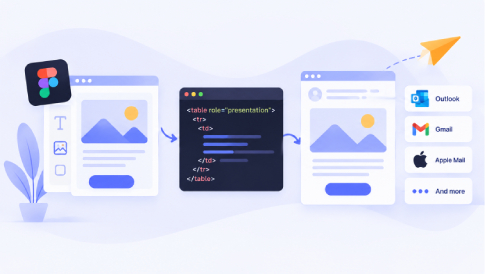
Your Figma mock-up looks flawless in Chrome, until classic Outlook crunches it into chaos. Because that desktop client still runs on Word’s dated HTML engine, even “modern” code breaks, and the new Outlook layer adds its own quirks. Gmail also has specific sender requirements, including email authentication and, for bulk senders, additional requirements such as DMARC and one-click unsubscribe for marketing and promotional messages.
Outlook compatibility and email deliverability require different areas of expertise. We compared six custom email template design and coding services that focus on email compatibility, cross-client testing, and production.
How We Chose the Final Six
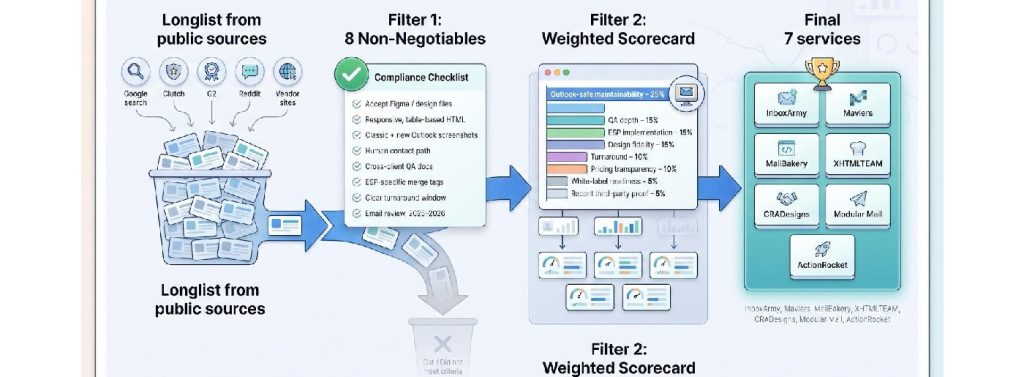
We began with a rapid scrape of Google, Clutch, G2, Reddit, and each vendor site to build a long list of specialist email-template partners.
We then tested custom email template design and coding services against eight non-negotiables:
- Accept Figma (or comparable) design files,
- Return responsive, table-based HTML,
- Provide real screenshots from classic and new Outlook,
- Publish a human contact path,
- Document cross-client QA,
- Insert ESP-specific merge tags,
- State a clear turnaround window, and
- Show at least one independent email-specific review dated 2025 or 2026.
Any provider that missed more than two boxes or kept third-party coders hidden was cut.
Next, we applied eight weighted criteria. Outlook-safe maintainability carried 25 percent, while QA depth, ESP implementation, and design fidelity held 15 percent each. Turnaround and pricing transparency earned 10 percent each, and white-label readiness plus recent third-party proof added 5 percent each. That scorecard revealed the six standouts you’ll meet next.

Quick Comparison Table
Before the individual profiles, scan the rows, find the “best for” tag that matches your situation, and keep reading for the story behind each score.
| Rank | Service | Best for | Coding-only price* | Design + code price* | Advertised turnaround | Test coverage | ESP implementation | White-label | Review proof |
| 1 | InboxArmy | Full-service, multi-ESP programs | Custom quote | Custom quote | Regular weekly production | 40 + clients | 40 + ESPs | Yes | 4.9 / 5 (71) |
| 2 | Mavlers | High-volume production | Quote | Quote | Not published | Ask | 50 + ESPs | Ask | 4.9 / 5 (118) |
| 3 | MailBakery | Independently reviewed specialist | From $98 | From $196 | Three business days (priority available) | 40 + clients | Add-on | Yes | 4.9 / 5 (19) |
| 4 | XHTMLTEAM | Rush and agency subcontracting | $99 | $149 | 12 to 24 hours rush | Litmus / Email on Acid | Editable modules | Yes | Google 4.9 |
| 5 | CRADesigns | Design-first pilots | Not offered (design only) | $499 or $999 per month subscription | 24 to 48 hours | Not published | Not published | Not published | Limited |
| 6 | ActionRocket | Interactive, showcase creative | Custom | Custom | Project-based | Custom matrix | Yes | Campaign case studies |
Prices and features checked September 10, 2026. “From” figures exclude extras such as dark-mode tuning, accessibility work, ESP uploads, or rush fees.
A headline count such as “40 + email clients” can mislead. Ask custom email template design and coding services for the named list of clients and versions; ten apps at four DPI settings still add up to forty. The profiles that follow include this deeper breakdown.
1. InboxArmy: Best Overall for Full-Service and Multi-ESP Work
InboxArmy tops this list because it does more than turn pixels into tables; it pairs production muscle with lifecycle support, including strategy, automation, and deliverability. You work with one partner from brief to send.
The team takes Figma, Sketch, PSD, XD, AI, or InVision files, converts the design to responsive table-based HTML, layers MSO conditionals for classic Outlook, and returns screenshots from more than forty email clients. Looking for reliability? A dedicated crew stays on your account, guiding onboarding through the first four weeks and then shifting to weekly production check-ins.
ESP fluency is the differentiator. Developers build and upload modules inside more than forty platforms, from Klaviyo and Mailchimp to Salesforce Marketing Cloud and Oracle Eloqua, so merge tags, dynamic content, and folder hierarchies arrive ready to send.
Agencies also rely on the white-label program. An NDA and unbranded deliverables keep your logo out front; InboxArmy says its white-label program provides unbranded deliverables and keeps the vendor’s identity out of client-facing materials.
Pricing is custom because scope ranges from a single hero template to an enterprise migration with hundreds of automated emails. Ask for a slim pilot quote first, then expand after you review the code and communication flow. Clutch reviewers give the agency 4.9 out of 5 across 71 reviews.
Pick InboxArmy when you juggle multiple ESPs, want strategic oversight, or prefer one vendor that can code, test, load, and iterate without loose ends.
2. Mavlers: Best for Production Volume
Need production capacity on tap? Mavlers grew out of the Email Monks and Email Uplers brands, making high-volume production a significant part of its offering.
Template work is quoted per project. Agencies with nonstop demand can book a dedicated email expert from $1,800 to $3,000 a month part-time or $3,000 to $5,000 full-time, per Mavlers’ published rate card.
Ask for the screenshot deck and the named client list before you commit. Working in Salesforce Marketing Cloud, Braze, or Klaviyo? Merge tags and dynamic blocks land exactly where you expect them.
Independent proof backs the pitch. Clutch lists 118 verified reviews for Mavlers, with an overall rating of 4.9 / 5, many of them praising on-time delivery without render defects.
If you launch frequent campaigns or juggle multiple brands, Mavlers keeps the production line humming while you focus on strategy and creative.
3. MailBakery: Best Independently Reviewed Specialist
MailBakery has focused on email development for more than a decade, with its custom email template design and coding services. Because the studio lives solely in the inbox.
Upload your Figma file and choose one of three paths: straight-to-code, full design plus code, or a master modular system that drops neatly into Klaviyo, HubSpot, or SFMC. Entry prices start around $98, but dark-mode tuning, accessibility checks, and ESP uploads appear as separate line items, so you pay only for what you need.
Quality control is rigorous. Each build runs through 40 plus named email clients, and you receive a full screenshot deck to spot-test classic Outlook, new Outlook, Gmail, and Apple Mail in seconds. MailBakery backs each build with a money-back guarantee if you are not satisfied.
Independent proof seals the deal. Clutch lists 19 verified reviews for MailBakery, averaging 4.9 / 5 as of September 10, 2026, with clients praising clear communication and code that just works in live campaigns.
Pick MailBakery when you want a specialist shop, transparent menu pricing, and outside reassurance that every slice of code has been field-tested.
4. XHTMLTEAM: Best for Rush and White-Label Coding
When the brief lands on Friday and needs to leave your outbox by Monday, XHTMLTEAM steps in.
Its email arm offers three clear tiers: $99 Starter, $149 Pro, and $299 Advanced. Each step layers on deeper QA, dark-mode support, and editable modules, so you can buy exactly the coverage you need.
Speed is the hook. Pick rush delivery and you get finished HTML, Litmus or Email on Acid screenshots, and a tidy assets folder in 12 to 24 hours; standard jobs take 24 to 48 hours. Weekend hours cover premium orders.
Agencies value the white-label workflow. NDAs are signed on request, proofing links show no vendor branding, and delivery is unbranded, keeping your brand front and center.
Independent proof is lighter than our top picks: the studio shows a 4.9 out of 5 Google rating on its site, so ask for client references.
Choose XHTMLTEAM when a hard deadline looms, a reseller relationship matters, and you prefer predictable, menu-priced tiers over open-ended quotes.
5. CRADesigns: Best for a Low-Risk Pilot
Testing the waters before you commit real budget? CRADesigns is a flat-rate design subscription ($499 or $999 a month, no contract) that turns around requests in 24 to 48 hours and offers a free trial of up to 10 hours. Email and newsletter design is an add-on, and the service does not write HTML or CSS, so pair it with one of the coding shops above for the build. It may suit teams that need design volume first and plan to handle HTML development separately.
6. ActionRocket: Best for Advanced Interactive Email
Most campaigns need a solid template; a few need the email itself to become the experience. That is ActionRocket’s specialty.
The London studio blends strategy, copy, design, and code to build inbox mini-apps (think CSS animation and checkbox-driven carousels) and then wraps them in graceful fallbacks so classic Outlook shows a crisp static version, not a blank box.
Because scope ranges from kinetic banners to full interactive microsites, pricing stays custom. Expect a discovery call, a creative-concept phase, and a technical spec before numbers appear. That rigor slows the schedule yet prevents surprise costs once you move beyond a standard two-column layout.
Quality control is thorough. Developers prototype each interactive layer in modern clients, then degrade gracefully for classic Outlook and high-contrast dark mode. Accessibility has its own checklist: alt text, semantic labels, and keyboard navigation ensure no-click animation never blocks users with assistive tech.
ActionRocket publishes no rate card or volume deal, and it has no Clutch profile we could find. What it does publish is a portfolio of headline-grabbing work, including work for the BBC and an OMMA award for Best Use of Dynamic Email Content.
Shortlist ActionRocket when the email itself must carry the story, not just deliver the message.
How to Choose the Right Service
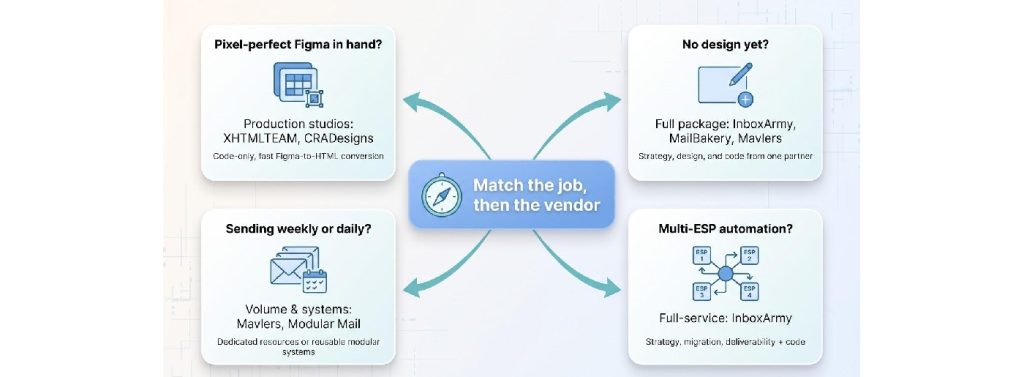
Match the job, then the vendor.
-
- Pixel-perfect Figma in hand? A production studio such as XHTMLTEAM or MailBakery can convert it directly into responsive HTML, with table-based layouts and cross-client testing.
- No design yet? Go full-package. InboxArmy, MailBakery, and Mavlers start from a blank canvas, align with your brand, then hand back HTML ready for Klaviyo or SFMC. Before choosing a coding service, make sure the resulting template is compatible with the email marketing software and ESP your business already uses.
- Sending weekly or daily? Book a dedicated resource plan with Mavlers.
- Multi-ESP automation? A full-service partner such as InboxArmy pairs strategy, migration, and deliverability support with code.
Demand evidence.
Ask each finalist for its exact test matrix. “Forty clients” should resolve into a named list: classic Outlook, new Outlook, Gmail web and mobile, Apple Mail light and dark, Yahoo Mail, high-DPI Windows, and so on. Request screenshots to catch surprises before they reach the CEO’s inbox.
Lock the deliverables.
Your quote should spell out every file and service: original Figma returns, optimized images, hosted-asset guidance, ESP-specific merge tags, test reports, documentation, revision rounds, and a bug-fix warranty. Confirm IP ownership in writing.
Run a paid sample if you’re torn.
Send the same miniature brief (hero, content block, footer) to each contender. Compare code readability, render accuracy, dark-mode handling, ESP editability, communication style, and final cost. The winner will stand out faster than any sales deck.
DIY Versus Custom-Coded Email Templates
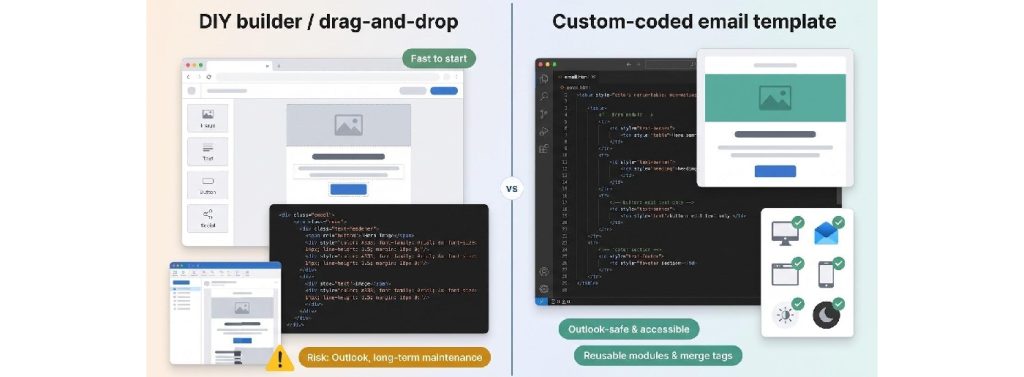
Drag-and-drop builders and Figma plugins feel cheaper on day one. For a simple announcement they often are: a few clicks, a quick send. If you’re still choosing where to send your campaigns, our guide to free email marketing platforms can help you compare beginner-friendly options before investing in custom template development.
The trade-off appears in Outlook and long-term maintenance. Builder output may rely more heavily on modern CSS and web-oriented layouts, which can create compatibility issues in classic Outlook. When the render breaks, your team owns the fix. If no one speaks table anatomy, MSO conditional comments, or accessibility rules, those “free” templates can cost hours.
Custom-coded templates can provide more control over table-based layouts, buttons, dark-mode behavior, accessibility, and client-specific compatibility when those requirements are included in the project scope. Future edits stay safe because modules, merge tags, and inline comments show exactly what you can change.
In short:
- Builders win on speed for one-off sends.
- Specialist coders can be useful when reliability, accessibility, reuse, and cross-client compatibility are priorities.
Tight budget? Prototype in your favorite builder, then hire a coding service for final QA, accessibility fixes, and Outlook safeguards before launch.
Frequently Asked Questions
How much does a custom HTML email template cost?
Coding-only work from the services above starts at about $98 to $99 per template. Add visual design and published prices run roughly $149 to $299. Strategy, automation, or motion moves pricing into custom-quote territory. Always check what the figure includes: testing, dark mode, ESP upload, and revisions often sit outside the headline fee.
How long does Figma-to-HTML conversion take?
Public offers cite 24 to 48 hours (XHTMLTEAM, with 12 to 24 hour rush) up to three business days (MailBakery standard) after you provide final assets. Complex personalization or extra revisions extend the schedule.
Why does a Figma export break in Outlook?
Figma describes the look, not the code. Classic Outlook relies on Word’s HTML rendering engine, which supports a different subset of HTML and CSS from modern email clients. As a result, layouts that depend on modern CSS, web fonts, or other browser-oriented techniques may render differently. Table structures, inline styles, and MSO conditional comments keep the render intact.
Does a custom-coded template improve deliverability?
Good code fixes rendering, accessibility, and clickability. Inbox placement still depends on authentication, complaint rates, and spam thresholds set by mailbox providers such as Gmail (which, since February 2024, enforces SPF, DKIM, DMARC, and one-click unsubscribe for bulk senders).
Is MJML better than hand-coded HTML?
MJML speeds up responsive scaffolding, yet the compiled HTML still requires Outlook-specific tweaks and real-client testing. Treat it as an accelerator, not an automatic solution.
How many clients deserve testing?
Focus on the clients your audience actually uses plus the known troublemakers: classic Outlook, new Outlook, Gmail web and mobile, Apple Mail light and dark, and a high-DPI Windows setup. Quality beats an inflated but vague “90 clients” claim.
Can I paste custom HTML directly into Outlook to send?
Outlook’s compose window differs from an ESP. Paste-in campaigns often strip styles or convert tables. Send through your ESP or a test service and review screenshots before launching to a live list.
Can I edit the template myself later?
Yes, provided the developer protects editable regions and documents merge tags. Request a short Loom or PDF guide showing where to swap copy and images without touching structural code.
Can AI replace an email developer?
AI can generate syntactically valid HTML quickly, but it may still miss client-specific rendering problems, accessibility issues, or dark-mode inconsistencies. Human review and real-client testing remain important before deployment.
Conclusion
Follow this path, and you’ll hire a provider that offers custom email template design and coding services that fit the work you actually need, not just the flashiest landing page. Match the job first: a finished Figma file wants a production studio, a blank canvas wants a full-package partner, and a multi-ESP program wants a service that pairs code with strategy and deliverability. Ask every finalist for a named test matrix, lock the deliverables in writing, and run a paid sample when two contenders look alike. Builders still win on speed for one-off sends, but custom-coded templates can provide greater control over compatibility, accessibility, and long-term maintenance when those requirements are part of the project.