
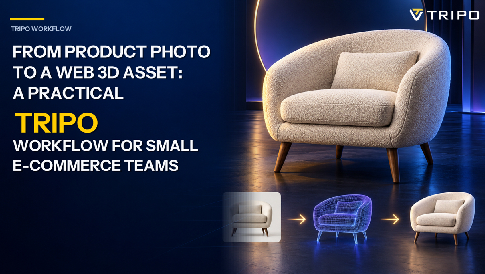
Small e-commerce teams often receive product photos long before they have reusable 3D assets. For a cream bouclé lounge chair, the gap becomes apparent when the store needs a rotating product view, a room mockup, or a campaign crop from an angle that was never photographed. This article follows a focused Tripo workflow for turning one catalog image into a reviewable web 3D asset, with clear limits on what the model should and should not represent. The generated model is a starting asset. It becomes suitable for web delivery only after optimization, export checks, and device testing.
Imagine a furniture shop preparing a cream bouclé lounge chair for a seasonal collection. The immediate goal is not a manufacturing model. It is a lightweight visual asset for a product page, a room-scene render, and two social crops. That narrower goal shapes every decision that follows.
Audit the Photo Before Generating Anything
The original catalog image shows the chair from a front three-quarter angle on a warm gray background. The rounded back, separate seat cushion, and four walnut legs are visible, while the rear seam and underside remain hidden. Teams evaluating the workflow can try Tripo’s free plan to test its AI 3D model generator on a sample product photo, subject to the plan’s credit, export, and usage restrictions. In this scenario, Tripo’s image-input workflow provides a practical starting point. The input is cleaned before upload: surrounding props are removed, the whole silhouette stays inside the frame, the floor shadow is softened, and no leg is clipped. These changes give the model a cleaner reference, but they do not reveal hidden geometry. Details such as the rear upholstery, underside, and unseen leg connections must still be inferred unless additional reference views are supplied.

Optional Prompt for a Concept Reference Image
Use this prompt only if you need a concept image to test the workflow. For an actual store web 3D asset, use a photograph of the real product; an AI-generated reference may introduce details that do not match the item being sold.
Cream bouclé lounge chair, rounded wraparound back and arms, separate plush seat cushion, small rectangular back cushion, four tapered walnut legs, realistic soft fabric texture, front three-quarter product view, entire chair visible on a neutral studio background, no room scene, text, logo, or extra props.
Add Another Product View If Possible
If the team can photograph the product again, a rear three-quarter view is worth capturing. It does not need to be a styled image. Even lighting, a consistent focal length, and the same chair configuration matter more. A second view can provide more information about the back curve and leg placement. For an asymmetrical product, consider additional consistent views and compare the generated result against them.
Set Acceptance Criteria for the Store
A visually pleasing preview is not enough. The team should review the web 3D asset against the page it will serve. Before investing in an interactive model, consider whether 3D content will genuinely help customers understand the product. Our guide on deciding whether your website needs 3D content explains when interactive visuals add value and when conventional product photography may be the better choice.
For this chair, the team should use four checks.
Proportion: the seat width, back height, cushion depth, and leg spread should match the reference closely enough that the page does not misrepresent the product.
Material appearance: the bouclé texture should look soft and retain its characteristic looped surface under the intended lighting, while the legs should remain distinct from the upholstery.
Rotation: the rear and underside should remain structurally plausible as the viewer rotates beyond the source angle.
Page weight: the exported web 3D asset must meet the store’s page-performance requirements. A model intended for a full-screen campaign render can be heavier than one loaded inside a mobile product page.
Generate, Inspect, then Choose the Right Finishing Path
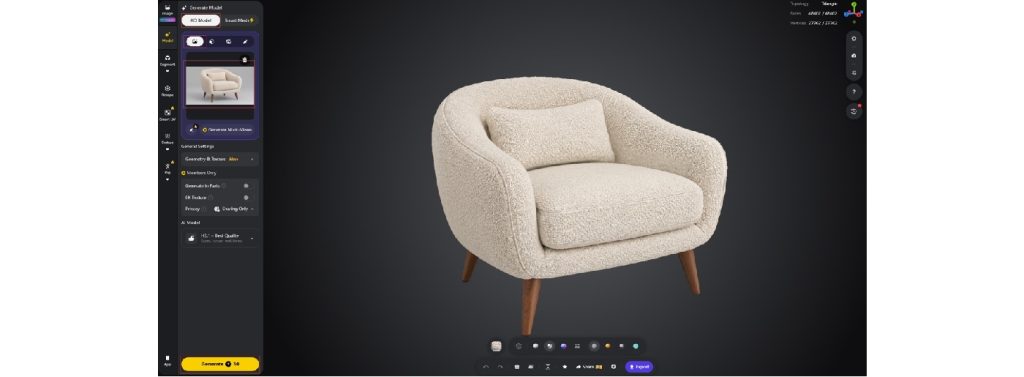
Tripo supports image-to-3D generation from a single reference image, as well as multi-view input when several product angles are available. After generation, you can inspect the model in the 3D viewer, refine it with available tools, and export it for further work. The choice of generation mode and mesh quality should depend on the intended output: a detailed static render or an optimized asset for an interactive viewer.
For the first pass, rotate the chair under neutral lighting and inspect the textured model from several angles. Look for bouclé detail that smears across cushion seams, inconsistent fabric patterns, and visible texture distortions. If the viewer or your 3D editing software provides an untextured or wireframe view, use it to inspect fused legs, uneven arm thickness, and collapsed rear geometry.
Check Licensing and Product Accuracy
Before using a generated model in a commercial store or campaign, review the terms and licensing conditions that apply to your Tripo account and the specific output. Tripo’s Free plan has different ownership, visibility, and commercial-use conditions from its paid plans. Do not treat Free-plan models as exclusive business assets, and a successful export does not automatically grant commercial-use rights. Also check whether uploaded product images or generated models will be publicly accessible before using confidential product materials.
If the overall form is wrong, fix the reference rather than polishing the texture. In case the form is sound but the material looks too smooth, the finishing work can focus on surface treatment. If the interactive product page will never expose the underside, do not spend the same effort there as on the seat, arm curves, and front legs.
For this use case, an AI 3D model generator should be treated as a starting point for visual production, not as evidence that the web 3D asset is dimensionally exact. The team should keep measurements, construction drawings, upholstery specifications, and compliance information in the systems already used for product data.
Plan Three Outputs from One Approved Web 3D Asset
For a MotoCMS-powered product page, I would prepare a controlled three-quarter hero render with empty space for the name, price, and call to action. The chair should sit on a simple floor plane so the shadow feels grounded without competing with the upholstery.
For an interactive viewer, export a web-compatible format such as GLB or glTF, then check the mesh, textures, and file size before integration. Test the web 3D asset on a representative mid-range phone to confirm that it loads smoothly and rotates without distracting delays. The viewer needs smooth, predictable rotation and a useful initial viewing angle; dramatic reflections are less important. If loading or interaction is distracting, reduce mesh and texture complexity, then check again that the approved silhouette remains acceptable.
For social promotion, place the approved model in a compact reading-corner scene. One potential benefit of an approved reusable web 3D asset is that the team can create alternative room scenes, camera heights, and crops without scheduling a new chair shoot for every variation. The room props should remain secondary so the product is still the first thing a shopper notices.
Document What the Model May and May Not Do
Store the original photographs, cleaned inputs, approved turntable, web export, render version, and review notes together. Add a short usage note: suitable for product-page visualization and campaign imagery; not approved for measurement, upholstery matching, or manufacturing reference. This protects the team from treating a marketing asset as something it is not.
For a small store, a practical Tripo workflow is selective. Use photo-to-3D when reusable viewpoints, room scenes, or campaign crops create clear value. Keep conventional photography where color accuracy, close material judgment, or regulatory detail matters most. This makes AI-generated 3D assets a useful addition to the product-content workflow, allowing an approved model to be reused across several visual channels after rendering, optimization, and review.