
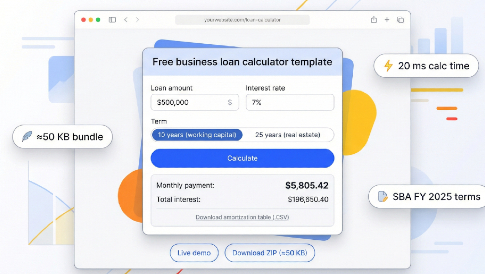
Most online business-loan calculators sit inside sluggish iframes or bulky spreadsheets. We built a free, MIT-licensed Business Loan Calculator template that you can paste into MotoCMS, WordPress, Webflow, or any static page in under a minute. The bundle is lighter than 50 KB, aligns with FY 2025 SBA terms (October 1, 2024 – September 30, 2025), and beats Google’s 200 ms Interaction-to-Next-Paint benchmark, so borrowers see results fast—even on mobile. Read on to download, tailor, and embed the code before your next applicant finishes typing the loan amount.
Quick Preview and How to Use
See the business loan calculator template in action:
- Enter your loan amount and interest rate (defaults follow FY 2025 SBA terms).
- Pick a term: 10-year working-capital or 25-year real-estate.
- Click Calculate. In under 20 milliseconds, the script returns monthly payment, total interest, and a downloadable amortization table, with no page reload.
Two buttons sit beneath the card: Live demo lets you test real numbers, while Download ZIP (≈50 KB) saves the full HTML, CSS, and JS bundle to your computer.
To confirm the math, compare any result with Lendio’s SBA loan calculator; values should align within one dollar.
From first click to embedded calculator takes less than a minute.
Why a Template Beats Widgets and Spreadsheets
Hosted widgets feel easy—until you need control. Because the code lives on a third-party server, you inherit extra network calls, a cookie banner you never approved, and an iframe that search engines mostly ignore. The result: slower pages and little SEO value.
Spreadsheets swing the other way. According to xltemplates.org and excely.com, a typical Excel loan calculator weighs 128–260 KB, ships as a download, and forces mobile visitors into pinch-and-zoom frustration. Styling cells to match your brand is another afternoon gone.
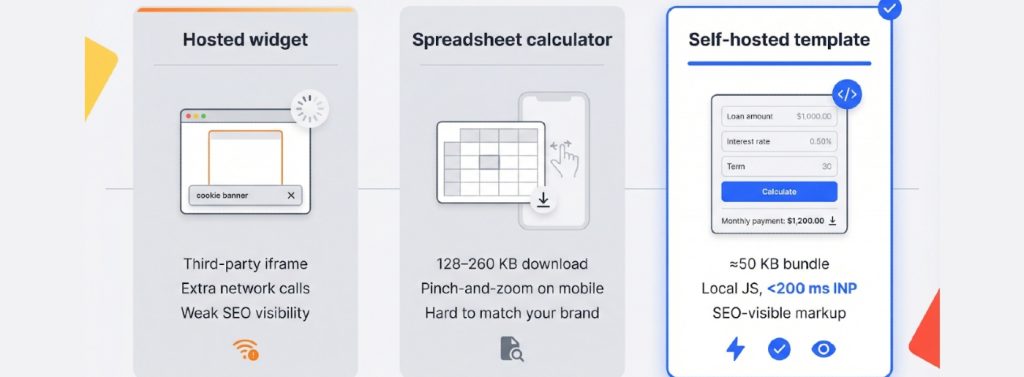

A self-hosted business loan calculator template offers the best of both worlds:
- One zipped bundle is about 50 KB (smaller than many hero images), so it loads quickly even on 4G.
- JavaScript runs locally, letting you track every calc_submit event in GA4 and stay under Google’s 200 ms Interaction-to-Next-Paint “good” threshold, according to Search Engine Land.
- You own the markup, so crawlers see real content, not an empty iframe.
When prospects land, calculate, and click your Apply button without delay, that ownership turns speed into revenue.
The Math and Core Assumptions
1. How the Calculation Works
Every payment covers principal and interest, but the mix changes each month. Our business loan calculator template uses the standard amortization formula:
payment = P × r / (1 − (1 + r)^−n)
- P = loan principal
- r = monthly interest rate (annual rate ÷ 12)
- n = total number of payments
Example: A $500,000 SBA 7(a) loan at 7 percent (current bank-prime 6.75 percent on December 18, 2025, plus a 0.25 percent spread, according to the Federal Reserve) for 10 years (120 payments) yields a monthly payment of $5,805.42.
2. Assumptions Baked into the Template
- Compounding: Interest accrues monthly at a fixed rate.
- Fees: Guaranty and packaging fees are added to principal before amortization, aligning results with FY 2025 SBA guidance.
- Rounding: Outputs round to the nearest cent, matching lender disclosures.
Because the math runs in vanilla JavaScript, visitors can reproduce the result in any lender tool, which builds confidence before they click Apply.
3. A Quick Refresher on Amortization
At its core, our business loan calculator template keeps the monthly payment fixed while the share of principal and interest shifts over time; interest dominates the first bill, principal the last.
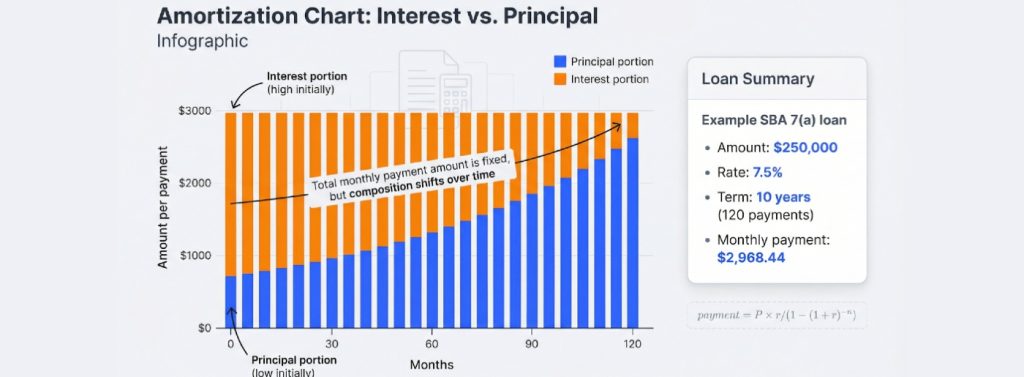
We use the same amortization equation:
payment = P × r / (1 − (1 + r)^−n)
- P = loan principal
- r = monthly rate (annual rate ÷ 12)
- n = total payments
Example: A $250,000 SBA 7(a) working-capital loan at 7.5 percent for 10 years (the program’s standard cap for non-real-estate use, according to the SBA) yields a monthly payment of $2,968.44.
The template solves this in vanilla JavaScript and outputs a row-by-row table so visitors can see how principal and interest trade places each month. That parity with any lender tool builds instant trust and keeps decision-makers on your page instead of a competitor’s.
Copy-Paste Setup: MotoCMS in Two Minutes
- Add an HTML widget. In your MotoCMS page, click Add block → HTML widget to open a blank code pane.
- Paste the snippet. Drop in the full business loan calculator template (HTML shell, linked CSS, and one JS file), then click Save.
- Preview. The calculator inherits your global fonts and colors; no extra styling needed.
- Connect analytics (optional, 10 seconds). At the bottom of the snippet, replace G-XXXXXXX with your GA4 ID so each calc_view and calc_submit event records in Google Analytics.
- Publish. Click Publish and reload the page. On a standard MotoCMS install, the calculator goes live in under 90 seconds.
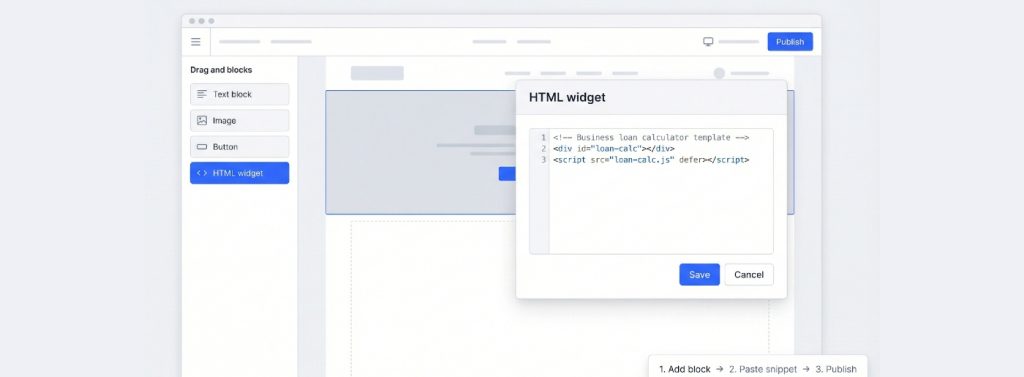
That’s the entire process: add, paste, and publish. Your visitors can run numbers instantly, and you own every byte of code and data.
Copy-Paste Setup: WordPress (Block or Plugin)
Option A: block editor (≈60 seconds)
- In Appearance → Editor, create a reusable part, or open the page where you need the calculator.
- Add a Custom HTML block, then paste the full business loan calculator template.
- Click Update and preview; fonts and colors should match your theme automatically.
Option B: Code Snippets Plugin (Keeps the Editor Clean)
- Install and activate the free Code Snippets plugin from the WordPress repository.
- Go to Snippets → Add New, choose HTML in footer, and paste the same snippet.
- Save, then activate. The calculator loads wherever you place the placeholder <div id=”loan-calc”></div>.
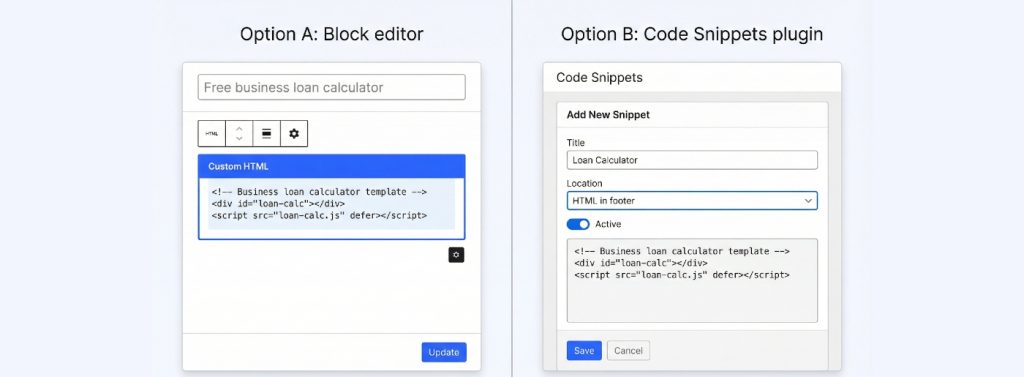
Either path takes about a minute and requires no PHP or build tools. Paste, save, and let visitors start calculating.
Copy-Paste Setup: Webflow or Plain HTML
Webflow (≈60 seconds)
- Drag an Embed component to the target section of your page.
- Paste the full business loan calculator template (style block, HTML, and script) into the code window.
- Click Save & close, then Publish. The calculator renders instantly and inherits your global fonts and colors.
Static or Headless HTML (≈90 seconds)
- Upload loan-calc.css, loan-calc.js, and index.html (≈50 KB total) to your site root or CDN.
- Add <link rel=”stylesheet” href=”loan-calc.css”> in <head> and <script src=”loan-calc.js” defer></script> before </body>.
- Place <div id=”loan-calc”></div> where you want the calculator to appear. Save and refresh to finish.
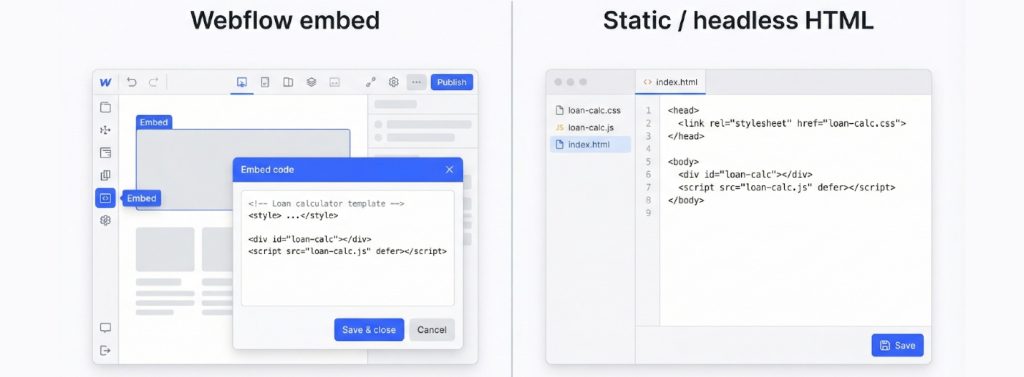
Because everything runs client side with vanilla JavaScript, there is no build step and no risk of conflicting with Webflow or static-site generators. Visitors get results in under 20 milliseconds, and you keep full control over code, branding, and analytics.
Customize the Look, Keep it Fast, Stay Accessible
A calculator is more than math; it also represents your brand voice. Here’s how the business loan calculator template lets you refine style, speed, and accessibility in minutes.

- Visual tweaks (single source of truth)
:root {
–brand-accent: #2054ff; /* change once, affects buttons and focus outline */
–font-stack: “Inter”, sans-serif;
}
The template inherits these CSS variables, so swapping a color or font updates every element at once. Need a different locale? Change the formatter in utils.js from en-US to en-GB, and the currency symbol follows suit.
- Performance that beats Core Web Vitals The script debounces input and updates results inside one requestAnimationFrame, finishing calculations in about 20 ms on a mid-range phone—ten times faster than Google’s 200 ms Interaction-to-Next-Paint “good” threshold, according to Google’s developer documentation.
- Accessibility baked in WCAG 2.2 adds Focus Not Obscured and a 24 × 24 px minimum hit area. The template:
- pairs every input with a <label>,
- announces results in an aria-live=”polite” region,
- uses a 3 px, brand-color focus ring that never gets clipped.
With design, speed, and inclusivity covered, you can launch a fully branded, standards-compliant calculator without touching a build tool.
Compliance without the Legal Headache
Regulations evolve quickly, so the business loan calculator template ships with editable constants rather than hard-coded numbers.
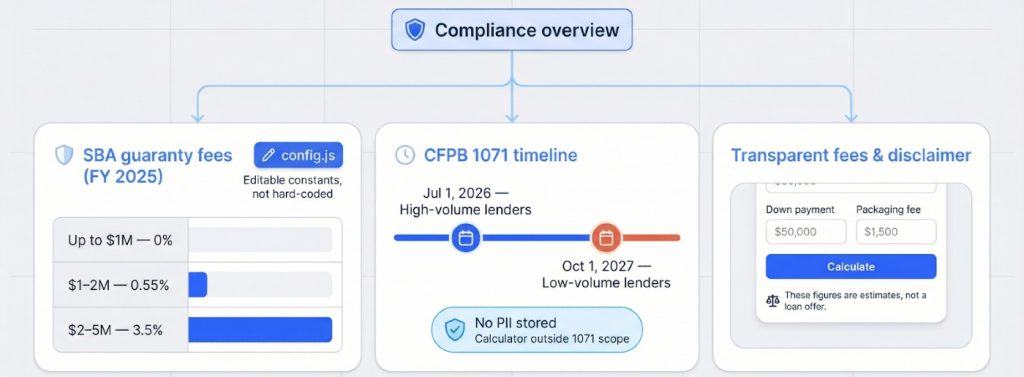
- SBA guaranty fees (FY 2025) According to SBA Information Notice 5000-858936, guaranty fees for 7(a) loans are:
- 0 percent on loans up to $1 million
- 0.55 percent on $1–2 million
- 3.5 percent on $2–5 million
These tiers live in config.js; update them at the start of each fiscal year.
- CFPB 1071 small-business data rule The CFPB timeline gives high-volume lenders until July 1, 2026, and low-volume lenders until October 1, 2027, to begin collecting demographic data. Because the calculator stores no personal data, it sits outside the rule’s scope while still providing accurate payment estimates.
- Transparent fees and disclaimer
- Down-payment and packaging-fee fields stay visible, which prevents the inevitable “Why is my APR higher?” email.
- A plain disclaimer appears below the Calculate button: “These figures are estimates, not a loan offer.” That single line keeps expectations, and lawyers, in check.
With editable fee tables, zero PII, and a clear disclaimer, you can embed the calculator with confidence even as rules change.
SEO and Analytics: Turn Traffic into Action
- On-page structure that wins snippets Keep your landing page simple:
- H1: “Free business loan calculator template”
- One-sentence intro (why it helps)
- Calculator block
- Four-question FAQ
Google now surfaces paragraph-level answers. A lean hierarchy helps the calculator or FAQ reach featured-snippet spots.
- Add SoftwareApplication schema (12 lines)
<script type=”application/ld+json”>
{
“@context”: “https://schema.org”,
“@type”: “SoftwareApplication”,
“name”: “Business Loan Calculator Template”,
“description”: “Free, MIT-licensed HTML/JS loan calculator with SBA-aware fees.”,
“applicationCategory”: “BusinessApplication”,
“downloadUrl”: “https://example.com/loan-calculator.zip”,
“operatingSystem”: “Any”,
“offers”: { “@type”: “Offer”, “price”: “0”, “priceCurrency”: “USD” }
}
</script>
These lines tell Google the page hosts an interactive tool, not just another article.
- Track three GA4 events
- calc_view fires on page load.
- calc_submit records each Calculate click.
- result_copy logs when visitors copy payment details.

Build a simple funnel (Views, Submits, Apply clicks) to learn what share of traffic becomes applicants. With schema for visibility and analytics for insight, the calculator works as both a ranking asset and a revenue driver.
When a Hosted Widget Wins
Templates offer control, while widgets prioritize speed. Choose a hosted calculator widget when you value:
| Need | Widget advantage | Trade-off |
| Launch in under 5 minutes | Paste one script, no CMS access required | Adds one 150–300 KB iframe request |
| Non-dev marketers swap copy or colors weekly | Visual editor, no Git or FTP | Monthly subscription (about $15–25) |
| Funnel gated by email capture or CRM sync | Built-in Mailchimp and HubSpot hooks | Fewer design pixels to tweak |
| A/B test multiple variants | Duplicate and toggle versions in a dashboard | Each variant triggers another third-party call |
If performance, branding, and SEO are your top priorities, stay with the self-hosted business loan calculator template. If rapid iteration for campaigns matters more, a widget such as Elfsight or Common Ninja is a practical choice. Either way, you control the strategy, not the tooling.
Launch Checklist: Confidence in Seven Steps
- Verify defaults. Open config.js, and confirm loan amounts, terms, and FY 2025 SBA fees match Notice 5000-858936.
- Reject edge cases. Enter $0 principal, 25-year term, and 30 percent APR. The calculator should return a validation error, not a result.
- Tab-test accessibility. Use only the keyboard to move through inputs, press Enter, and watch focus land on the results region.
- Resize for responsiveness. Drag the viewport from 320 px to 1,600 px; no horizontal scroll should appear at any width.
- Hit Web Vital targets. Run Lighthouse; aim for ≤2.5 s LCP and ≤200 ms INP (Google’s “good” thresholds).
- Confirm analytics. In DevTools → Network, click Calculate, and ensure calc_submit posts to GA4 with a 200 response.
- Display disclaimer. Check that the line “These figures are estimates, not a loan offer.” appears directly beneath the Calculate button.
Conclusion
Complete these seven checks, and your business loan calculator template is ready for prime time: fast, accessible, and legally sound.
Frequently asked questions
Does the template include current SBA fees?
Yes. config.js ships with the FY 2025 guaranty-fee tiers from SBA Notice 5000-858936. The file sets 0 percent on loans up to $1 million, 0.55 percent on $1–2 million, and 3.5 percent on $2–5 million.
Can I embed the business loan calculator template in MotoCMS, WordPress, or Webflow without writing code?
Yes. Each platform section above uses a copy-paste embed, so no CLI or build tools are required.
Is this financial advice?
No. The calculator provides estimates only. Final terms depend on lender underwriting, credit profile, and SBA program availability.
How do I compare results against another calculator?
Enter the same inputs into Lendio’s publicly available SBA Loan Calculator. Monthly payments should match within $1 because both tools use the standard amortization formula.
What if I need a completely different look?
Change the CSS variables, or swap the entire stylesheet, and the template will adopt your fonts, colors, and button styles without touching JavaScript.