
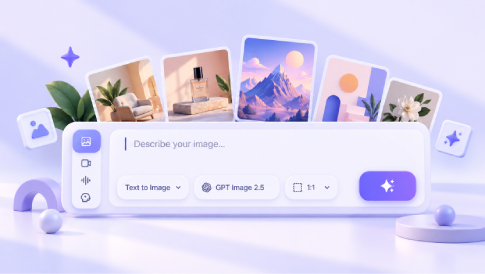
If you’ve been seeing stunning visuals created in seconds and wondering how people are doing it, you’re not alone. AI image tools have gone from niche experiments to everyday creative assistants. Today, beginners can generate social posts, product mockups, blog graphics, portraits, and concept art with just a few words. The best part? You don’t need to be a designer to get started.
In this guide, you’ll learn what AI image tools are, how they work, where they’re useful, and which beginner-friendly options are worth trying.
What Are AI Image Tools?

An AI image tool is a platform that is powered by AI to create, edit, or enhance images. Some tools generate pictures from text prompts. Others help you remove backgrounds, expand an image, retouch portraits, or turn rough ideas into polished visuals.
That’s a big deal for beginners. In the past, creating high-quality visuals often meant learning complex design software. Now, many AI image generators for beginners are built to be fast, intuitive, and easy to use.
How AI Image Tools Work
AI image generator tools work from prompts. A prompt is simply a written description of the image you want.
For example, you might type:
- “A cozy coffee shop interior with warm lighting, cinematic style”
- “Minimalist product background in pastel tones”
- “A futuristic city skyline at sunset, digital art”
The tool interprets your prompt and generates an image based on patterns learned during its training.
Some tools also include editing features, such as:
- background removal
- object replacement
- image upscaling
- face retouching
- style transfer
For beginners, this means you don’t need to master every technical detail on day one. Some tools also support image-to-image workflows, which can be useful when you want to transform or refine an existing visual rather than start from scratch. See our guide to image-to-image AI in design and marketing for more examples. You can start simple and improve as you go.
What Can Beginners Use AI Image Tools For?
This is where things get exciting. AI image tools for beginners are useful in more situations than most people expect.
Blog and Website Visuals
Need a featured image for a blog post? Want a custom banner instead of using stock photos? AI image tools can help you create visuals that feel more original and on-brand. If you want to explore more specialized options, see our guide to AI image editors for fast, pro-quality visuals.
Social Media Content
From Instagram posts to YouTube thumbnails, visuals are often the first thing people notice. AI image tools can help beginners create scroll-stopping content faster.
Ecommerce and Product Marketing
If you sell online, you can use AI image generation tools for product backgrounds, promotional graphics, mockups, and ad creatives. This is especially helpful for small businesses that need more content without hiring a full design team.
Personal Projects
AI image tools are also great for invitations, mood boards, presentations, profile pictures, and creative experiments. You don’t need a business use case to enjoy them.
What Makes a Good AI Image Tool for Beginners?
Not every platform is beginner-friendly. Some tools are powerful but overwhelming. Others are simple but too limited.
If you’re just getting started, look for these features:
Easy Interface
A clean, intuitive dashboard makes a huge difference. You should be able to generate or edit images without feeling lost.
Good Prompt Support
Some tools do a better job of understanding natural language. That matters when you’re still learning how to write prompts.
Editing Options
Even basic editing features like background removal or resizing can make a tool much more useful.
Affordable Pricing
Many beginners want to test a tool before committing, so free plans, trials, or low-cost entry options can be useful.
A Few Tools Worth Trying
If you want a simple place to start, there are several solid options available today.
- Pollo AI: A practical choice for users who want an accessible way to create AI visuals and experiment with different creative outputs. It’s useful for beginners who value speed and simplicity.
- GPT Image: A good option for users who prefer describing ideas in natural language and refining images through follow-up instructions. It supports text and image inputs and can be used for both generation and editing.
- LightX: A helpful option for those who want both AI image creation and editing features in one place, especially for quick design tasks and social content.
Each tool has its own strengths, so the best one depends on what you want to create. The easiest way to find your fit is to test a few and compare the workflow.
Tips for Getting Better Results
A lot of beginners assume the tool does all the work. In reality, better inputs usually lead to better outputs. Here are a few simple tips:
Be Specific
Instead of saying “make a nice image,” describe the subject, style, color, mood, and setting. The more direction you give, the better the result tends to be.
Start Simple
Don’t overcomplicate your first prompts. Begin with one clear idea, then refine from there.
Use Style References
Words like “realistic,” “minimalist,” “editorial,” “3D,” or “watercolor” can help shape the result.
Generate More Than One Version
Your first result may not be the best one. Try variations. Small prompt changes can make a big difference.
Choose the Right Format
Think about where the image will be used before generating it. A website hero, Instagram post, product image, and YouTube thumbnail may all require different dimensions and compositions.
Common Beginner Mistakes to Avoid
When starting with AI image tools, a few mistakes show up again and again.
- using prompts that are too vague
- expecting perfect results on the first try
- ignoring image dimensions for the intended platform
- choosing style over clarity
- relying on one tool for every task
The learning curve is not steep, but there is still some trial and error. That’s normal.
From AI Images to a Website
Creating the visual is only one part of the process. If you’re using AI-generated images for a website, you’ll also need a simple way to place them into pages, blog posts, landing pages, and other content.
A website builder such as MotoCMS can make that process easier by letting you add and update images directly within the site’s visual editing environment. This can be useful for beginners who want to experiment with AI visuals without adding a complicated design or development process.
The important thing is to choose images that fit the page, load efficiently, and support the content rather than simply adding visuals for decoration.
Final Thoughts
The biggest reason AI image tools matter is simple: they make visual creation more accessible. You no longer need advanced design skills to turn ideas into usable images. Whether you’re creating content for work, business, or personal projects, these tools can save time and unlock new creative possibilities.
For beginners, the key is not to find the “perfect” tool right away. It’s to start experimenting. Try a few prompts. Test a few platforms. See what feels natural.
Once you understand the basics, creating better visuals becomes a lot less intimidating — and a lot more fun.